Contact us

What Is .NET Aspire and When Should You Use It?

15 mins read

what is .net aspire
Blog Calculator Widget Logo

Estimate Your Software Project Cost

Describe your idea — get a budget breakdown in minutes.

Get Your Estimate

The application you ship today is rarely one deployable unit. It is a set of services, each running closer to the user or the data it depends on, so responses come back faster and a failure in one service stays contained instead of taking down the whole product.

The shift is happening fast. The global distributed cloud market is projected to grow from $5.93 billion in 2026 to $25.65 billion by 2034, at a CAGR of 20.10%.

But distributed systems are often challenging to manage. Every new service adds more configuration, dependencies, monitoring, and infrastructure to maintain.

.NET Aspire is Microsoft’s answer to that problem. It provides a set of tools and components for building distributed applications, making it easier to develop, run, and manage them from local development to production.

In this article, we provide a comprehensive .NET Aspire overview, explain how its main components work, its key benefits, and when it makes sense to use it.

What is .NET Aspire?

.NET Aspire (or just Aspire) is a .NET-based opinionated stack for building cloud-native, distributed applications. It is a set of tools, templates, and NuGet packages that standardize how distributed apps are built, run locally, and deployed.

Aspire reached general availability alongside .NET 8. It now follows an independent versioning model, with Aspire 13 supporting the latest .NET 10 release. Aspire 13 also added polyglot orchestration, extending support beyond C# to Python and TypeScript app hosts.

Understanding .NET Aspire starts with its core components:

  • AppHost/orchestration layer. It defines and wires together the services, containers, and dependencies that make up a distributed application.
  • Service Defaults. A shared configuration for telemetry, health checks, and resilience (retries, timeouts, circuit breakers) that is applied consistently across services.
  • Integrations/components. Pre-built packages for common dependencies: PostgreSQL, Redis, RabbitMQ, Azure services, and others, each configured with sensible defaults.
  • Dashboard. A local UI showing live logs, traces, metrics, and the relationships between services while the app is running.

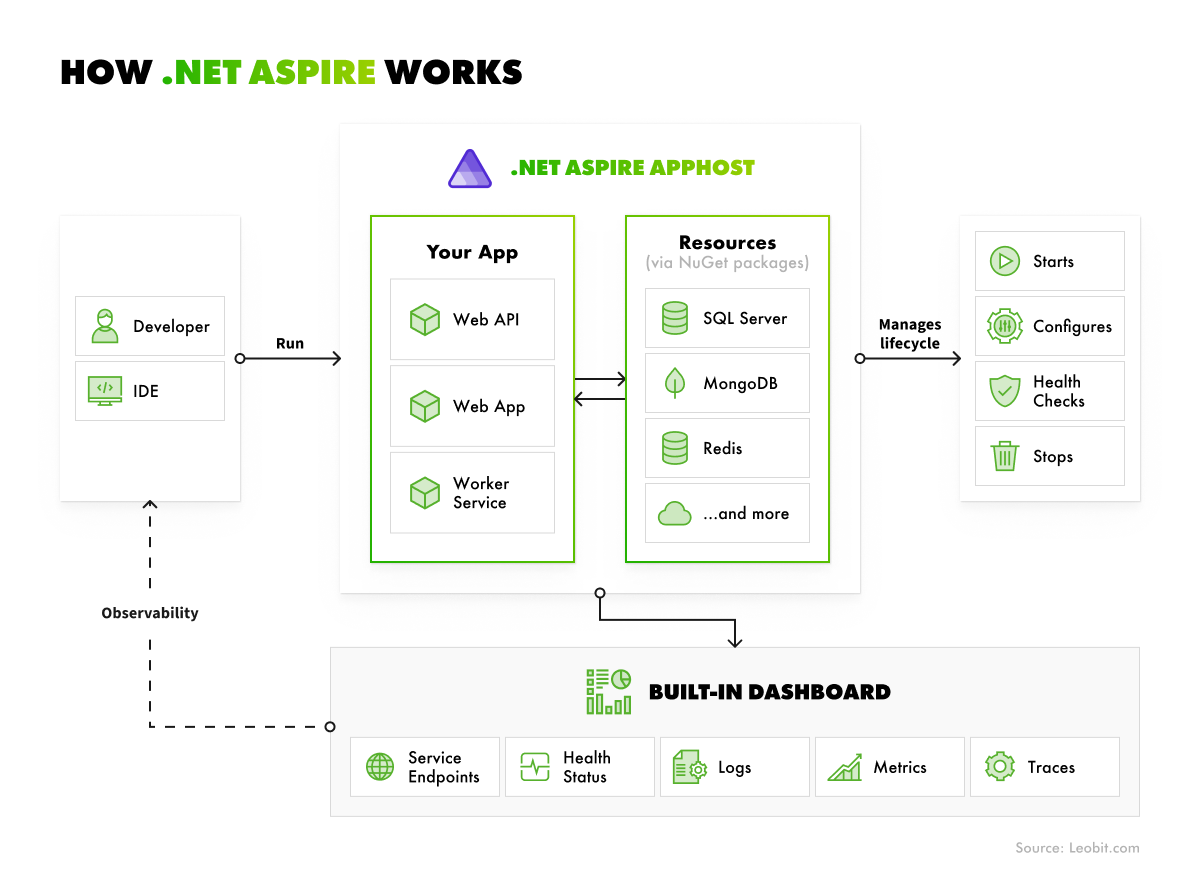
The diagram below illustrates how these and other components within the distributed infrastructure built with .NET Aspire interact with each other.

.net aspire overview
.NET Aspire workflows

The .NET Aspire cloud-native stack supports three adoption paths, depending on where a team is starting from:

  • New projects. Aspire’s project templates set up the AppHost, Service Defaults, and Dashboard from the outset. Distributed architecture is built in from the first commit rather than bolted on later.
  • Teams with an existing application. Aspire can be added incrementally, introducing the AppHost and Service Defaults around the current codebase without requiring a rewrite. As a result, a single service can start benefiting from built-in observability and orchestration while the rest of the system stays untouched.
  • Teams modernizing a legacy system. Aspire supports a gradual migration: new services are stood up under Aspire’s orchestration one at a time, while older components continue running alongside them, visible in the same dashboard. This lets teams decompose a monolith at their own pace, with full visibility into how the new and old parts of the system interact at every step, rather than attempting a single, high-risk cutover.
 Book Icon

Key .NET Aspire Benefits

.NET Aspire helps businesses build manageable and flexible distributed architectures that can be deployed across both cloud and on-premises environments. Below are some of the key benefits of the .NET Aspire cloud-native stack.

Simplified local multi-service orchestration

A typical distributed .NET app might depend on an API service, a background worker, a Postgres database, a Redis cache, and a message queue. Without Aspire, running this locally usually means maintaining a Docker Compose file, keeping environment variables in sync across services, and manually starting dependencies in the right order.

Aspire’s AppHost replaces all that with a single C# project: developers define the services and their dependencies in code, then run one command to start the entire system. Adding a new service usually means adding a few lines to the AppHost project. Your specialists should typically reference the new project, define its dependencies, and set any required environment variables. There’s no need to manually edit YAML files, update port mappings, or troubleshoot container networking.

This makes multi-service orchestration easier and more straightforward for software engineers, enabling teams to manage increasingly complex infrastructures without unnecessary effort. It also allows companies to establish more efficient, cost-effective practices for managing cloud resources, which is especially important given that organizations waste over 27% of their cloud spend.

Built-in observability

Every Aspire project comes with OpenTelemetry-based tracing, structured logging, and health checks configured by default. The dashboard surfaces all of it in one place: a request that touches the API, then a queue, then a downstream worker shows up as a single connected trace. As a result, a software engineer can see exactly which service introduced a delay or threw an error.

For a business, it means a much faster incident response. By using Aspire’s dashboard, developers can save time spent grepping through separate log files for each service and manually reconstructing the timeline.

The business impact is significant. Companies lose an average of $300 million per year to unplanned outages, while a single major incident is associated with an average 3.4% drop in stock price. The faster teams can detect and resolve such issues, the lower the cost of downtime.

Faster onboarding for distributed systems

Around 44% of organizations say onboarding new developers to a project takes 2 or more months. This becomes even more challenging with distributed systems. Typically, a software engineer joining such a project has to reconcile outdated architecture diagrams with the actual codebase and figure out how several independent services communicate. The missing pieces often come from colleagues who have worked on the project longer or from trial and error.

Aspire’s dashboard considerably shortens and simplifies these processes. It surfaces every live service, its current health status, its dependencies, and real-time traffic in a single view, updated as the system runs. Rather than being told how the architecture fits together, a new engineer can observe it directly, tracing a request as it moves from an API through a queue to a downstream worker, in real time.

That shift, from documentation-dependent to directly observable, is what compresses onboarding time, accelerating the project and providing the engineering team with a reliable, self-documenting foundation.

Reduced boilerplate for common integrations

Wiring up something like Postgres or RabbitMQ from scratch usually involves writing connection string management, retry-and-backoff logic for transient failures, and a health-check endpoint for every service that touches that dependency.

This manual, repetitive work adds hours to developers’ workload, and mistakes or omissions in the process easily accumulate into tech debt, a major source of frustration among software engineers, according to Stack Overflow.

 Book Icon

Aspire’s integrations eliminate this overhead by packaging the setup once. Adding a Postgres integration to a project gives every service that references it a working connection, built-in retry policies, and a health check, out of the box. A team standing up a new microservice that needs Redis for caching can add the integration and begin writing cache logic immediately, rather than first building and then maintaining the underlying plumbing.

For the business, this means faster delivery of new features and lower engineering effort.

Optimal .NET Aspire Use Cases

.NET Aspire is a strong choice for building complex distributed systems in the cloud or on-premises. Below is an overview of the key .NET Aspire use cases where this solution fits best.

Building an AI/agentic application foundation

Building the foundation for AI-first software products or solutions with retrofitted AI features typically requires wiring together several moving pieces:

  • A vector database
  • A model API, caching
  • Orchestration logic

Each such component should have its own connection setup, retry behavior, and failure modes to account for.

Aspire’s integrations and AppHost-based model let teams quickly stand up this foundation. Pre-built components handle the repetitive setup for each dependency, while the AppHost defines how they’re composed and started together, so the team can focus on building the actual AI logic rather than spending time on setup and configuration. This helps organizations adopt AI faster and join the 97% of business leaders who report positive ROI from AI initiatives.

Additionally, Aspire’s built-in observability is critical for debugging AI pipelines, especially when failures aren’t always obvious from the output alone. With this functionality, engineers can track requests, dependencies, and service interactions to quickly identify where a problem occurred.

 Book Icon

Modernizing a monolith into microservices

For companies decomposing a legacy monolith, migration risk is usually the biggest obstacle to getting started. A full rewrite is expensive and slow, but a piecemeal migration, where new services are peeled off one at a time, typically means running old and new components side by side for months or years, with no clear way to see how they’re actually interacting in production.

Aspire addresses this directly. Teams can stand up new services incrementally, following patterns like the Strangler Fig approach. In this method, a new service takes over a single piece of monolithic functionality while the rest of the system continues to operate unchanged. That’s exactly the approach we applied while modernizing a SaaS stakeholder management software for a UK-based tech company to minimize risks and keep the solution working during the migration.

As each new service comes online, Aspire’s dashboard shows its traces, health checks, and dependencies alongside the legacy components it still talks to. This gives engineering teams a live, accurate picture of the architecture as it evolves.

As a result, organizations can plan and implement a low-risk migration path, incrementally introducing changes and validating them against real traffic while catching integration issues when they are still easy to fix.

 Book Icon

Accelerating time-to-market for new multi-service products

For startups building a multi-service product from scratch, infrastructure setup is often the first task to complete before a single feature ships. Standing up even a modest system, such as an API, a background worker, a database, a cache, typically means writing and maintaining Docker Compose files. This approach also involves wiring telemetry and logging by hand and configuring health checks and retry logic for every service, before any business logic gets written at all.

Aspire removes much of this overhead because its project template provides some critical infrastructure components from day one:

  • AppHost and Service Defaults
  • Integrations from common dependencies
  • Preconfigured observability, including logging, tracing, and health checks

Along with possibilities for accelerated onboarding, such capabilities ensure a meaningfully shorter path from idea to working product. Teams can skip weeks of infrastructure setup and get straight to writing the business logic that actually differentiates their product, while still ending up with a system that’s observable and production-ready.

Supporting multi-service SaaS platforms with heavy backing services

Mature SaaS platforms rarely depend on just one or two backing services. A product can combine a primary database, a message queue for asynchronous processing, and several third-party APIs for payments, email, or authentication. Each such component has its own connection behavior, failure modes, and latency profile that should be controlled and monitored, especially as the platform grows.

  • Aspire provides a dashboard that gives engineering teams real-time visibility into the entire system. In particular, specialists can track:
  • The full path a request takes as it moves across services and backing dependencies
  • Continuous status checks that flag degrading components before they cause visible failures downstream
  • Consolidated logs from every service in one place

As a result, a team can catch a misconfigured retry policy, a queue that’s silently backing up, or a cache that isn’t invalidating correctly, while the system is still running locally. The problems are caught before they get exponentially more expensive to fix, which is especially relevant to complex, multi-tenant SaaS platforms.

 Book Icon

.NET Aspire vs. Docker Compose vs. Kubernetes-Native Tooling

.NET Aspire has notable alternatives among orchestration tools. The choice often comes down to what a team already has in place. While Aspire is an optimal choice for .NET-based distributed projects that heavily rely on Azure and the Microsoft ecosystem, there are also cases where Docker Compose or Kubernetes-native development tools are a better fit. The table below compares these services based on their critical properties and optimal use cases.

.NET Aspire
Docker Compose
Kubernetes-Native Tooling (Tilt, Skaffold)

Primary use case

Local development and orchestration for distributed .NET apps

Local multi-container orchestration

Local development against a Kubernetes cluster

Language/stack focus

.NET-first, with polyglot support for Python and TypeScript

Language-agnostic

Language-agnostic

Observability

Built-in dashboard with logs, traces, and metrics

None built in, requires separate tooling

Varies by tool; often relies on cluster-level observability

Setup format

C# (or TypeScript/Python) app host code

YAML

YAML/config files, often layered on existing Kubernetes manifests

Deployment target

Can generate manifests for Azure and other cloud targets

Local/dev only, not a deployment tool

Kubernetes clusters

Best fit

.NET-centric teams wanting integrated local dev and observability

Teams needing simple, language-agnostic container orchestration

Teams that are already standardized on Kubernetes for dev and prod parity

The differences also compound over time. A tool chosen for its simplicity today can become the bottleneck that dictates how much re-tooling a migration to Kubernetes or Azure requires down the line.

How Leobit Can Help You Build a Distributed Application with .NET Aspire

.NET Aspire makes development and orchestration of distributed apps less challenging, but it doesn’t eliminate the complexities entirely. The solution requires a strong understanding of .NET development principles, distributed systems design, service boundaries, and how the underlying infrastructure behaves under real production load.

That’s where Leobit can help, bringing deep expertise in complex architecture design and the .NET ecosystem.

With over 10 years of experience in .NET development, we have a solid portfolio, including 100+ .NET and 70+ ASP.NET projects and solutions, as well as solutions built with other technologies from the Microsoft tech stack, such as Blazor, .NET MAUI, and Azure services. We’ve worked on a variety of projects, ranging from enterprise platforms to high-load, API-driven systems with distributed architectures that Aspire is built to orchestrate.

Leobit is also a Microsoft Solutions Partner for Digital & App Innovation and Data & AI. These partner designations demonstrate that our team has met Microsoft’s standards for technical expertise, certified talent, customer success, and the ability to deliver high-quality solutions built on Microsoft technologies.

We can leverage our technical experience to build an AI-powered product using Aspire, add Aspire to an existing .NET system, or gradually decompose a legacy monolith.

Final Thoughts

With .NET Aspire, teams can build distributed applications, leveraging benefits like simplified multi-service orchestration, strong observability, fast and convenient onboarding, and reduced boilerplate for common integrations.

With these capabilities, this opinionated stack is an optimal fit for building AI-powered products, running monolith-to-microservices migrations, developing multi-service products quickly, and supporting multi-service SaaS platforms with heavy backing services. Even though the solution faces strong competition from Docker Compose and Kubernetes-native tooling, Aspire remains a great choice for .NET or Microsoft-based projects.

Whether you are building a new application with Aspire or gradually modernizing an existing architecture with its orchestration capabilities, Leobit can help. Contact us, and we’ll gladly consult you on how you can benefit from using .NET Aspire.

FAQ

.NET Aspire provides a stack of tools, templates, and NuGet packages to simplify the development of cloud-native, distributed .NET applications. Rather than manually wiring up service discovery, health checks, telemetry, logging, and configuration for every microservice, developers get these as extendable defaults out of the box. It also includes an orchestration layer and a dashboard for viewing traces, logs, and metrics across all services, along with built-in integrations for common dependencies like databases, caching, and message brokers.

No. While it’s built for .NET, the .NET Aspire Community Toolkit also supports other stacks, including Go, Node.js, and Java. Therefore, Aspire can orchestrate services written outside the .NET ecosystem, too.

Yes, it reached general availability with .NET 8. Microsoft designates it as a production-ready opinionated stack for building and deploying cloud-native applications.

They solve different problems and often work together rather than compete. .NET Aspire is a development-time tool that simplifies building, running, and debugging distributed .NET applications locally. Kubernetes is a production-grade container orchestration platform that manages deployment, scaling, and networking for containerized applications running in real infrastructure. In practice, teams often use .NET Aspire to enhance local development and testing, then deploy the same .NET Aspire app to Kubernetes for production.

.NET Aspire orchestrates the moving parts of AI-powered apps. It connects language models (via Azure OpenAI, OpenAI, GitHub Models, or local Ollama containers) with vector stores like Qdrant or Azure AI Search, while handling telemetry, logging, and secure credential management across those services out of the box.