For Leobit, this was a practical problem. Leora, Leobit’s voice sales assistant, answers prospects’ questions out loud and looks up the answers in company data through a RAG search. Today, it runs on Azure GPT Realtime, and suddenly there were four credible engines to choose from.
Despite impressive vendor demos, a demo doesn’t show how an assistant behaves when someone asks about headcount, then switches to German, then pauses mid-sentence. So we built a real-time voice AI benchmark and ran the same scenarios against all four engines.
This article shares what we measured, what surprised us, and which engine fits which situation.
The Four Real-Time Voice AI Engines We Compared
We tested four ways to run the same voice assistant: three engines released in September 2026 and the Azure GPT Realtime model Leora runs on today.
Architecture
How we ran it
GPT Live (gpt-live-1)
Full-duplex speech model that delegates reasoning and tools to a backend model
Azure AI Foundry deployment, backend model gpt-5.4-mini
Azure GPT Realtime
Native speech-to-speech
Azure, GA Realtime protocol (our current baseline)
Gemini 3.8 Live
Native speech-to-speech
Gemini API, free tier
ElevenLabs Agents
Cascade: speech recognition, then an LLM, then v4 Turbo speech synthesis
gemini-2.5-flash as the LLM, paid plan, measured in November 2026
One clarification matters here. ElevenLabs v4 and v4 Turbo are speech synthesis models rather than language models. Inside ElevenLabs Agents, a separate language model of your choice does the reasoning, and v4 Turbo then turns its answer into speech. In our setup, that reasoning model was gemini-2.5-flash.
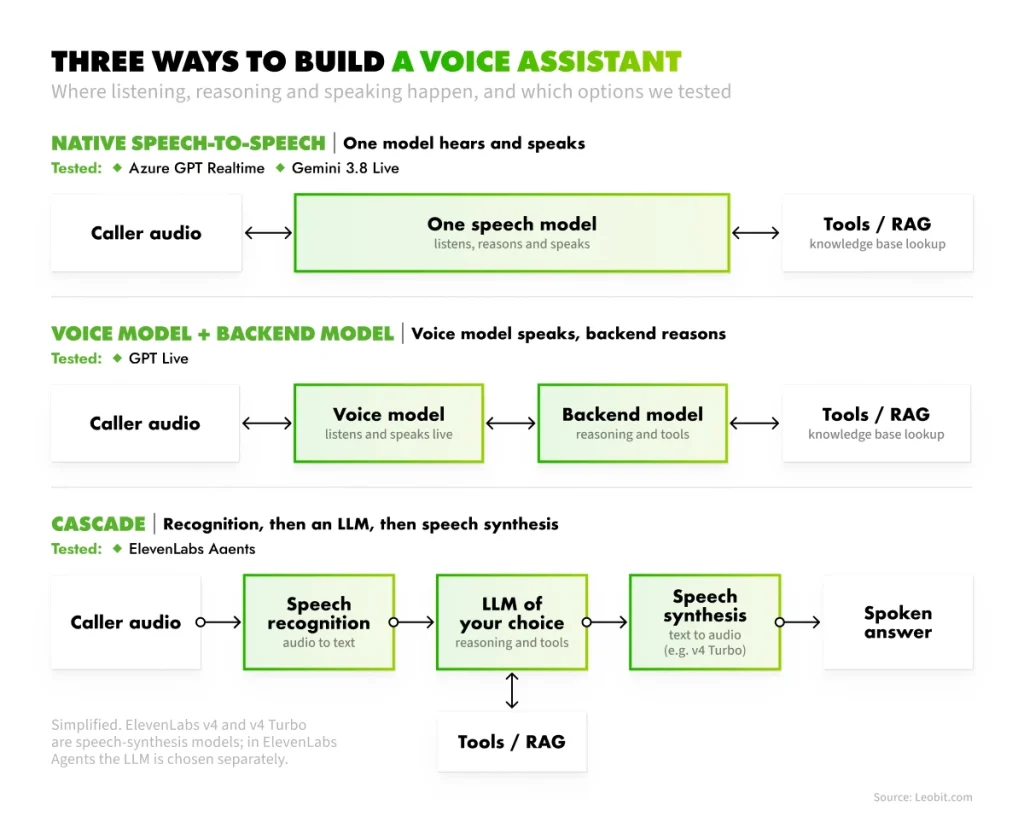
A native speech-to-speech model takes audio in and produces audio out within a single model. A cascaded voice pipeline chains three separate components: speech recognition, a language model, and speech synthesis. The cascade gives you control over each part and adds steps; the native approach cuts steps and limits your choice of components. This benchmark compares the two approaches as much as the four products. If you want the broader context on how AI agents reason and call tools, we cover it in our guide to agentic AI architecture.
Three ways to build a voice assistant, and which options we tested
How We Tested the Voice AI Engines
A benchmark is most useful when it recreates the situations an assistant meets in daily work. Since we were choosing an engine for Leora, the scenarios follow a typical conversation with a working voice assistant:
Greetings and small talk
Questions whose answers live in the knowledge base
Questions the knowledge base cannot answer
Caller reading back a phone number
Off-topic request
Service question from speakers of other languages
Together, these cover the range of behavior you would want to understand before putting an engine in front of your customers.
Two principles shaped the measurement itself.
First, identical conditions: every engine received the same system prompt, the same single function for searching company data, and the same pre-recorded audio, so the differences in the results reflect the engines themselves.
Second, measure what the caller experiences. We streamed the audio at the speed of real speech and started the clock at the end of the user’s phrase, since the time between a question and the first sound of an answer is what shapes how responsive the assistant feels. The full setup:
Scenarios. 11 scripted questions: small talk, questions that need a knowledge-base lookup, a question the knowledge base cannot answer, reading a phone number back, a one-sentence answer, an off-topic request, and the same service question in German, Spanish, and French.
Same setup for everyone. One system prompt, one function backed by a small synthetic knowledge base, and the same pre-recorded audio.
Real-time pacing. The audio was streamed at the speed of speech, and we measured from the end of the user’s phrase to the first audible sound of the answer.
Repeats. Three runs per scenario, which gives 24 English runs per option plus 9 multilingual runs. For ElevenLabs Agents, measured in November 2026 on a paid plan, we ran five repeats per scenario (40 English and 15 multilingual runs).
Degraded audio. A separate test took four of the English questions in seven degraded versions: steady room noise at two levels, several other voices talking, a telephone-quality band, a very quiet speaker, muffled speech with echo, and an overdriven microphone. 12 runs per option and version.
Scoring. Keyword checks on the transcript, tool-call checks, and speech recognition word error rate (WER) against the known text.
A few limitations are worth noting upfront: we used synthetic audio, including artificially degraded samples, and evaluated the results using our own scoring method. Each option also used a different underlying model. For these reasons, the numbers below should be treated as directional rather than definitive, and that’s how we interpret them as well.
Latency: Which Voice AI Engine Answers Fastest?
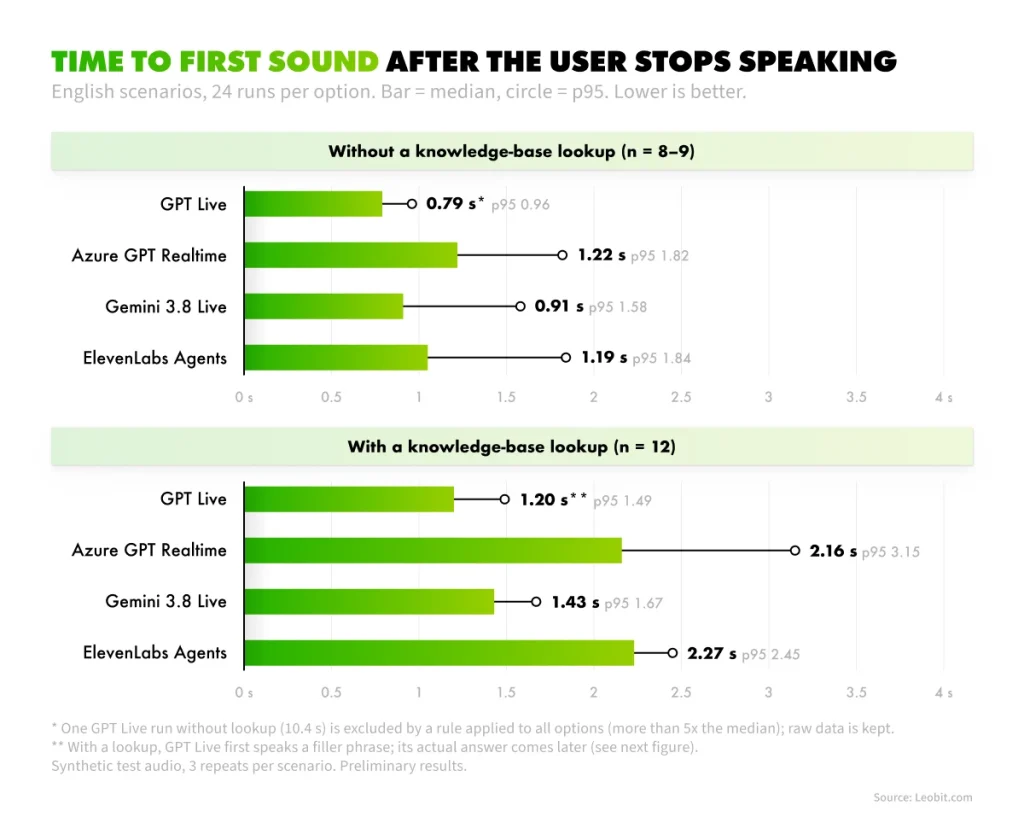
Without a knowledge-base lookup, GPT Live produces the first sound fastest. With a lookup, Gemini 3.8 Live reaches the actual answer fastest in our tests.
English scenarios, 24 runs per option (40 for ElevenLabs Agents), p50 / p95:
GPT Live
Azure GPT Realtime
Gemini 3.8 Live
ElevenLabs Agents
First sound, no lookup
0.79 s / 0.96 s*
1.22 s / 1.82 s
0.91 s / 1.58 s
1.19 s / 1.62 s
First sound, with lookup
1.20 s / 1.49 s
2.16 s / 3.15 s
1.43 s / 1.67 s
2.27 s / 3.23 s
Start of the actual answer, with lookup
≈3.6 s / 4.3 s
2.16 s / 3.15 s
1.43 s / 1.67 s
2.27 s / 3.23 s
*In one GPT Live run without a lookup, it took 10.4 seconds to produce the first sound. We excluded this result from the row because it exceeded five times the median, following the same rule applied to all options. We’ve disclosed it here for transparency and kept the raw data.
The first two rows show a clear advantage for GPT Live. The third, however, reveals a more nuanced picture of voice agent latency.
The filler effect in GPT Live
GPT Live behaves differently when it needs to do a lookup. It starts speaking almost immediately with a response like “Let me check on that…” while the back-end model processes the request and the function runs. This makes the conversation feel responsive, even though the actual answer arrives later. In our tests, GPT Live delivered the requested information about 3.6 seconds after the question, compared with 1.4 seconds for Gemini.
Benchmark: Time to first sound after the user stops speaking
The first-sound number alone is misleading, which is why we report both. A benchmark that only shows time to first sound would rank GPT Live fastest in every row.
When you evaluate a voice AI engine, measure two latencies separately: time to the first audible sound and time to the start of the substantive answer. A filler phrase can hide several seconds of real waiting, and your callers notice the second number.
Speech Recognition and Function Calling
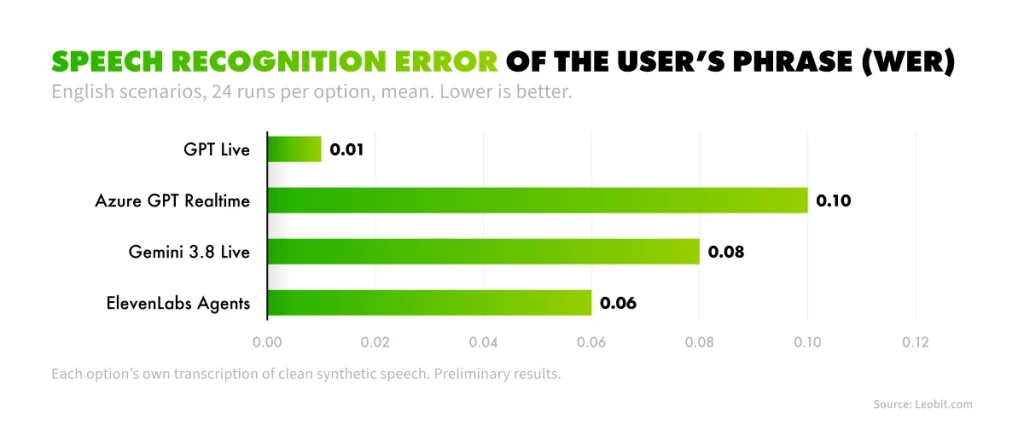
All four engines called the knowledge-base function correctly in every English run. Speech recognition accuracy varied far more than tool use did.
GPT Live
Azure GPT Realtime
Gemini 3.8 Live
ElevenLabs Agents
Speech recognition error (WER)
0.01
0.10
0.08
0.06
Function called when needed (English)
21/21
21/21
21/21
35/35
An AI voice agent is a system that talks with a caller and pulls answers from your data in real time; function calling is what connects it to that data. In English, every engine handled it. In one French run, Azure GPT Realtime skipped the lookup and invented the company’s services instead.
That single run is a useful reminder: check tool use in every language you support, because a model that passes in English can fail quietly elsewhere. Benchmark: Speech recognition error of the user’s phrase, lower is better
Multilingual Behavior and Turn-Taking
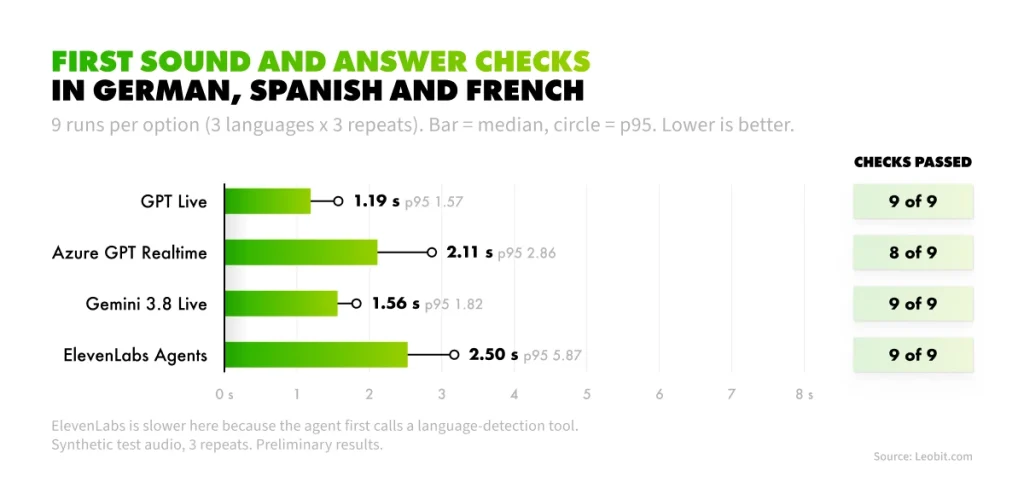
Three engines passed every multilingual check, but they differed in speed and in how they handled pauses during a caller’s turn.
Both capabilities become important once a voice assistant moves beyond a controlled demo environment. Customers may switch languages mid-conversation, and support for multiple languages in the underlying model does not necessarily mean the entire voice pipeline can handle those transitions smoothly.
Pauses are just as common. Callers stop to think, check a document, or read a number from a card, and the engine has to determine whether they are simply pausing or have finished speaking. We tested both capabilities using the same knowledge-base question in German, Spanish, and French, as well as a phone-number scenario with deliberate pauses.
German, Spanish, and French, 9 runs per option (15 for ElevenLabs Agents):
GPT Live
Azure GPT Realtime
Gemini 3.8 Live
ElevenLabs Agents
Checks passed
9/9
8/9
9/9
15/15
First sound, p50
1.19 s
2.11 s
1.56 s
2.50 s
ElevenLabs answered correctly in all three languages and was the slowest here. In our setup, the agent first calls a language-detection tool and only then searches, which adds time. A dedicated agent per language would likely be faster and less flexible. First sound and answer checks in German, Spanish, and French
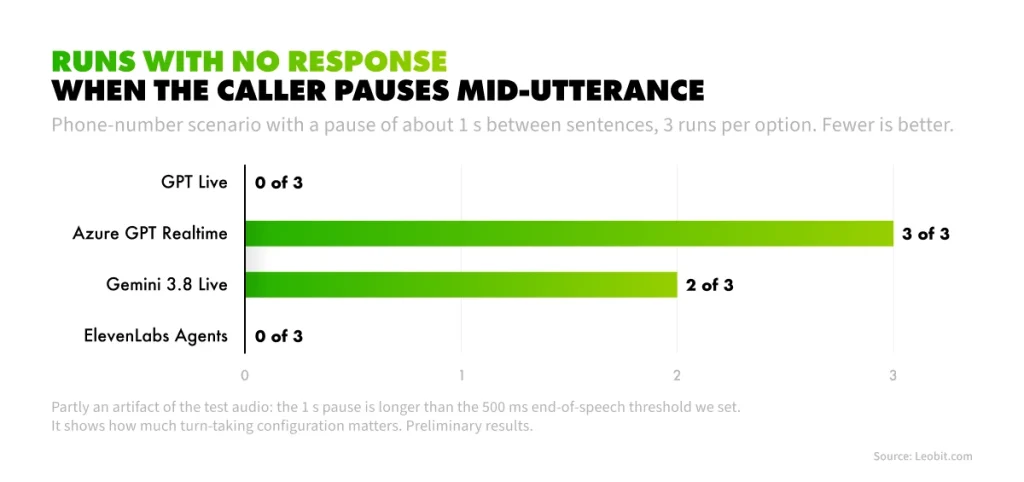
Turn-taking produced one of the sharpest splits in the whole benchmark. In one scenario, the caller reads a phone number with a pause of about a second between sentences. With a 500 ms end-of-speech threshold, Azure GPT Realtime failed to respond in 3 of 3 runs and Gemini in 2 of 3, while GPT Live and ElevenLabs handled it in all runs. This test is partly an artifact of our audio. It still shows how much end-of-speech configuration matters for real callers, who pause mid-sentence and read numbers off a card.
Runs with no response when the caller pauses mid-utterance (out of 3; out of 5 for ElevenLabs Agents).
Reliability and Degraded Audio
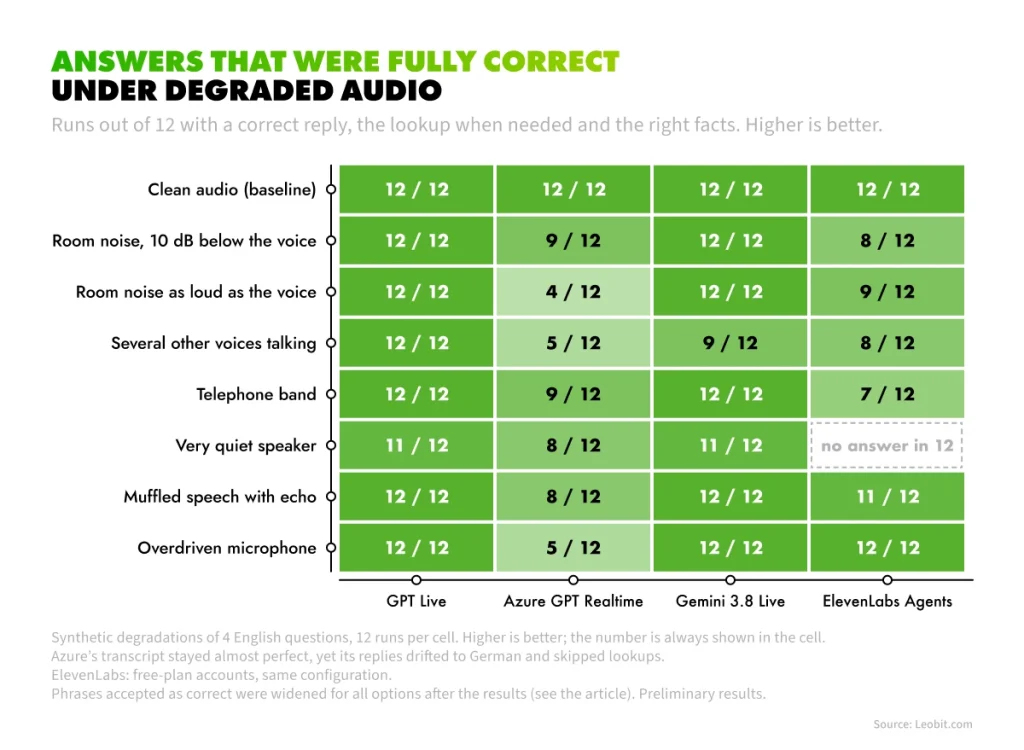
Callers rarely sound like a studio recording, so we tested every engine against seven degraded versions of four English questions. GPT Live and Gemini 3.8 Live stayed accurate; Azure GPT Realtime lost more than a third of its runs, and ElevenLabs Agents stayed accurate except in one condition, where it did not answer at all.
A reply counted as fully correct only if the assistant answered, called the lookup when it needed to, and gave the right facts. After seeing the first results, we widened the accepted phrasing for two questions, because GPT Live answers in spoken style (“one twenty” instead of “120”). The same rule applied to every engine, and we checked the affected replies by hand.
Fully correct answers out of 12 under degraded audio
Out of 84 degraded-audio runs per option:
GPT Live: 83 of 84. The only miss occurred with a very quiet speaker that the system did not detect. It asked the user to repeat the question, which was a reasonable fallback.
Gemini 3.8 Live: 80 of 84. Its main weakness was handling multiple voices at once. With overlapping speech, it answered 9 of 12 runs correctly; in the other three, the second half of the question was lost.
ElevenLabs Agents: 72 of 84. It answered every run correctly in six of the seven conditions but failed to respond in all 12 runs with the very quiet speaker. We saw the same behavior with different accounts and agents, so a quota-related issue is unlikely. Our hypothesis is that turn detection does not trigger at such a low input level.
Azure GPT Realtime: 48 of 84. Interestingly, transcription remained near-perfect across all conditions, with a WER of 0.00 even when multiple voices were present. However, this did not consistently translate into correct behavior. In noisy conditions, the assistant sometimes responded in German to an English question—7 of 12 runs with the overdriven microphone—or skipped the lookup and answered from its own knowledge.
The last result highlights an important point: an accurate transcript does not necessarily mean the assistant understood the request correctly. Gemini sometimes mis-transcribed the company name in noisy conditions while still producing the correct answer. Azure showed the opposite pattern: its transcripts remained highly accurate, but its answers were not always correct. This is why voice assistants should be evaluated on the quality of their answers, not transcript error rates alone.
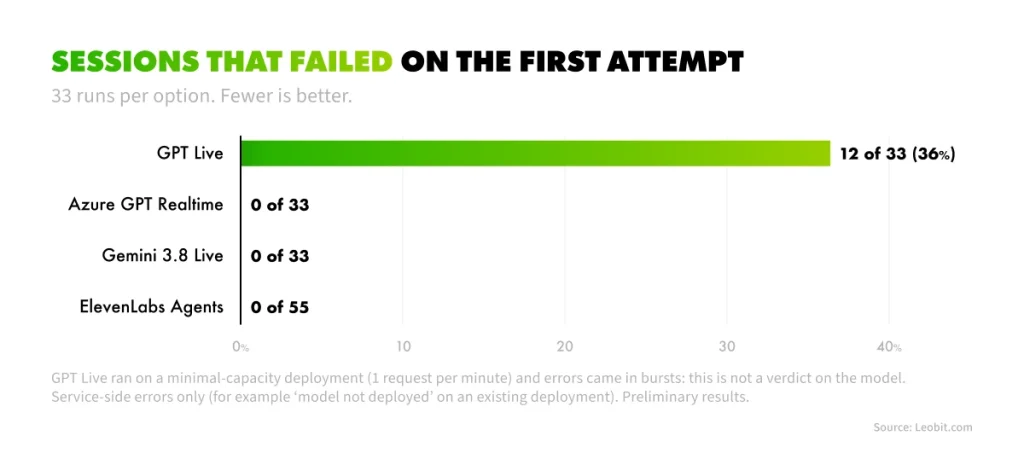
Clean-audio testing revealed another issue: service reliability. In our GPT Live deployment, 12 of 33 sessions failed on the first attempt because of service-side errors, including a “model not deployed” error for an existing deployment. The deployment was running at minimal capacity (one request per minute), and the failures occurred in bursts, so we do not consider this evidence of a problem with the model itself. The other three options had no service errors during our tests. If you plan to use GPT Live in production, test it under a realistic quota and workload first.
Sessions that failed on the first attempt: 33 runs per option (55 for ElevenLabs Agents)
Latency barely moved under noise: first-sound times stayed within a few tenths of a second of the clean runs.
How Much Does a Voice AI Conversation Cost?
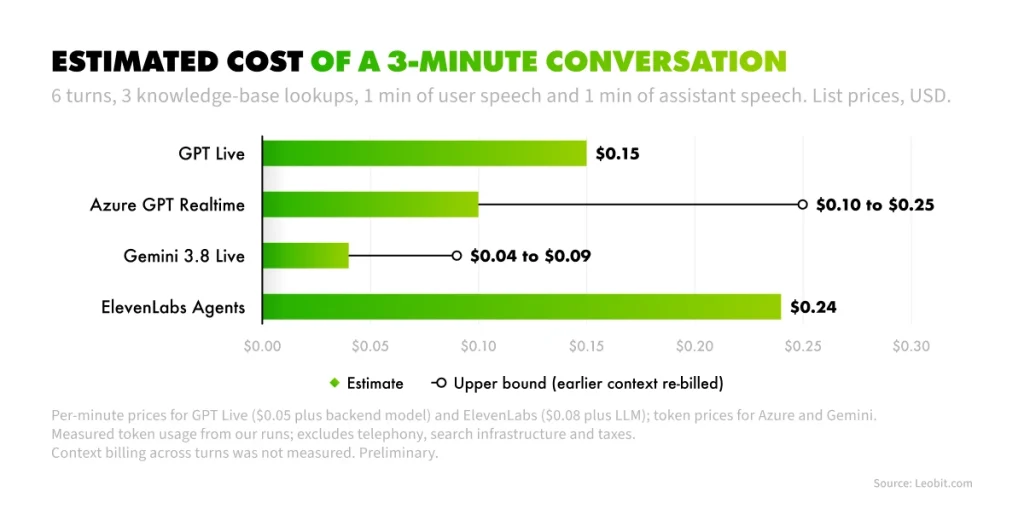
In our estimate, a 3-minute conversation with three knowledge-base lookups costs from $0.04 on Gemini 3.8 Live to about $0.24 on ElevenLabs Agents at list prices. The pricing models differ more than the totals suggest.
We modeled a typical conversation: 6 turns, 3 of which need a lookup, with about one minute of user speech and one minute of assistant speech. We combined list prices (checked on October 10, 2026) with token usage measured in our own runs.
Pricing model
Estimated cost, 3-minute conversation
Per 1,000 conversations
Gemini 3.8 Live
Tokens (audio in and out, text)
$0.04 to $0.09
$37 to $86
Azure GPT Realtime
Tokens (audio in and out, text)
$0.10 to $0.25
$101 to $245
GPT Live
$0.05 per minute plus backend model tokens
about $0.15
about $154
ElevenLabs Agents
$0.08 per minute plus LLM
about $0.24
about $242
The price difference is substantial. At list prices, the least expensive option costs about six times less per conversation than the most expensive one — roughly $37 versus $242 per thousand conversations. The four engines also fall into two pricing models: token-based and minute-based. This difference in pricing structure accounts for much of the cost gap, rather than any single rate alone.
Estimated cost of a 3-minute conversation, list prices, USD.
What sits behind these numbers:
Per-minute pricing is simple. GPT Live and ElevenLabs charge for session time, so cost grows linearly with call length. In our runs, the GPT Live backend model added only about $0.0014 per lookup turn.
Token pricing depends on the call profile. In our measurements, Azure GPT Realtime used about 10 audio tokens per second of user speech and 20 per second of assistant speech, while Gemini billed about 25 audio tokens per second.
The ranges are real uncertainty. For the token-billed options, the lower figure assumes earlier conversation context is cached, and the upper figure assumes earlier audio is re-billed on every turn. We measured single turns, so treat the range as a guide.
Not included: telephony, the search infrastructure behind the knowledge base, taxes, and free-tier allowances.
The totals above describe one specific call profile, and that is the real conclusion of this section.
Per-minute billing grows with how long your calls last, while token billing grows with how much is said and how context is billed. An engine that is the cheapest for our 3-minute profile may rank differently for yours, so re-run this estimate with your own average call before the price becomes an argument for or against any engine.
Yaroslav Bychkov
.NET Software Engineer
Voice AI Benchmark Surprises: What We Learned Along the Way
Benchmark tables show how an engine performs, but they tell you little about what it is actually like to build with one in the first weeks after release. With models this new, that experience matters too. Specifications and pricing pages describe how the technology is supposed to work, while engineering teams encounter the practical realities: evolving quotas, changing protocols, and billing behavior that may only become clear once real usage begins.
We encountered all of these issues while setting up the benchmark. Sharing them here can help you account for them before they surface in the middle of a project. Four findings in particular cost us time and could have a much greater impact in production.
Full-duplex models need a live input stream. Our early GPT Live results showed answers cut off mid-sentence. The cause was our test rather than the model: we stopped sending audio after the question, and a full-duplex model expects the microphone to stay open. After the fix, answers completed normally. We re-ran everything and discarded the earlier numbers.
Protocols change quickly. The beta Realtime protocol that worked on our Azure deployment in mid-September was rejected in early October. Check what your production assistant depends on.
New models start with tiny quotas. Our GPT Live deployment could only be created at one request per minute, which stretched a benchmark from minutes to hours.
Free tiers go a long way, and they are time-boxed. Gemini worked for these tests on its free tier, while GPT Live has no free API tier. ElevenLabs bills agents by conversation time, so a call that nobody answers still burns credits until it times out. Our free ElevenLabs credits ran out twice, so we ran the final ElevenLabs measurements on a paid plan.
None of these findings change the benchmark results, but they do affect your implementation plan. Allow time for quota requests, pin your protocol versions, and monitor credit usage during testing. Once you account for these operational considerations, you can return to the main question this benchmark set out to answer.
Which Voice AI Engine Should You Choose?
There is no single winner. The best engine depends on what your assistant must do well, and our measurements point to a different option for almost every priority. That is why we summarized the results as a decision table instead of a ranking.
Each row is a priority a voice assistant project might put first, from answer speed to cost to control over the stack. For each one, the table names the engine that performed best in our tests and the measurement behind that call, so you can check the reasoning against the sections above.
Start from the row that matches your project’s first priority; if two rows matter equally, the engine that appears in both is your shortlist of one.
Best fit in our tests
Why
Fast answers that need a knowledge-base lookup
Gemini 3.8 Live
1.43 s to the actual answer
Snappy conversation without lookups and accurate transcription
GPT Live
0.79 s first sound, WER 0.01
Tolerance for natural pauses
GPT Live or ElevenLabs Agents
No dropped turns in our pause test
Multilingual support with minimal setup
Gemini 3.8 Live or GPT Live
9/9 checks, first sound 1.2 to 1.6 s
Accuracy on noisy and unclear audio
GPT Live or Gemini 3.8 Live
83 and 80 of 84 degraded runs fully correct
Lowest cost per conversation
Gemini 3.8 Live
About $0.04 to $0.09 per 3-minute conversation at list prices
Full control of the brain and the voice layer
ElevenLabs Agents
Pluggable LLM, v4 Turbo voice
If you are deciding how to build the agent around the engine, our guide to building an LLM-powered AI agent for business covers the architecture choices that sit above this layer.
What we did not measure matters too: interruptions (barge-in), real-world noise and accents, voice naturalness through blind listening, and real invoices rather than list-price estimates. We also ran only three repeats per scenario (five for ElevenLabs Agents), so don’t over-interpret small differences. We plan to extend the benchmark with these tests.
Beyond Question Answering: A Voice That Points at the Screen
The same engines can do more than answer questions. A voice guide for a web application listens to the user while watching the current page, then shows where to act, for example by highlighting the right button as it explains the step out loud.
For this kind of assistant, Gemini 3.8 Live turned out to be the most convenient base for us. A single streaming session accepts audio, text, and images, so the page can be described to the model as a structured list of elements while the user talks. Function calling lets the model answer with an action, such as “highlight this control”, instead of only words. It adds the fastest answer after a lookup in our benchmark, the lowest estimated cost per conversation, and the least glue code and budget to try.
We built an early prototype based on this approach, and in our initial tests, the highlight appeared roughly 1 to 1.5 seconds after a question. The concept is still experimental: accuracy on long, multi-field forms is not yet consistent, and the implementation may evolve. For now, we see it as a promising direction rather than a production-ready solution. If you are considering a similar approach for your web application, we would be happy to explore what it could look like for your use case.
How Leobit Can Help You Build a Voice AI Assistant
At Leobit, we build voice and text assistants on top of company data and benchmark the underlying models in real scenarios before recommending one. The projects behind this article are public:
Leora, our voice sales assistant, answers prospects’ questions from Leobit’s knowledge base through RAG.
AI-powered voice assistant PoC on Azure OpenAI Real-Time API went from idea to a working voice RAG solution in under 4 weeks, with responses initiated within 500 ms.
The ranking changed depending on which scenario we looked at, and that is the real finding. There is no best voice engine in the abstract. There is a best engine for your questions, your languages, and your call profile, and a few days of benchmarking on your own data is the cheapest way to find it.
Yaroslav Bychkov
.NET Software Engineer
Final Thoughts
The benchmark answered our original question: Leora’s next engine depends on which capabilities matter most for its use case, and the same will be true for any voice AI project. What applies more broadly is how these engines are evaluated.
A filler phrase can make an assistant feel responsive while the actual answer is still several seconds away, so measure how long callers wait for the information they need. Cost requires the same context. Per-minute pricing increases with call duration, while token-based pricing depends on how much is said, so model your own call patterns before comparing totals.
Less obvious risks need dedicated testing as well. An engine that performs well in English may behave differently in other languages, while options that appear similar on clean recordings can diverge sharply under noisy conditions. As our tests showed, even a highly accurate transcript does not guarantee a correct answer. And when working with newly released models, treat quotas and protocol changes as part of implementation planning rather than unexpected problems.
A benchmark like this takes days to run, but it can prevent months of discovering the same limitations after a system reaches production.
If you are choosing between GPT Live, Gemini Live, ElevenLabs, or Azure for your own assistant, our AI development team can run the same kind of test on your questions and your data. Contact Leobit to discuss a voice AI pilot.
FAQ
A native model processes audio in and audio out inside one model. A cascade chains speech recognition, an LLM, and speech synthesis, which gives you more control over each part and adds steps and latency between them.
In our tests, Gemini worked on its free tier, and ElevenLabs’ free credits covered only part of our runs. GPT Live has no free API tier, and Azure deployments need available quota. Limits change, so check current terms.
It speaks while the backend model and the function work in parallel, which keeps the conversation alive. The trade-off is that the substantive answer arrives later: about 3.6 s after the question in our tests, versus 1.4 s for Gemini 3.8 Live.
In our estimate, a 3-minute conversation with three knowledge-base lookups costs roughly $0.04 to $0.09 on Gemini 3.8 Live, $0.10 to $0.25 on Azure GPT Realtime, about $0.15 on GPT Live, and about $0.24 on ElevenLabs Agents at list prices. Real bills depend on call length, how much is said, and how context is billed.
In our synthetic test, GPT Live and Gemini 3.8 Live gave fully correct answers in 83 and 80 of 84 degraded runs, Azure GPT Realtime in 48, and ElevenLabs Agents in 72 (it did not respond at all to a very quiet speaker). Several voices talking at once was the hardest case for Gemini. Validate with recordings from your own environment.
Inna loves making complex tech feel simple. With a strong eye for innovation, she helps businesses turn complicated ideas and data into clear strategies they can actually use. Whether it’s new tools or big trends, she’s all about making technology work for people.
Yaroslav builds practical software that turns business challenges into working solutions. He has more than two years of experience with .NET and Angular, and his focus is applied AI: RAG assistants, voice agents, and proof-of-concepts built on Claude, OpenAI, and Gemini. He enjoys testing new models in practice and showing which ones actually work for real products.
Google’s 2025 DORA report found that 90% of developers now use AI at work. The data on code quality is less encouraging. GitClear analyzed 623 million ...
62% of business leaders at mid-sized and large companies believe parts of their business-critical applications are already so outdated that they no longer meet ...
In August 2025, TypeScript overtook Python and JavaScript to become the most used language on GitHub: 2.6 million monthly contributors, up 66.6% in a single ...
Nearly 90% of organizations are already piloting or deploying generative AI in their quality engineering practice, according to the World Quality Report 2025. ...
Lenovo’s 2026 CIO Playbook, with research by IDC, found that 46% of AI proofs of concept (PoCs) have progressed into production, so just over half have ...
MIT’s State of AI in Business 2025 report shows that monthly job listings for forward deployed engineers increased by more than 800% this year, part of a ...
The .NET ecosystem continues to flourish in 2026, with over 478,000 packages on NuGet that have been downloaded over 800 billion times. Numbers from ...
16 mins read
We use cookies to enhance your browsing experience. By agreeing, you accept our Privacy and Cookies Policy.
By ignoring or closing this banner, we will only collect essential cookies necessary for the website to function properly.
 Leobit