The quality of this output depends on what surrounds the model, because the same model can produce reliable code in one project and flawed code in another. That surrounding system is an AI harness, and your project sets how much of it you need.
This article covers what an AI harness is made of, how to tell whether your project is under-harnessed or over-harnessed, and what the Leobit’s team found while working on our own projects.
What Is an AI Harness and What Are Its Layers?
An AI harness is the structure around an AI agent that turns its output into work your team can accept. The model generates, and the harness decides what counts as done. Five layers make it up:
Project knowledge. Architecture decisions, naming conventions, domain rules, and the Definition of Ready, written down where an agent reads them before it writes code.
Automated verification. A test behind every acceptance criterion, running on every commit rather than once a sprint.
Review gates. A defined point where a person approves the plan, the specification, the change, and the merge.
Permissions. An explicit statement of what the agent may read, change, and run, and which actions need a human signature.
Your existing engineering system, combined with these five layers, forms your AI harness. None of it requires a new platform, and most of it consists of plain text stored in your repository.
AI assistants can speed up development, with engineers reporting about 6 hours saved each week compared to working without such assistance. A harness keeps that speed reliable. It gives the assistant your project rules and automated checks that confirm each piece of work meets your standards, and it stays when you switch AI tools.
The split becomes clear once you see where each one fails. An assistant works inside one session with one developer. When that session closes, the reasoning behind the change closes with it, and when that developer moves to another team, the project keeps the code and loses the context. Useful prompts, architecture reasoning, and hard-won fixes disappear, and the team solves the same problem again six weeks later because nobody can find the first answer.
An AI agent harness holds what has to survive. The specification, the acceptance criteria, the tests, and the decisions behind them live in version control, so the next agent session and the next engineer both start from them.
Without that foundation, AI-generated code rarely fails in an obvious way. Still, the approach lacking a solid foundation can cause many issues with the reliability of AI outputs.
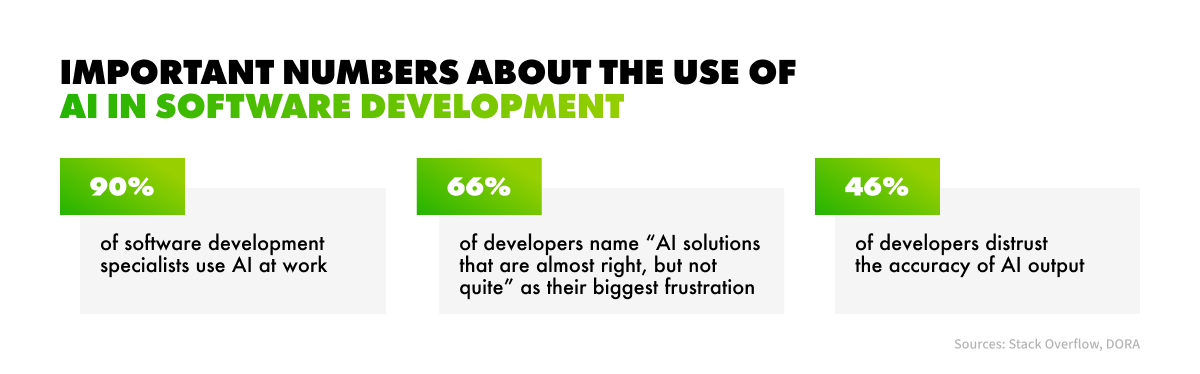
Statistics on AI usage in software development
The generated code passes a quick review, merges, and ships, and the damage appears weeks later in delivery metrics and the backlog. Two failure modes show up repeatedly, and both are quiet:
Throughput rises while stability falls. DORA’s 2025 report found that AI adoption is now associated with higher delivery throughput, reversing its 2024 finding, but it is still associated with more delivery instability. In plain terms, your team ships more changes, and more of those changes cause problems in production. Every failure costs engineering hours in fixes, rollbacks, and rework, and customers feel the disruption. Speed that creates cleanup work does not add capacity. Instead, it moves effort from writing code to repairing it.
Rework becomes the hidden cost of ownership. Low first-pass acceptance means reviewers correct and regenerate AI output repeatedly. Inconsistent patterns and duplicated solutions pile up with every release, accelerating AI technical debt.
Teams often mistake both problems for an ordinary delivery slowdown. Both come from the same gap between what your team knows and what your agents can read. How wide that gap is largely depends on how far your delivery process has already gone with AI.
The Value of the AI Maturity Curve for a Harness
Before sizing a harness, locate yourself on the AI maturity curve. Our AI-native software development lifecycle model describes five levels, and the distance between them mostly depends on how much is written down.
What it looks like in practice
1. Traditional
Delivery runs on the manual and automated processes you already had. AI has no defined role.
2. AI-Assisted
Developers use copilots and chat assistants for individual tasks. Workflows are unchanged, so results depend on individual practice.
3. AI-Integrated
AI supports several delivery stages with human review, but governance, shared context, and engineering standards are applied inconsistently.
4. AI-Native
AI is embedded through governed workflows, shared context, permissions, human review, and delivery metrics. Engineers keep control.
5. AI-Autonomous
Agents perform most execution inside clearly defined boundaries, while engineers supervise strategy, governance, and exceptions.
The gap between level 2 and level 4 is almost entirely harness. The models are the same, and the tools are often the same. What changes is how much of the project an agent can read and how much of its output is verified before a person sees it. For companies going AI-native, building as much harness infrastructure as possible may seem like a logical approach, but more isn’t necessarily better. Your level shows where you stand, not how much harness a given project needs, and the right amount varies from project to project.
The Problem of Over- or Under-Harnessing
A project needs as much harness as its scope, complexity, delivery speed, and risk profile call for. Build less than that and AI output reaches production unchecked. Build more, and you have added a process nobody uses, which is how over-engineering worked before AI arrived.
Four drivers set the level:
Scope. The longer a project runs and the more people touch it, the more context gets lost between sessions and team members. A two-week internal utility needs little written down, while a multi-year platform needs documented rules so the assistant doesn’t contradict earlier decisions.
Complexity. When systems depend on each other, a change in one place can break another, so the assistant needs a written specification of how the parts connect. Isolated scripts rarely need one, because the assistant can see everything it affects.
Delivery speed. Short release cycles leave no time to read every line of AI-generated code. Automated checks replace that manual review and catch problems before each release.
Risk. A mistake that touches financial transactions, personal data, or a regulated workflow costs far more than a bug in an internal tool, so these projects need strong checks however small or fast they are. The same applies to client production environments, whatever the project label says.
You weigh all four together, but risk matters most. A small, fast project can get by with a light process, unless it handles money or personal data, and then it still needs strong checks. Scope, complexity, and speed tell you how much process you can justify. Risk tells you the least process you can safely use.
How much harness does your project need?
The four drivers land differently on every project, which is why two teams on the same tooling end up with different setups.
Harness level
What drives it
Greenfield MVP
Strict when it serves clients or production.
Risk. Specifications before code, with every acceptance criterion traced.
Scope and complexity. The harness grows as the team works with the system.
Internal business tool
Light, plus project knowledge.
Risk. If the tool handles billing or other sensitive processes, unchecked AI generation is off the table.
Whether it’s a startup MVP or a legacy platform, the harness grows with the project rather than ahead of it. Start with the knowledge layer and the review gates your risk level demands, then add parts when a real problem asks for them.
Mykola Sheredko
Solution AI Architect
How to Start Sizing Your Own Harness
Sizing a harness requires an honest look at your project’s risk, the context your agents lack, and the checks that stand between AI output and production. The five steps below use only the systems and documents your team already has, and each one produces something you can act on right away.
Grade one project by risk. Ask what breaks when the AI is wrong. Risks, such as personal data, regulated workflows, client production environments, and financial transactions, move you up a grade.
Write down what the agent currently has to guess. Architecture decisions, naming conventions, domain rules, the Definition of Ready. That document is the first part of your harness and the fastest one to build.
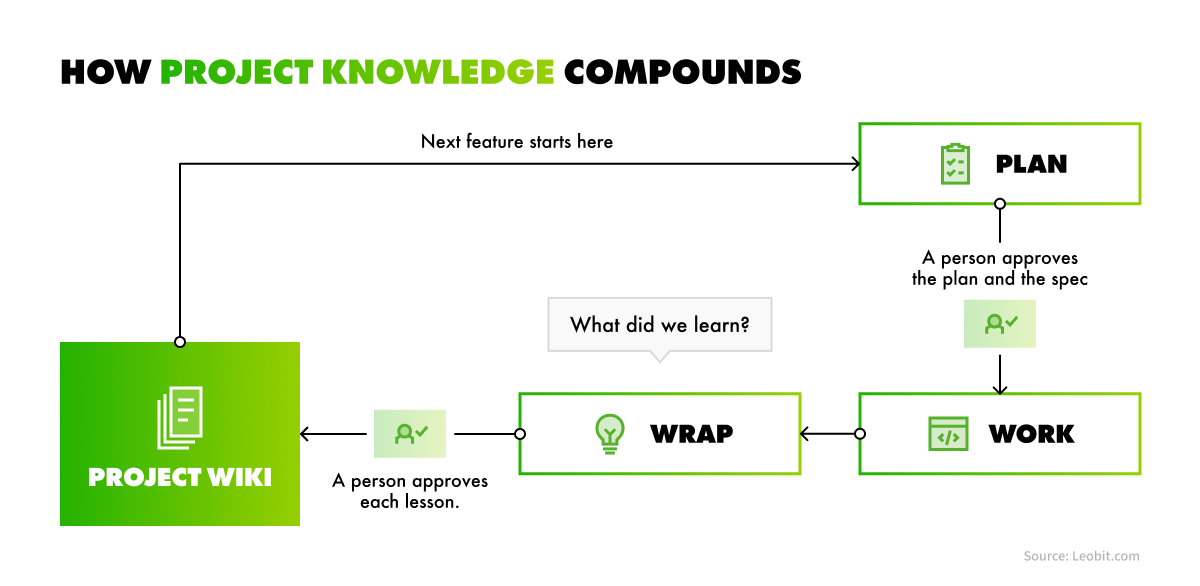
Pick one feature and run the plan, work, wrap. Approve the plan before code, and end with one approved lesson written into the project wiki.
Give every acceptance criterion an ID and a test. Then measure how many criteria have no test behind them. The gap you find is your current quality risk, stated as a number.
Measure one task three ways. By hand, with AI on your current setup, and with AI plus written context. Use the same prompt every time and have someone grade the results without knowing which method produced them. Otherwise, you will measure how fast the work feels instead of how fast it is.
Sizing the harness settles what you build, but it does not settle who checks the output. Every harness, light or rich, ends at a review gate where a person reads what the agents produced.
Does Human Review Become the New Bottleneck for Developing Software with AI?
Human review becomes a bottleneck only if people read every line of everything. Faster code generation moves the constraint rather than removing it: every change still needs a person to read it, and review capacity stays flat while output volume grows. The way out is to change when review happens rather than how much of it there is.
Three shifts do the work:
Earlier. A person approves the plan and the specification before any code exists. Catching a wrong assumption in a specification costs minutes, while in a merged pull request it costs a sprint.
Smaller. One tested task per pull request. A reviewer reading a focused change with its tests attached works far faster than one reading a 2,000-line commit.
Shared. Each role checks its own output. The business analyst owns the specification, the developer owns the code, and QA owns the tests.
The stability gap in DORA’s 2025 report, mentioned above, points to the same constraint. As development output increases, pre-production quality checks need to scale accordingly to catch defects early, improve change reliability, and minimize rework. The three shifts above keep review in step with volume, driving fewer production failures and less rework on the projects.
What Does the Evidence Show About the Value of an AI Harness?
Claims about AI productivity may be hard to verify. Surveys often capture how developers feel, and generic benchmarks test models on tasks that look nothing like project work. The more useful evidence comes from comparing ways of working on real tasks, with a baseline and a fixed method for grading the results.
So we ran that comparison on our own delivery. We used an internal project, a billing and invoicing tool our team maintains, where the timings are ours to measure. The same everyday tasks went through three ways of working, with the same model throughout and the grading method fixed before the first run.
The benchmark compared three levels:
By hand. A person does the task from start to finish with no AI. This is the baseline, and its timings come from expert estimates of manual effort.
AI on a light harness. The model works directly in the project’s repository. It reads the code and documentation, connects to GitHub through MCP, and follows a short rules file. However, it has no access to a structured project knowledge base containing more precise information, such as project rules, and conventions.
AI working from a documented knowledge layer. This is the light harness plus written project context, such as documented flows, rules, conventions, and skills. It builds on the previous level, so the gap between the two shows what documented context adds.
Here is how the benchmark was set up:
20 everyday tasks across business analysis, QA, development, and project management: a user story written from a backlog item, regression test selection, a pull request review, a status report.
120 AI runs. An AI judge graded the results blind, without knowing which setup produced which result, and a person double-checked the close calls. We froze the task prompts before any run started.
What came out of it:
Speed. Based on expert estimates of manual effort, AI completed tasks approximately three times faster on average, with estimated gains ranging from 2x to 6x depending on the task.
Quality. Both AI setups (light harness and AI working from a documented knowledge layer) had over 90% of their results accepted after review. The clearest difference appeared in QA, where the setup with the knowledge layer had all 12 results accepted, compared with 9 of 12 for the setup without it.
QA showed the clearest gap. QA tasks showed the most noticeable improvement, with approximately 25% less rework when AI had access to documented project workflows and rules.
Task type decides the gain. The impact varied by task type. In our tests, repetitive, well-defined tasks showed the greatest improvements, while novel design tasks benefited less.
One limitation affects how to interpret these results. The benchmark evaluated the knowledge layer: the outcome when agents begin from documented project context rather than a blank session. It did not assess the review gates separately. The results therefore offer a partial view of the harness, but they still provide useful evidence of what documented project context contributes.
How Does an AI Harness Perform in Real-World Development Tasks?
A harness pays off most when a team has a backlog of known problems and a fixed deadline. The question then becomes how quickly the team can turn documented requirements into verified, merged work. A recent Leobit project shows what that looks like. The client’s engineering design software, built in .NET and TypeScript, had a fixed deadline, and the team went from the client’s own documents to two releases in three days.
The numbers behind those three days:
58 pull requests merged, one task per pull request, every one of them merged by the client’s own tech lead. The client approved every change themselves, so nothing reached their product without their sign-off, and small changes get approved faster.
78% of the code that landed was tests, because every fix started from tests written against the specification. Fewer bugs reach customers, and the tests keep protecting the product in every future release.
461 acceptance criteria derived from 73 requirements, each traced back to a document the client already had. The client can check every change against what they asked for, so there are fewer disputes and fewer surprises at delivery.
Five steps per fix: tests, code, AI reviewer, Leobit developers, the client’s tech lead. Several checks catch mistakes before customers see them, so the team can move fast without risking quality.
Agents did the volume, while people kept every decision, including the merge. This pace suits many small, well-specified fixes. Large design work moves more slowly, and a harness doesn’t change that. What the AI coding harness changes is how quickly a team clears a backlog of well-understood problems.
Building a harness takes AI engineering expertise many organizations do not yet have in-house, and keeping one running can also be a challenge. Without continuous work on the AI agent harness, project context goes stale, tests fall behind the specifications, and every review gate needs a named owner. A partner who has done this before can help you reach verified, merged work sooner, whether that means supporting your engineers or delivering the project end to end.
How Does Leobit Build an AI Harness
Leobit builds a harness as a layer on top of the engineering system you already run. The component that carries it is the AI Enablement Kit: a governed delivery system built around your codebase, documentation, and engineering workflows. Your repositories, tracker, CI pipeline, and toolchain stay where they are. The Kit provides ready-made components for whichever of the five layers your project needs, so your team doesn’t have to build them from scratch.
The Kit comes out of Leobit’s own delivery. We are a dedicated team and solution provider with 6+ years of AI development and 40+ AI projects delivered across fintech, insurtech, proptech, legaltech, and other industries. We also use an AI-native software development lifecycle, applying AI systematically through governed workflows, shared AI project context, human review, and measurable delivery metrics. Our engineers remain in control while AI becomes part of the engineering system.
Leobit’s AI Enablement Kit helps teams apply this approach to their own projects. It supports AI-native software development by providing capabilities that go beyond the core AI harness layers.
Components your team swaps and extends
The AI Enablement Kit lets your team adopt the parts it needs.If your team uses Azure DevOps instead of Jira, you only need to switch the connector. The rest of the setup remains unchanged. Your engineers can also create custom AI skills tailored to your team’s workflows. For example, they can define code review rules in a reusable skill, allowing AI agents to apply those standards consistently without requiring engineers to write detailed prompts for every review.
Knowledge capture at the end of every feature
Every feature runs through three stages: plan, work, wrap. The wrap stage asks one question: What did we learn? The answer might be a pitfall in the codebase, a decision and the reason behind it, or a fix that took hours to find. A person reviews each lesson and approves it before it goes into the project wiki. When the next feature starts, the team and the AI assistant read the wiki first. They skip the digging the last feature already did, and they don’t repeat its mistakes.
Knowledge capture
This is the part that survives staff changes. People leave and tools get replaced, but the memory stays in the repository.
Verification that costs nothing to repeat
The specification-to-test tracing described earlier now runs as a working check. Every acceptance criterion ID gets its own test, and a report lists the criteria that still have none. On the strictest project grade, work can’t move forward until that list is empty.
Those tests then run as ordinary automated checks and never call a model, so verifying every commit adds no AI usage cost. Done stops being a matter of opinion. A feature is complete when every acceptance criteria has a passing test.
No lock-in, because the knowledge is Markdown in git
Project knowledge is plain Markdown under version control, so your agents and your engineers read the same files. A new developer reads them instead of queuing for time with your busiest senior engineer. Claude Code runs the full flow today, and any agent that speaks MCP (Model Context Protocol), including Codex and Cursor, can read that knowledge and add to it.
The Kit also runs on the AI plan your team already pays for. That plan sets your usage limits.
Teams getting dependable output from AI agents rarely run the newest model. They are the ones whose projects have written down what the system is supposed to do, attached a test to every acceptance criterion, and kept a person on the merge button.
An AI harness makes that repeatable. It addresses two gaps: context that disappears when a session ends, and output that ships faster than anything can check it. Neither gap comes from the model, and neither closes on its own.
Start with one project this month. Rate it by what breaks when the AI gets something wrong, then measure one task three ways using the same prompt each time. By the end of the month, you have a number instead of an impression, and that number shows which part of the harness to build first.
Leobit can deploy the AI harness player into your delivery setup, whether your own engineers run the project or our dedicated team does. Either way, a person approves production changes, and acceptance criteria stay traceable to the requirements you started with. Watch the recording of our webinar, The Efficient AI Harness: What Your Project Really Needs, for more insights on AI harness and Leobit’s AI Enablement Kit. Also, contact us to book an assessment of your delivery setup and current tooling.
FAQ
AI coding agent guardrails are the permissions and review gates that limit what an agent may read, change, and run. They cover one part of the problem. An AI harness is the whole structure around the agent, which also includes written project knowledge and a test behind every acceptance criterion. Guardrails prevent the wrong action. An AI agent harness defines what finished work looks like.
Measuring AI developer productivity by how fast the work feels produces numbers you cannot act on. Run one task three ways instead: by hand, with AI on your current setup, and with AI working from written project context. Freeze the prompt, and have someone grade the results without knowing which method produced which. Our own benchmark used that method across 20 tasks and 120 runs.
No. Most of a harness is plain text in your repository: architecture decisions and domain rules, plus specifications with stable acceptance criteria IDs. Verification runs on the CI pipeline you already have, and those tests never call a model, so checking every commit adds no AI usage cost. Start with the knowledge layer, the fastest part to build, then add what a real problem asks for.
Yes. A harness lives with the project rather than with a particular team, so it works whether your own engineers run delivery or a partner does. Leobit deploys it and delivers against the same review gates, while you approve the plan and the release. Acceptance criteria stay traceable to the requirements you started from, which is how a non-technical owner verifies progress.
Mykola Sheredko is a solution AI architect leading AI Enablement at Leobit, helping teams and clients bring AI into everyday software development while keeping quality and people at the center. Anthropic-certified, he has worked across healthcare, fintech, and govtech, from modernizing legacy systems to building products from scratch. Mykola is focused on making AI practical and reliable beyond demos.
Roman has a deep passion for a wide array of subjects, spanning from market insights to in-depth technical examinations of complex projects. He dives deep into technical aspects of various solutions to extract valuable insights for business purposes, and he enjoys sharing tips and tricks with business owners to help them leverage advanced technologies effectively.
Google’s 2025 DORA report found that 90% of developers now use AI at work. The data on code quality is less encouraging. GitClear analyzed 623 million ...
In August 2025, TypeScript overtook Python and JavaScript to become the most used language on GitHub: 2.6 million monthly contributors, up 66.6% in a single ...
Nearly 90% of organizations are already piloting or deploying generative AI in their quality engineering practice, according to the World Quality Report 2025. ...
Lenovo’s 2026 CIO Playbook, with research by IDC, found that 46% of AI proofs of concept (PoCs) have progressed into production, so just over half have ...
Leona, Leobit’s AI agent designed to find promising cooperation opportunities and automatically send requests for proposals (RFPs), has helped our sales ...
Gartner estimates that generative AI cost projections can be off by 500% to 1,000% when organizations fail to account for how costs scale. They also predict ...
18 mins read
We use cookies to enhance your browsing experience. By agreeing, you accept our Privacy and Cookies Policy.
By ignoring or closing this banner, we will only collect essential cookies necessary for the website to function properly.
 Leobit