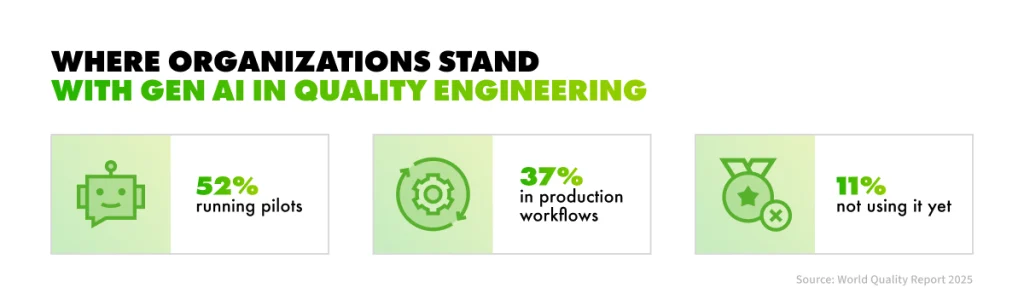
Nearly 90% of organizations are already piloting or deploying generative AI in their quality engineering practice, according to the World Quality Report 2025. Only 15% have scaled it across the enterprise. The gap between those two numbers is where testing budgets now leak.
The pressure behind the adoption rush is familiar to anyone who ships software: release cycles keep shrinking while regression suites keep growing, and testing quietly becomes the bottleneck of the roadmap. Meanwhile, AI tools have matured from code autocomplete into agents connected directly to Jira and CI pipelines. The question facing you as a product leader has shifted from whether to use AI in testing to how to do it without trading away quality.
World Quality Report 2025 highlights on generative AI use in QA
Here’s the truth: teams that capture the report’s average 19% productivity gain treat AI as a governed part of the software testing lifecycle (STLC). AI speeds up testing, but people stay accountable for quality.
In this article, you will find what AI does at each stage of the STLC, which metrics prove it is working, the risks worth pricing in, and a realistic adoption path.
What AI in Software Testing Means
An AI-driven STLC is a testing process in which AI assists every phase, and a QA engineer reviews and owns every result. That means AI adds speed and breadth, while QA engineers provide judgment and sign off on the release decision.
Despite the attention the topic gets, production use is still the exception. Among the near-90% of organizations working with generative AI in quality engineering, 37% run it in production workflows while 52% are still in pilots. If your team is still experimenting, you are in the majority.
AI-assisted testing vs. classic test automation
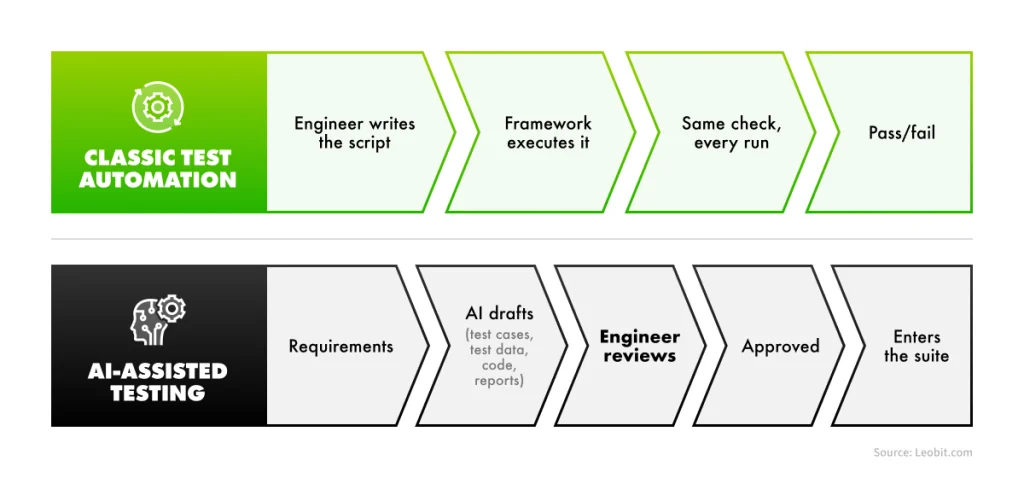
The difference between AI-assisted testing and classic test automation lies in who writes the test logic and how the output is treated. Classic test automation executes scripts that people wrote. It is predictable and repeatable: the same test checks the same behavior on every run.
AI-assisted testing works differently. It produces drafts, including test cases, test data, automation code, and reports, and each draft must be reviewed by an engineer before it counts. AI does not replace your test automation framework. It speeds up building and maintaining one.
Manual testing is going through the same repositioning. In Katalon’s State of Quality 2025 survey of 1,400 QA professionals, up to 82% of testers still run manual checks in their day-to-day work, and 45% automate regression testing. What changes is where the manual effort goes. Repeatable checks move to automation, increasingly written with AI assistance, while human testers concentrate on exploratory testing and the scenarios no script anticipates. If your team is still weighing that balance, our guide to manual and automated QA practices covers the foundation.
AI-assisted testing vs. classic test automation: scheme
Generative AI and agentic AI in testing
Generative AI in software testing drafts the artifacts testers need: test cases from acceptance criteria, synthetic test data, automation scripts, bug reports. Agentic AI takes the next step and connects those drafts to the tools where testing happens.
Through connectors such as MCP, an AI agent can work directly in Jira, a test management system, a CI pipeline, or an Appium-driven mobile device farm. The effect is compounding: after a failed run, a structured bug report and a draft root cause analysis can be ready within minutes, and a test summary report is one prompt away. A prompt chain shows the same idea at design time: a Jira story becomes a test plan, and the test plan becomes Playwright automation code, each step feeding the next.
The limits are real, though: an agent needs a tightly defined scope and guardrails, and its results still go through engineer review.
How AI Works Across the Software Testing Lifecycle
STLC is the sequence of stages a testing effort moves through on its way to a release decision, from requirements analysis to test closure. You will often see the STLC condensed to six phases in textbooks.
In practice, bug reporting and root cause analysis carry enough process weight to count as stages of their own, and AI helps a lot in both. In Agile teams, these stages repeat every sprint and constantly overlap, so treat the list as a cycle rather than a waterfall.
Vira Pryshliak
Software Quality Control Engineer
Each stage below follows the same pattern: what AI does, and what stays with the engineer. That pattern is the governance model in miniature, and it is what you should expect to see in any team that claims to run an AI-driven STLC.
Requirements analysis
AI reads requirements faster and more literally than any human reviewer. It flags vague or contradictory statements, spots missing scenarios such as an empty field or an unauthorized user, catches boundary conditions, and drafts clarifying questions for the business analyst. Its blind spot is just as defined: AI doesn’t know the unwritten business rules that live in your team’s heads.
The stakes at this stage are larger than they look. Classic industry studies collected by Rational Software, later part of IBM, traced 41 to 56% of all defects back to requirements errors and found that fixing them consumes 70 to 85% of total rework costs. Catching ambiguity before a line of code exists is the cheapest work AI will ever do for you.
Getting the questions answered is what still stays with the engineer.
A practice rule worth borrowing: no test design starts while requirement questions are still open.
Test planning
At the planning stage, AI drafts the scope and out-of-scope lists, suggests test types, prepares effort estimates, and helps rank risk areas. A draft plan in minutes instead of a day changes the economics of planning thoroughly.
What stays with the engineer: the risk decisions and the team’s agreement on them.
Test case development
Test case generation is the most visible of the generative AI use cases in software testing. From acceptance criteria, AI drafts happy-path cases, plus negative and boundary scenarios; reviews existing suites for gaps; and assembles regression checklists.
Two things stay firmly human. Expected results come from the requirements, never from AI guesses. And volume is a trap: twenty clear test cases beat fifty vague ones, so engineers prune what AI proposes rather than keep it all.
Environment setup and test data preparation
AI adds little to environment configuration and a great deal to test data. It generates datasets covering valid paths, invalid inputs, boundary values, injection strings, emoji, and overlong text, and writes the SQL queries that verify results directly in the database.
However, data safety is what engineers are responsible for. So they should use synthetic data only, and never real customer records.
Test execution
Execution is where AI in QA automation earns its keep day to day. Here’s what AI does:
Explains network requests, console errors, and log output
Writes API checks and automation scripts;
Selects the regression tests affected by a specific code change
Flags flaky tests before they erode trust in the suite
A flaky test passes on one run and fails on the next with no change to the code, usually because of timing or environment issues. It is a common problem: Google has reported that almost 16% of its tests showed some level of flakiness. Left alone, flaky tests teach a team to rerun failures instead of investigating them, which is how real defects start slipping through.
Self-healing tests deserve one honest caveat. When the UI changes, a self-healing framework automatically repairs the test, which saves maintenance hours. A wrong heal, though, can attach the test to the wrong element and quietly hide a real bug. That means that engineers need to review the heals. Green results are a claim, and someone has to verify it.
Bug reporting
AI turns scattered evidence, such as tester notes, console logs, and screenshots, into a structured report with reproduction steps plus expected and actual results. It suggests severity and flags likely duplicates before they clutter the backlog. Reproducing the bug and confirming the severity still stays with the engineer.
Root cause analysis
After a defect escapes, AI runs a structured 5 Whys analysis and suggests where else the same pattern may appear in the codebase. That widens a fix into prevention. The team keeps the conclusion and the corrective actions. Root cause analysis is about the process, never about blame, and no model can own that conversation.
Test closure and reporting
AI compiles execution numbers and defect lists into a summary report and a draft release recommendation, work that used to consume a reporting afternoon. The sign-off stays human, and the standing rule outranks any report: open critical bugs mean no release, whatever the summary says.
Pro tip: Ask your QA lead which of these eight stages consumes the most engineer hours today. That stage, and no other, is where your first AI pilot belongs.
What Are the Benefits of AI in Software Testing?
The benefits of AI in software testing are shorter feedback loops and wider test coverage, which surface defects earlier and shrink the distance between a code change and a confident release. Measurable improvements help you evaluate those benefits more specifically.
Measure a small set of QA metrics before the pilot and again after:
Test design time. How many hours pass between receiving acceptance criteria and having a reviewed, ready-to-run test suite. This is usually the first metric AI moves, because drafting cases is exactly the work generative AI accelerates, while engineer review keeps the quality bar in place.
Regression cycle time. How long a full regression pass takes before a release. This number caps your release frequency: the shorter the cycle, the more often you can ship. If AI-assisted test selection and maintenance are working, it falls sprint by sprint.
Defects found before release and defect leakage. Pay attention to how many defects your team catches before a release, and how many escape to production. AI, when implemented well, moves them in opposite directions. If leakage grows while your test suite grows, you are generating volume without coverage.
Share of AI output accepted without major edits. Of everything AI drafts, from test cases to reports, how much survives engineer review largely intact? A low share means the prompts, the context, or the tooling need work. A rising share is the clearest single sign that AI has earned its place in your process.
One number to ignore is the count of generated test cases. It measures activity, and activity is free. Quality shows up in the four metrics above or not at all.
The baseline matters as much as the AI. In our QA engagement for a disability claims platform used by a U.S. insurance company, a disciplined automation strategy cut regression testing from 3 days to 4 hours. That gain came from automated end-to-end tests wired into the CI/CD pipeline, the foundation AI builds on. With AI applied across the whole cycle, Leobit’s QA practice reaches 6 to 10 times faster accepted QA output, where accepted means an engineer reviewed the work and signed it off.
The ROI of AI testing lives in deltas on metrics you already track, multiplied by how often you release.
On a current, highly technical project where I set up QA from scratch and am the only QA, AI turned days of work into hours. In the first weeks, it helped me draft the test strategy, the test plan, and bug report templates, and it flagged missing scenarios in user stories before development started. Day to day, it drafts test cases from acceptance criteria, generates synthetic test data, and turns my notes and console logs into structured bug reports. But every draft goes through my review, and the risk decisions and sign-off stay with me.
Vira Pryshliak
Software Quality Control Engineer
Risks and Limits Leaders Should Price In
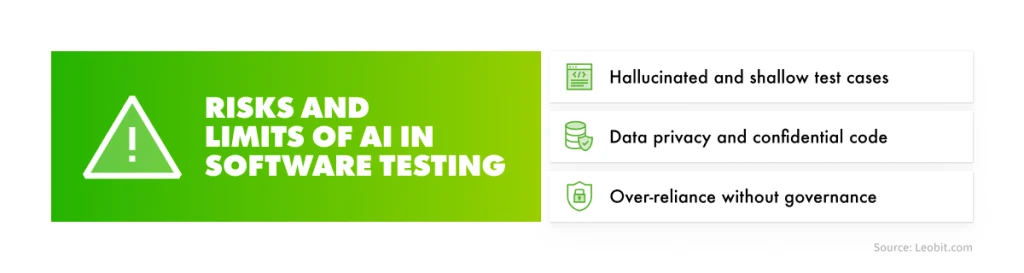
Every gain in the previous section has a failure mode attached. The same World Quality Report that measured the productivity boost also found that 67% of organizations name data privacy risks and 60% name hallucination and reliability concerns among their main barriers to scaling AI in quality engineering. Three risks deserve a line in any adoption plan.
Risks and limits of AI in software testing
Hallucinated and shallow test cases
AI can produce a test that looks complete, runs green, and checks almost nothing. A generated case may assert the response code and miss the business logic, or cover ten variations of the same standard scenario while the high-risk edge case goes untested. The green dashboard then reports confidence the product has not earned.
The defense is already in the model you have seen throughout this article. Every AI draft passes engineer review, and the accepted-without-major-edits metric tells you whether that review is a formality or a filter.
In Leobit’s QA practice, that defense has three working parts: review checklists for AI output, traceability of every test case back to a requirement, and pilot validation before any AI tool joins the standard stack. A generated test that cannot point to the requirement it verifies does not enter the suite.
Data privacy and confidential code
The fastest way to turn an AI pilot into an incident is an engineer pasting confidential code, requirements, or client data into an unapproved public tool. The fix is organizational rather than technical: an approved tool list, a written data policy that states where data may travel, and contracts with AI vendors that match your client commitments. The synthetic-data rule from the test data stage belongs in that policy. For the cost side of governing AI usage, our guide to AI cost control covers the mechanics.
This is how Leobit handles it on client projects. No client data or source code goes to public models, and engineers work only with approved enterprise AI tools under NDA and compliance requirements. ISO 27001:2022 certification backs the practice. The policy predates any individual tool, so a new AI assistant joins the workflow only after it clears the same bar.
Over-reliance without governance
Two patterns erode quality slowly. The first is variance: the same prompt can return different answers on different days, so an ungoverned process produces inconsistent artifacts. The second is cultural: when juniors learn that AI already wrote it, some stop thinking, and copy-paste becomes the workflow. Mandatory review is the countermeasure for both, and it only works as a process rule, never as a personal preference.
Leobit’s experience here reduces to two mechanisms. First, a human-in-the-loop rule with no exceptions, where a QA engineer reviews and approves every AI output before it counts. Second, transparency toward the client. You see where and how AI is used in your project, which keeps the process honest on both sides of the contract.
AI changes how fast you test, but it does not change who is accountable for quality.
AI Testing Tools: Categories and What to Check Before Buying
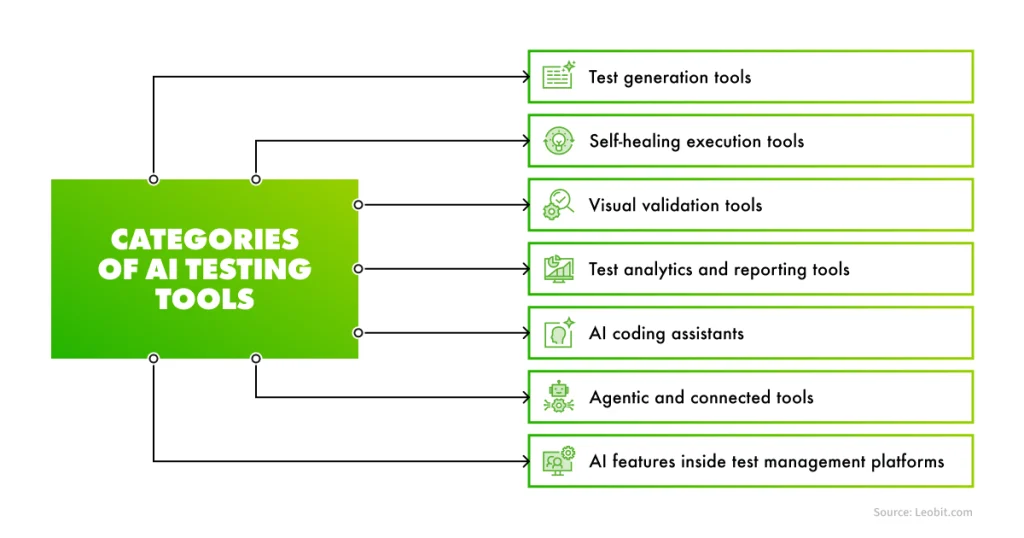
The market for AI testing tools is crowded, and most published guides rank vendors. For a buying decision, categories work better than brands, because each category solves a different part of the lifecycle and carries its own risk profile. The AI tools for software testing that you will evaluate fall into seven groups.
Categories of AI Testing Tools
Test generation. These tools draft test cases and test data from requirements, user stories, or recorded user flows, and they serve the test case development and data preparation stages. A suite skeleton that took a week of writing arrives as a reviewable draft within a few hours. Before buying, check how generated cases trace back to requirements: a tool that cannot show which requirement a case verifies will flood your suite with plausible, unanchored tests.
Self-healing execution. When the UI changes, these tools repair broken test locators automatically instead of failing the run, which is where most automation maintenance hours go. The caveat from the risks section applies in full, so check whether every heal is logged, reviewable, and reversible. A tool that heals silently is a tool that can hide a real defect behind a green run.
Visual validation. These tools compare rendered screens against approved baselines across browsers and devices, and they catch the layout and rendering defects that pass every functional assertion. The buying question is the false-positive rate on dynamic content such as dates, animations, or personalized blocks. A noisy visual tool trains the team to ignore it within a sprint.
Test analytics and reporting. These tools aggregate run history, cluster recurring failures, flag flaky tests, and draft the summaries that feed the closure stage. Check that the tool plugs into your existing CI pipeline and test management stack instead of asking you to replace them. Analytics that live outside the delivery flow stop being read.
AI coding. General-purpose tools in this group write and maintain automation code in frameworks such as Playwright and Cypress, explain failures, and refactor flaky scripts. For many teams, this is the cheapest entry point, because the licenses often already exist on the development side. Check your data policy first, though. These tools see your source code, so the enterprise tier and its data terms matter more than the feature list.
Agentic and connected tools. Through connectors such as MCP, these link AI directly to Jira, test management, CI, and mobile devices through Appium, closing the loop described earlier. Execution, bug reporting, and a draft summary without a human relay between them. Power is the risk here, so check the scope controls, the approval gates, and the audit trail. An agent that can act on your delivery stack needs limits it cannot talk itself out of.
AI features inside test management platforms. Platforms such as TestRail, Zephyr, or Xray now generate cases from stories and summarize runs right where your test assets live, which makes them the lowest-friction option on this list. You need to check what those features send outside your instance, and whether an administrator can turn them off per project when a client contract requires it.
Every AI automation testing tool earns its place the same way, through a pilot and a measured before-and-after on the metrics from the benefits section. It also needs a review rule that remains effective beyond the initial adoption period. Brand rankings age in months. Categories and checks do not.
How to Use AI in Software Testing: An Adoption Path
The question of how to use AI in software testing is really a question of sequencing. Teams that fail usually start with a tool. Teams that succeed start with their own process, because AI amplifies the process you already have, good or bad.
Check the prerequisites first
Three things need to be true before the first license is bought: your requirements are written down and testable, your test assets live in a test management tool rather than in spreadsheets and heads, and your automation, however small, runs stably. Weak requirements plus AI produce confident nonsense at scale, and unstable automation plus AI produce faster noise.
Modernization work often comes first. If you are unsure where your own QA process stands, a software quality assurance assessment is the honest first step.
Run a governed pilot
Pick one regression-heavy area, the place where the Pro tip earlier pointed, and agree on the rules before the first prompt: which tools are approved, what the data policy allows, and that every AI output gets engineer review. Then measure the four metrics from the benefits section for one or two sprints before AI and the same period after. The pilot ends with numbers rather than impressions, and an AI testing strategy for the rest of the cycle gets built on those numbers.
How Leobit Applies AI Across the Testing Life Cycle
Leobit runs AI across the software testing lifecycle as a governed engineering practice, with 100+ QA projects delivered and ISTQB Platinum Partner status behind the quality assurance service. Whether you are on the adoption path of AI in software testing or still deciding whether to step onto it, here’s how we can help.
If the prerequisites are the gap, our QA engineers assess your current process and build the automation baseline AI needs. That is how the work started with a New York luxury interior design retailer,where testing had never been properly implemented: unit tests and a Playwright proof of concept came before any acceleration.
If the baseline exists, we run the governed pilot with you, including approved enterprise tools, a written data policy, and the before-and-after metrics this article described. And if you are ready to scale, we apply AI across the full testing cycle inside our broader AI-native development lifecycle, reaching 6 to 10 times faster accepted QA output, where accepted means a QA engineer reviewed the work and signed it off.
The governance holds at every step, meaning no client code or data reaches public models, work runs under NDA and ISO 27001:2022 compliance, and every AI output passes human review with traceability back to requirements.
Case studies: What the gains of AI in software testing look like in practice
For a U.S. insurance company’s disability claims platform, the stakes were live users; the system was already in production, and any regression directly affected people relying on it for benefit support. Tight release timelines and heavy third-party integrations had limited test coverage to roughly 50%. Our QA team made regression and smoke testing mandatory gates before every release and integrated automated end-to-end tests into the CI/CD pipeline, where they run after each deployment. Regression testing now takes 4 hours instead of 3 days.
For a legal case management platform serving the U.S. judicial system, regression testing had grown into an operational bottleneck of 40+ hours of manual work per cycle. Leobit’s QA team automated the core functionality and critical end-to-end flows in Mabl, an intelligent test automation platform, preparing 281 test scripts aligned with the functional requirements. The scripts run on a nightly schedule from a dedicated server, which means every morning starts with fresh feedback on yesterday’s changes, and the framework scales as the product grows.
Conclusion
Remember the two numbers this article started with: nearly 90% of organizations are piloting generative AI in quality engineering, and only 15% have scaled it. The difference between those groups is rarely the tools. It is whether AI entered testing as a governed part of the lifecycle or as a loose collection of chat windows.
The playbook for ending up in the 15% fits in three actionable tips. Make sure the prerequisites from the adoption section hold before the first license is bought. Run a pilot on one regression-heavy area and judge it on measured deltas, from test design time to defect leakage. And keep one rule permanent at every stage of the STLC: AI drafts, engineers decide.
If you are deciding where AI fits in your own testing process, talk to our team. One conversation about your STLC is enough to see which stage would pay back first.
FAQ
No. AI takes over drafting and repetitive execution, and the work that decides quality concentrates in human hands: risk analysis, review of AI output, exploratory testing, and testing AI features themselves. The role changes shape, but the accountability does not move.
Across the whole testing lifecycle. AI reviews requirements for gaps, drafts test plans and test cases, generates synthetic test data, selects and repairs automated tests during execution, turns raw evidence into structured bug reports, assists root cause analysis, and drafts the test summary. In a governed process, a QA engineer reviews every one of those outputs before it counts.
Only under explicit controls. That means approved enterprise tools whose data terms match your client commitments, a written policy on what may leave your environment, and a hard rule that no confidential code or data reaches public models. Without those controls in place, the honest answer is no.
Yes, with methods built for non-deterministic output. A chatbot or an LLM feature rarely has a single correct answer, so teams verify quality with evaluation datasets and scored criteria across many runs, plus dedicated bias and safety checks. It is a separate discipline from the AI-assisted testing this article covers.
Four metrics, each captured before the pilot and after: test design time, regression cycle time, defects found before release paired with defect leakage, and the share of AI output accepted without major edits. If those numbers move in the right direction, the adoption is working. Counts of generated test cases prove nothing.
The software development lifecycle (SDLC) covers the entire process of building a product, from requirements through deployment and maintenance. The software testing lifecycle (STLC) is the testing discipline that runs inside it, from requirements analysis to the release sign-off. An AI-driven STLC is one layer of a broader AI-native SDLC.
Inna loves making complex tech feel simple. With a strong eye for innovation, she helps businesses turn complicated ideas and data into clear strategies they can actually use. Whether it’s new tools or big trends, she’s all about making technology work for people.
Lenovo’s 2026 CIO Playbook, with research by IDC, found that 46% of AI proofs of concept (PoCs) have progressed into production, so just over half have ...
Leona, Leobit’s AI agent designed to find promising cooperation opportunities and automatically send requests for proposals (RFPs), has helped our sales ...
Gartner estimates that generative AI cost projections can be off by 500% to 1,000% when organizations fail to account for how costs scale. They also predict ...
A 2025 DORA survey found that 90% of software engineers now use AI in their daily work. These numbers show that AI adoption has become a universal standard in ...
AI features rarely fail during a demo. They usually fail a few months after launch, when finance asks why the AI assistant is costing far more than anyone ...
Open WebUI has over 376 million downloads since its release in 2023, a scale of adoption that puts it among the most widely deployed open-source AI projects to ...
Lviv, Ukraine, August 2026 — Leobit has introduced an AI-native software development lifecycle (AI-native SDLC), a delivery model that embeds AI into the ...
6 mins read
We use cookies to enhance your browsing experience. By agreeing, you accept our Privacy and Cookies Policy.
By ignoring or closing this banner, we will only collect essential cookies necessary for the website to function properly.
 Leobit