Contact us

AI Cost Control Guide: Prompt Caching, Model Cascades, and Hard Caps

18 mins read

AI Cost Control Guide: Prompt Caching, Model Cascades, and Hard Caps
Blog Calculator Widget Logo

Estimate Your Software Project Cost

Describe your idea — get a budget breakdown in minutes.

Get Your Estimate

Gartner estimates that generative AI cost projections can be off by 500% to 1,000% when organizations fail to account for how costs scale. They also predict that at least half of generative AI initiatives will exceed their budgets by 2028, largely because of poor architectural decisions and limited operational expertise.

The good news is that many of these costs can be controlled through engineering. Anthropic, for example, reports that prompt caching can reduce costs by up to 90% and latency by up to 85% for long prompts.

In the previous article in this series, we built a three-scenario AI budget, with the optimistic scenario assuming prompt caching and cost-aware model routing were already in place.

In this article, we’ll look at how to put those optimizations into practice and keep AI costs under control as the system scales.
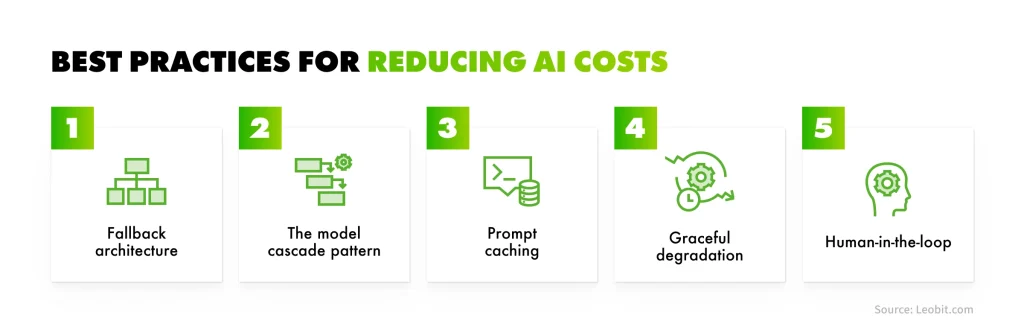
What Are the Best Practices for Reducing AI Costs?

For a typical production AI feature, the biggest savings usually come from a few engineering decisions, like:

  • Routing routine requests to lower-cost models and escalating only when necessary
  • Caching reusable prompt content
  • Removing unnecessary context
  • Controlling response length
  • Setting spending limits with graceful fallbacks

One of the most common sources of unnecessary cost is sending every request to the most capable model by default. In practice, many tasks can be effectively handled by smaller, less expensive models, while more powerful models are reserved for requests that genuinely require them.

Still, reducing AI costs does not necessarily mean switching to a cheaper provider or limiting what the feature can do. It means treating cost as an architectural consideration and designing the system to use AI resources efficiently from the start.

Let’s take a look at the most impactful best practices for reducing AI costs and how each one affects your bill.

AI cost optimization best practices

Adopting fallback architecture

Engineering teams typically think of fallback logic as a reliability mechanism: a backup that keeps an AI feature running when:

  • A provider is unavailable
  • A model fails
  • A request times out

But fallback architecture can also help control costs. Instead of sending every request to the most expensive model, teams can use lower-cost models for routine tasks and reserve more powerful models for cases that actually require their capabilities.

This works because many requests handled by production AI features are relatively straightforward. For instance, a customer support chatbot may answer hundreds of common questions alongside a smaller number of complex ones. A document assistant may perform routine data extraction most of the time, with only some cases requiring deeper reasoning. Sending all of these requests to the same flagship model means paying a premium even when a simpler, lower-cost model could handle the task just as effectively.

Using the model cascade pattern

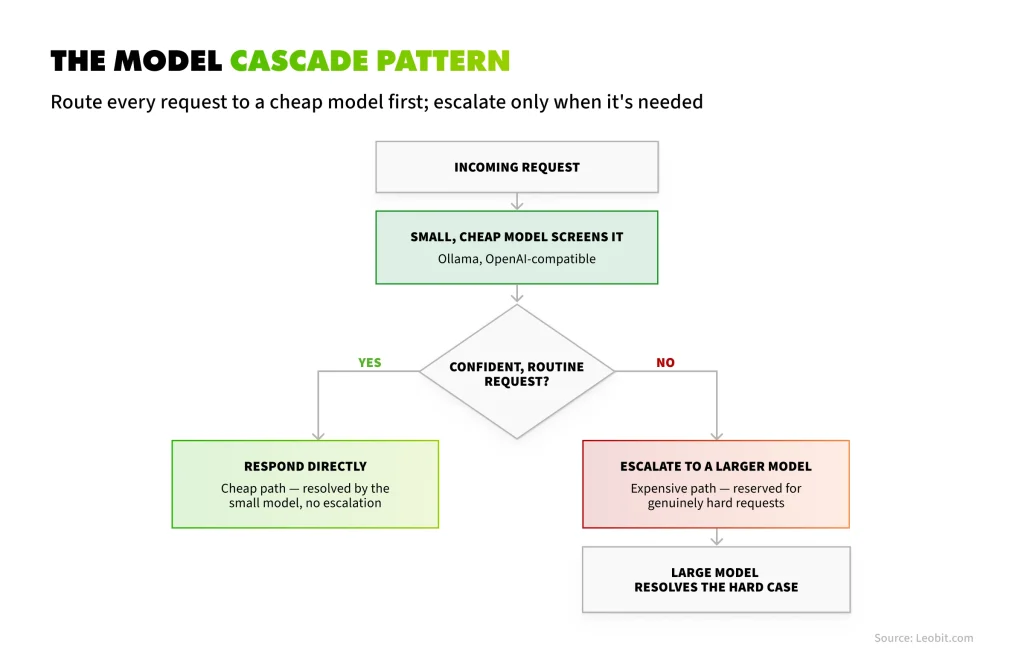
A model cascade routes each request to a smaller, lower-cost model first. If the model can handle the task with sufficient confidence, it returns the answer directly. If the request is more complex or confidence falls below a defined threshold, the system escalates it to a more capable model. This way, the expensive model is used only when its additional capabilities are actually needed.

The model cascade pattern scheme

Resent research suggests that this approach can significantly reduce AI costs without a comparable drop in quality. For instance, cost-aware routing research shows that systems can retain 95% of a frontier model’s output quality while directing 85% of queries to cheaper models, resulting in cost reductions of 45–85%, depending on the complexity of the workload.

A more conservative 2026 study used calibrated uncertainty to determine when requests should be escalated. The approach reduced costs by 31% while maintaining a 0.91 micro-F1 score, with performance close to that of routing every request to the largest model.

Even at the conservative end of these estimates, model cascading can deliver substantial savings. Unlike prompt optimization, which reduces the cost of individual requests, cascading changes how often the most expensive model is used in the first place.

For production AI systems handling a mix of simple and complex tasks, that can make model routing one of the most effective cost optimization measures available.

 Book Icon

Applying prompt caching

Prompt caching lets a provider store the static portion of a prompt and charge a fraction of the normal input price when it is reused. The discount can be substantial. On Claude models, cached input tokens are billed at roughly 10% of the standard input price, with a one-time write cost of 1.25 times the input price. On OpenAI models, cached input tokens cost 50% of the standard price, and caching happens automatically.

Light Bulb Logo

The catch is that caching only delivers those savings if the application is built to take advantage of it. This is an engineering decision, not a billing setting that a finance team can simply switch on.

The key principle is that caching matches on a prompt prefix. To maximize cache hits, structure prompts so the static content comes first and remains identical across requests, while variable content comes last. That typically means placing system instructions, tool definitions, and reference documents at the beginning, followed by the user’s message and any request-specific data.

If the static portion changes even slightly between calls, for example, because of a timestamp in the system prompt or a tool list serialized in a different order, the cache can miss and the discount disappears without an obvious error explaining why. The potential savings explain why Anthropic reports cost reductions of up to 90% for long prompts.

Consider a multi-step agent task that carries a 20,000-token system prompt on every step. Without caching, you’re billed for that prompt in full each time. With the static prefix cached, every step after the first is billed at roughly a tenth of the standard input price, without changing the model, the feature, or the output. For a business, this is a cost optimization that comes with no quality tradeoff: you simply stop paying full price to process the same instructions repeatedly.

The most common caching failure we see is silent. The code is correct, the cache setting is on, and the hit rate is close to zero because something small changes in the prompt on every call. We always check the cache-read token count in the API response before we believe a caching estimate.

Denys Korpan

Denys Korpan

Senior .NET Software Engineer

Major providers report cached tokens in their API response usage fields. If that number stays at zero across repeated requests with the same system prompt, something in the prefix is likely changing between calls. Common causes include timestamps, user IDs, or conditionally assembled instruction blocks.

Cutting costs with graceful degradation

A cost-saving fallback only works if it does not noticeably reduce the quality of the product. If users see the AI getting worse as soon as a cost control kicks in, they may lose trust in the feature.

Three patterns can help reduce costs without compromising the user experience:

  • Serve a cached response instantly when the same or a near-identical question has been answered recently. Done well, this simply makes the feature feel faster, while avoiding an unnecessary model call.
  • Reduce scope under load by shifting from a detailed, multi-paragraph analysis to a shorter summary when the system is under budget or capacity pressure, rather than failing the request entirely. The user still gets a useful answer, just with less detail.
  • Defer non-urgent work and notify the user when it is complete instead of making an interactive request wait for an expensive model call. Tasks that do not need an immediate response can be moved to a provider’s batch API, which can offer significant savings. Anthropic, for example, provides a 50% discount on both input and output tokens for batch processing.

The rule across all three is simple: degradation should be deliberate and designed into the product. If a feature starts returning lower-quality answers under cost pressure without clearly defined rules for when and how that should happen, it is not graceful degradation. It is unpredictable behavior.

Keep human-in-the-loop

It is easy to think of fallback as one model handing a request off to another. But for some requests, the most cost-effective fallback may be a person.

Consider a feature that answers questions based on a long, complex document, such as a 100-page contract. Loaded into context, that document might contain 50,000 to 70,000 tokens. At an input price of $5 per million tokens, sending the full document to a frontier model for every new question would cost roughly $0.25 to $0.35 in input tokens per request.

That may seem insignificant for a single question, but the cost adds up across large volumes of documents and repeated reviews. More importantly, when the content is legally or financially sensitive, the business may require human verification regardless of how capable the model is.

For these cases, routing the request to a trained specialist can be both more reliable and, in some situations, more cost-effective than continuing to escalate through increasingly expensive AI workflows. The key is to treat human review as a planned fallback tier, rather than something that happens only after the AI produces an answer nobody trusts.

The handoff should therefore be designed around the complexity and risk of the request. High-stakes cases can be routed to a specialist from the start, while AI handles the routine work where automation provides the most value.


Now that you know when a request should go to a cheaper model, a cache, or a person, let’s take a closer look at the complete decision matrix.

Decision Matrix: When to Fall Back, When to Retry, and When to Fail Visibly

The most common failure pattern in AI feature engineering is applying one blanket response to every failure, regardless of what actually went wrong. Distinguishing between failure modes, once, deliberately, is what the matrix below is for.

Right response
Why

Transient error (network blip, momentary timeout)

Retry, with exponential backoff

The failure is temporary and unrelated to load; a brief, spaced-out retry almost always succeeds

Rate limit hit (429 response)

Retry with backoff, or queue; never retry immediately in a tight loop

An immediate retry adds to the exact congestion that caused the failure

Low-confidence output from a small model, task tolerates escalation

Fall back to a larger model (cascade)

This is the routine case the cascade pattern exists for

Request is legitimate but not time-sensitive

Fall back to queued or batch processing

Captures the batch-API discount and avoids competing with real-time traffic

Identical or near-identical request seen recently

Fall back to a cached response

Fastest and cheapest option: skip the call entirely

Task complexity, ambiguity, or stakes exceed what any model tier reliably handles

Fall back to a human, formally and by design

Treat as a first-class routing decision, not a last resort

Provider outage, or hard quota genuinely exhausted, no safe fallback available

Fail visibly and tell the user plainly

A visible, honest failure preserves trust; a silent guess does not

The value of building this matrix explicitly, as an engineering artifact, is that it forces a deliberate decision, once, for each failure category, rather than an improvised one under pressure during an incident.

Teams that skip this step tend to default to “retry everything” as their only failure-handling strategy. That is precisely the pattern most likely to turn a routine rate-limit event into a full outage, and the pattern least likely to capture any of the cost benefits described in this article.

Monitoring and Governance: Keeping the Savings After Launch

A budget model is a prediction. Once a feature goes live, the focus shifts from forecasting to governance. That means identifying when actual usage starts to diverge from the plan early enough to act, rather than discovering the problem at the end of the quarter.

Here are four practices that keep AI spend visible and under control after launch.

Token usage dashboards

“Total tokens consumed this month” tells you how much was used, but not what drove that usage. A dashboard built for cost governance should break it down across at least three dimensions:

  • Cost per user cohort. Usage is rarely distributed evenly. A relatively small group of power users can consume significantly more tokens than occasional users, so understanding who drives spend is essential for forecasting and setting appropriate limits.
  • Cost per feature. If AI is used across multiple parts of a product, track costs for each feature separately. Otherwise, when the total bill increases, it becomes difficult to identify what is driving the change.
  • Anomaly spikes. A sudden increase in average tokens per call can indicate a prompt regression, a conversation loop, or unexpected user behavior, such as pasting an entire contract into a field designed for a short question. Detecting these spikes quickly gives the team a chance to investigate before they turn into a significant cost increase.

Together, these views turn a monthly invoice into something a team can act on: they show where the spend comes from and when it stops matching the plan.

Spend alerts and hard caps

Spend monitoring usually starts with soft caps: notifications when cumulative spend crosses a defined threshold. They provide visibility, but they should not be the only safeguard because an alert does not stop spending.

For example, a bug might cause a conversation loop to repeat indefinitely, or a poorly configured retry mechanism could continue calling the API after a transient error. Either can consume a meaningful share of the budget before someone notices and responds to an alert.

Hard caps close that gap by automatically throttling or stopping usage once spend reaches a defined threshold. However, simply switching off an AI feature when the cap is reached creates a different problem. Hard caps should therefore be paired with the graceful-degradation patterns described above. So, instead of making the feature unavailable, the system can move to a cheaper model, return a cached response, reduce the scope of the output, or defer non-urgent work.

Prompt regression

Prompts tend to frequently change: a tone adjustment, an additional instruction, or a longer example added to handle an edge case. Each change can increase input tokens and may also affect the length of the model’s response. Individually, these edits rarely look significant. Over time, however, they can gradually increase the cost of every request.

The solution is to treat prompts with the same discipline as code: keep them version-controlled and benchmark both cost and quality when they change. Before a new prompt version goes live, it can be tested against a fixed set of cases to measure changes in output quality, input tokens, and response length.

This makes the tradeoff explicit. Instead of discovering months later that the cost per call has increased, the team can see that a specific prompt change added, for example, 400 output tokens per request and decide whether the quality improvement justifies the additional cost.

Quarterly model cost review

Model pricing and capabilities change quickly. At the flagship tier, for example, Claude Opus fell from $15 per million input tokens and $75 per million output tokens with Opus 4.1 to $5 and $25 with Opus 4.8. At the same time, a newer model is not necessarily cheaper than the version it replaces, particularly when it offers greater capabilities.

That makes model selection an ongoing decision rather than something to revisit only when a migration becomes unavoidable. A quarterly review is a practical cadence and should answer three questions:

  • Is there now a lower-cost model that meets the feature’s quality requirements?
  • Has the price of the model currently in production changed?
  • Is there an upcoming deprecation that will require a migration?

This review should involve both the people responsible for vendor relationships and your AI engineering team. Commercial changes need technical evaluation, and technical decisions need cost visibility. Done regularly, the review creates an opportunity to reduce spend as models and pricing evolve, sometimes without changing the product experience at all.

How Leobit Can Help With AI Cost Optimization

Every technique in this article is straightforward to describe and easy to get subtly wrong. A cascade that escalates far more often than intended, or a cache that silently never hits, does not look like an outage. It looks like a feature that is working while quietly erasing most of the savings it was supposed to deliver. And monitoring tends to be treated as a phase-two item, which means it gets built the same week a cost anomaly forces the conversation.

Leobit builds these controls into AI features from the first sprint. Our engineers implement cascade routing and prompt caching with the confidence thresholds and cache-key design that make them actually deliver, and set up the usage dashboards, spend alerts, and hard-cap safeguards that keep a feature’s economics visible for as long as it stays in production.

This cost discipline is part of a larger delivery model. Leobit has embraced an AI-native software development lifecycle (AI-native SDLC), which embeds AI into the entire delivery process, from planning and coding to testing and release, under full human oversight. Treating cost as an architectural consideration from the first sprint is one practice that keeps that model sustainable: the same governed workflows that accelerate coding, testing, and documentation also keep token usage measurable on every project.

Connecting the Dots

The organizations that get burned by AI cost are rarely the ones using the most expensive models or building the most ambitious features. They are the ones running every request through the flagship model by default, resending the same multi-thousand-token system prompt uncached on every call, and finding out about the loop bug from the invoice.

Every practice described in this article corrects one of those defaults. Cascades stop paying frontier prices for routine work. Caching stops paying full price for the same instructions twice. Graceful degradation and hard caps stop a bad day from becoming a bad quarter. And a quarterly model review catches the price drops that providers will not announce to you personally.

Done together, these turn an AI feature’s cost into what the first two articles in this series argued it can be: known in advance, budgeted as a range, and revisited on a schedule.

If you want these controls designed into your AI feature rather than added after the first surprising invoice, contact Leobit’s team, and we will review your use case together.

FAQ

Route most requests to a cheaper model and escalate only the ones that need a larger one, cache the static portion of every prompt, trim the prompt itself, and control response length. Then protect the savings with usage dashboards, hard spending caps paired with graceful fallbacks, and a quarterly review of model pricing. In Leobit’s experience, the first two levers, cascading and caching, deliver the largest share of the reduction for most features.

Prompt caching lets a provider store the unchanging part of a prompt, such as system instructions and reference documents, and bill it at a reduced rate when it reappears. Cached input tokens cost roughly 10% of the standard price on Claude models and 50% on OpenAI models. The savings depend entirely on structuring prompts so the static part comes first and stays identical between calls.

A model cascade sends every request to a small, inexpensive model first and escalates to a larger model only when the small one is not confident in its answer. Because most requests to most AI features are routine, the expensive model handles a minority of traffic. Research on this pattern reports cost reductions of 45 to 85% with near-identical output quality.

Yes, but never on their own. A hard cap that simply switches the feature off converts a budget problem into an outage. Pair every cap with a degradation path, such as routing to a cheaper model, serving a cached response, or deferring the request, so that hitting the cap changes the experience rather than removing it.

Quarterly. Model prices change in both directions, and providers retire models on defined schedules. Each review should ask whether a cheaper model now clears your quality bar, whether the price of your current model has changed, and whether a deprecation deadline is approaching. The review belongs with whoever owns vendor relationships, with engineering input.