Flexera’s 2026 State of the Cloud Report found that 85% of organizations name managing cost as their top cloud challenge. Respondents from the same survey also estimate that 29% of their cloud spend is wasted, while 17% went over their public cloud budget in the past 12 months. Those overruns usually do not originate in finance. While cloud overspending can have multiple causes, our experience suggests that some of these challenges can be traced back to decisions made during the initial Azure environment setup.
Cloud adoption often starts with one subscription for the first project, and production arrives before any governance does. As the organization grows and more teams and workloads are introduced, establishing a consistent governance framework becomes increasingly important.
An Azure landing zone provides a reliable foundation by establishing governance from the outset. It serves as a governed foundation established before workloads arrive, so every new project inherits the organization’s identity, networking, security, and cost controls instead of improvising its own.
This article covers what an Azure landing zone actually is, what goes inside, the business outcomes it produces, and how to start building one without putting delivery on hold.
What Is an Azure Landing Zone: An Overview
An Azure landing zone is a governed, multi-subscription Azure environment that applies consistent security, networking, identity, and cost controls to every workload deployed into it. With these capabilities, the environment becomes a reliable foundation for your cloud projects.
Azure Policy plays a critical governance role by enforcing consistent rules. It turns on resource logging, configures Microsoft Defender for Cloud, and blocks risky setups such as classic resources, subnets without network security groups, or management ports open to the internet. Azure RBAC controls who gets access. Network traffic runs through a central hub, where Azure Firewall inspects it.
This approach gives you better control over all project assets. Security rules apply automatically, so teams don’t wait on manual reviews, and compliance reporting starts from consistent settings. Tags and budgets set at creation show finance who owns each dollar of spend.
Microsoft publishes the architecture in its Cloud Adoption Framework for Azure and ships it as a landing zone accelerator, with options in Bicep, Microsoft’s own Azure language, and Terraform, the multi-cloud standard. In this approach, your specialists don’t need to design the hierarchy from scratch. Because the environment is defined as code, every change to it is versioned in Git and reviewed before it reaches your tenant. The configuration lives in the repository rather than in a wiki page someone forgot to update.
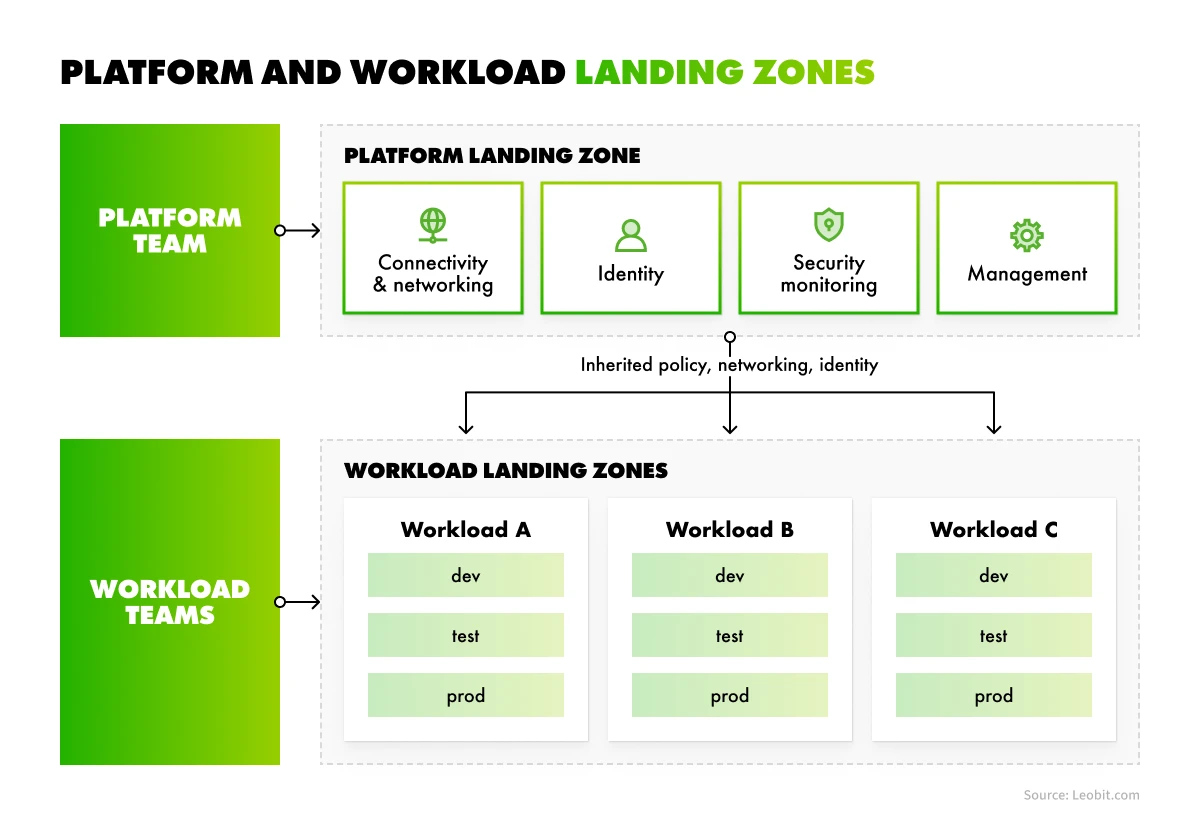
The Azure landing zone architecture consists of two parts: a platform landing zone that holds the shared foundation, and workload landing zones that hold the projects running on it.
Platform landing zone and workload landing zones
Let’s take a closer look at each one and their fundamental properties.
Platform landing zone
The platform landing zone is the centralized foundation. It holds the management group hierarchy that organizes every subscription in your tenant.Anything you assign to a management group applies to every subscription beneath it. It also provides the shared capabilities all workloads use: connectivity and networking, identity services, security monitoring, and management tooling.
Microsoft’s guidance is that most organizations should run only one platform landing zone per Microsoft Entra tenant. A platform team owns it. One of its core jobs is handing out workload environments through subscription vending. Vending creates each new subscription, places it in the right management group, sets up access, and connects its network to the hub. Workload teams get a ready environment faster, and the platform team stops configuring each one by hand.
Workload landing zones
Each workload gets its own workload landing zone: the subscriptions provisioned for that one application, placed inside the platform’s management group hierarchy so they inherit the platform’s policy and connectivity from the start. Often that means several subscriptions, because teams give each environment its own subscription so quotas and role assignments stop at the environment boundary.
Each subscription sits under a management group, and the resources inside inherit the Azure Policy assignments applied there. Workload teams own what runs inside the boundary. The platform team owns the boundary itself. This division of responsibility lets workload teams move quickly while the platform team keeps governance consistent across every subscription.
The Cost of Skipping an Azure Landing Zone
Without a landing zone, governance turns into a per-project negotiation. Every new subscription reopens the same questions about networking, access, tagging, and cost ownership, and each answer gets made by whoever is closest to the deadline. The cost of that compounds, because every negotiation now starts inside an environment that has already drifted from the one before it.
Every added subscription and environment is another place where rules can drift. This drift rarely presents as an architecture problem. It shows up in delivery work.
The following symptoms usually mean an environment has outgrown its setup:
Provisioning a new environment takes weeks of coordination between infrastructure, security, and the delivery team
Nobody can produce a current answer to which subscriptions hold regulated data and who has standing access to them
Two teams solved the same networking problem in two incompatible ways
Cost reports arrive aggregated at the tenant level because no one enforced tagging
What Are the Core Azure Landing Zone Design Areas?
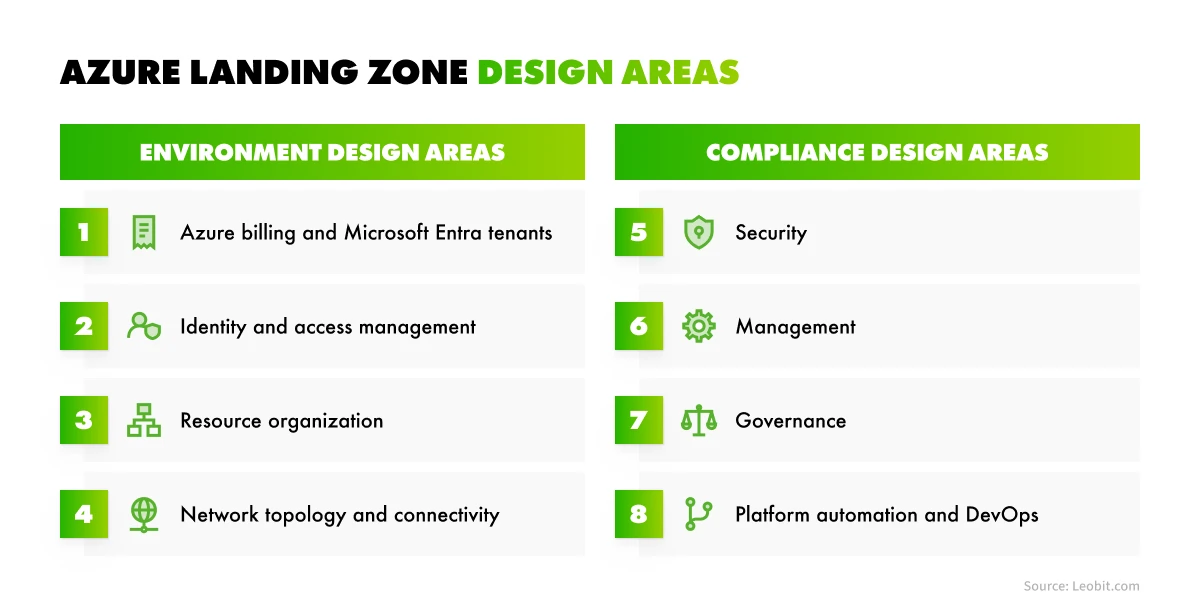
Microsoft’s Cloud Adoption Framework organizes landing zone decisions into eight design areas, split into environment design and compliance design.
Design areas of an Azure landing zone
Completing these steps in sequence produces a coherent platform, as each decision builds on the one before it. The table below summarizes Azure landing zone’s eight design areas.
Environment design areas
Azure billing and Microsoft Entra tenant. Tenant creation, enrollment, and billing structure. Hard to change later, so it goes first.
Identity and access management. Your primary security boundary in Azure, covering Entra ID design, role assignments, and privileged access.
Resource organization. Subscription design and management group hierarchy, kept reasonably flat at no more than three or four levels.
Network topology and connectivity. Hub-and-spoke or Azure Virtual WAN, private DNS, firewall placement, and connectivity back to on-premises systems.
Compliance design areas
Security. Controls and processes that protect the environment, including Microsoft Defender for Cloud coverage and encryption standards.
Management. The operational baseline: monitoring, logging, backup, and recovery.
Governance. Automated auditing and enforcement through Azure Policy rather than manual review.
Platform automation and DevOps. The tooling and pipelines that deploy the landing zone and keep it reproducible.
If part of your system stays on-premises or on another cloud, the connectivity decisions in this list extend outward. Azure Arc handles that case by projecting non-Azure resources into the same control plane your landing zone governs.
Many landing zones were originally deployed with Azure Blueprints, a service that packaged role assignments, policy assignments, ARM templates, and resource groups into one definition and applied it to subscriptions.
However, Azure Blueprints retires on January 31, 2027, and the phased shutdown has already frozen existing definitions and new assignments. From December 31, 2026, you can no longer modify existing assignments, and anything you have not exported by the retirement date will be deleted, though deployed resources will remain.
Microsoft splits the replacement across two features, so plan the migration in two parts: Azure Deployment Stacks take over assigning, lifecycle management, and resource locking, while template specs or a Git repository handle storage and versioning. The locking part needs attention first. Blueprint locks are implemented as deny assignments, so rebuild them as deny settings on a deployment stack before enforcement stops. Otherwise, effective permissions change on resources you deployed long ago.
Business Benefits of an Azure Landing Zone
A landing zone in Azure converts governance from a recurring manual cost into a one-time design cost. Four business outcomes follow from that.
Faster environment delivery for product teams
When provisioning runs through subscription vending, a new workload environment goes from a multi-week project to a request fulfilled against a template. Delivery teams stop waiting on infrastructure, and infrastructure stops absorbing interrupt-driven work.
Flexera’s finding that cloud budgets run 17% over plan, mentioned above, reflects environments where nothing stops a team from overprovisioning. Teams can manage budgets more effectively with Azure landing zone guardrails like resource limits, mandatory tags, approved SKUs, and budget alerts assigned at the management group level and inherited by every subscription beneath it.
The practical effect is that cost reporting becomes accurate enough to act on. Tag-based cost attribution by product line and environment saves time when you look for overprovisioned products. Once attribution works, your team can target the cloud cost optimization measures it already knows about.
Security and compliance you can demonstrate
A landing zone standardizes how access is granted in Azure. Role assignments go to Entra groups at the management group scope and reach every subscription beneath them. Privileged access is elevated through Microsoft Entra Privileged Identity Management for a limited window instead of being held permanently.
For regulated industries, such as fintech, this matters most at audit time. Auditors want to know who has access to what, and whether the required controls are enforced. Without a landing zone, answering means collecting evidence separately from each project. With one, you present the policies assigned at the management group and the compliance report Azure generates against them. A single source of evidence covers every subscription.
A foundation that absorbs new technology
When designing its landing zone, Microsoft focused on ensuring it can support new and emerging technologies without changing the overall architecture. When AI workloads arrive with new data residency and access requirements, you change the policy once at the platform landing zone. From there, new deployments are evaluated against it, and existing resources are flagged as non-compliant with the named subscriptions. Bringing them into line is still manual work. The policy tells you where that work is needed.
That is a meaningful difference from updating 30 subscriptions by hand.
Ad hoc Azure environment
Azure landing zone
New environment provisioning
Manual, coordinated per project
Templated and repeatable
Policy enforcement
Manual, reviewed per deployment
Inherited from management groups
Cost attribution
Possible, but depends on tags applied by hand
Tags required at creation, so grouping by product, environment, or client holds
Network design
Decided per workload
One approved topology
Audit evidence
Need to be evaluated per project
Reported from policy compliance state
In short, a landing zone replaces per-project decisions with platform-level defaults, so every new workload, including AI workloads, starts out governed instead of being brought into line later.
The team works through the eight design areas in sequence, settling each one before deploying anything. This is what your team works through, and what each stage protects.
An audit of what already exists. The team lists current subscriptions, their owners, the data in them, and which ones carry production. This is usually where the real problem surfaces.
The tenant and billing structure. The team decides whether to use a single Microsoft Entra ID tenant or multiple tenants, based on the organization’s identity boundaries, administrative responsibilities, and compliance requirements. This question gets settled first, because it is the most expensive decision to reverse later.
The management group hierarchy. Platform resources stay separate from workload resources, and the structure stays shallow enough that a new team member can explain it. If your compliance or ownership model does not fit the standard shape, this is the stage where a software architecture specialist can help.
Accelerator or custom build. Microsoft’s accelerators deliver the recommended architecture and fit most organizations. A custom build is worth its cost only when regulatory or connectivity requirements sit far from the standard pattern, and your team should come to you with that reason stated.
Environment provisioning. As mentioned earlier, subscription vending handles this. The team sets the rules it follows and automates the process once volume justifies it.
The migration path. New workloads go into the landing zone first, and existing ones follow. Nothing about your software migration has to freeze while that happens.
A realistic first milestone is a working platform landing zone with one workload migrated into it, so the guardrails get tested against a real deployment before the rest of the estate depends on them.
The challenge comes at the start of a landing zone setup. Before you write a single policy, you have to decide what your management groups represent. It’s tempting to mirror your business: by product, with clients underneath, or by client, with products underneath, or by geo-region.
Microsoft recommends grouping by policy and access requirements, and keeping products, clients and environments at the subscription and tag level. A separate management group is justified when its rules truly differ, for example when one client issues strict data-residency requirements. So the approach is shaped by the policies and subscriptions structure we implement.
Oleksandr Pshenychnyy
Solution Architect
A Microsoft Azure landing zone is rarely a project of its own. Teams build one because something larger is underway: a migration off on-premises systems, a modernization program, or a new product that needs a governed place to run. The foundation sits at the center of that work, and it locks in decisions that are hard to reverse once workloads land on top, tenant structure and identity design most of all. It also demands Azure architecture, identity, networking, and infrastructure-as-code skills at the same time.
That is why the team that handles your whole Azure project should also know the principles of building a landing zone.
Why Leobit Is the Right Partner for Your Azure Project
Leobit has extensive experience delivering Azure solutions, particularly for highly regulated industries. Those engagements include cloud migrations, platform modernizations, and greenfield development projects.Designing the foundation, such as an Azure landing zone, is a fundamental part of them. We are a dedicated team and solution provider, working on the Azure and .NET stack for 12 years, with 100+ Azure-based projects delivered and 78 Microsoft-certified engineers on our team.
Our architects design against the Azure Well-Architected Framework across reliability, security, performance, cost, and operations, the same decision set a landing zone formalizes. You get a team that covers every role the foundation work draws on, from solution architect to data engineer and DevOps engineer.
Our Azure practice covers the services a landing zone is assembled from: Microsoft Entra ID and Entra External ID for identity, Azure Policy and Azure RBAC for governance, AKS and Azure Container Apps for workloads, and API Management for the integration layer. Leobit’s DevOps specialists write the deployment code in Bicep or Terraform and run it through Azure DevOps or GitHub Actions.
Clutch named Leobit a Top Cloud Consulting Company and a Top Azure Company. Our cloud consulting work spans infrastructure assessment, cloud strategy, migration from on-premises systems or another provider, hybrid cloud configurations, and cost optimization, delivered under ISO 9001:2015 and ISO 27001:2022.
Final Thoughts
A well-designed landing zone is essential for governing an Azure environment. It gives every team the same rules for networking, access, tagging, and cost ownership, so new environments launch faster and spend stays attributable. Without one, each project team makes those decisions on its own, often under deadline pressure. The cost surfaces later as provisioning delays, unattributed spend, and extra audit effort. Measuring what these problems cost you today is what justifies the design work.
Many teams reach this point while working on a larger Azure project, such as a full-scale migration or greenfield development of an Azure-based system. Leobit can support your whole Azure project, from environment audit and Azure landing zone implementation to development and deployment. Contact us to see how we can help you get more value from Azure infrastructure.
FAQ
An Azure landing zone is a governed, multi-subscription Azure environment that applies consistent security, networking, identity, and cost controls to every workload deployed into it. It has two parts. The platform landing zone holds the shared foundation: the management group hierarchy that organizes every subscription in your tenant, plus connectivity, identity services, security monitoring, and management tooling. Workload landing zones hold the subscriptions for each application, placed inside that hierarchy so they inherit policy and connectivity from the start.
The Azure landing zone Cloud Adoption Framework guidance organizes the work into eight design areas, split between environment design and compliance design. Billing and tenant structure comes first because it is the most expensive decision to reverse. Identity and access management, resource organization, and network topology follow, then security, management, governance, and platform automation. Microsoft ships the architecture as a landing zone accelerator in Bicep and Terraform, so your team deploys it instead of designing the hierarchy from scratch.
An enterprise Azure landing zone implementation starts with an audit of current subscriptions, their owners, and which ones carry production. Tenant and billing structure is settled next, then the management group hierarchy, kept to three or four levels. After that, your team chooses an accelerator or a custom build and sets the subscription vending rules. New workloads land in the zone first, and existing ones follow. A workable first milestone is one platform landing zone with one workload migrated.
Yes, once a second team arrives. One subscription works while one team owns everything. The moment another team needs an environment, governance turns into a per-project negotiation about networking, access, tagging, and cost ownership, and whoever is closest to the deadline answers. Four signs you have passed that point: provisioning takes weeks of coordination, nobody can say which subscriptions hold regulated data, two teams solved the same networking problem incompatibly, and cost reports arrive aggregated at the tenant level.
With nearly 20 years of experience in IT, Oleksandr brings deep expertise and a genuine passion for modern technology to every project he takes on. His strong background as a Solution Architect, combined with a keen interest in AI, allows him to design solutions that embrace the latest technologies and follow best architectural practices. Alongside his career as an IT expert, Oleksandr holds a PhD in Computer Science. He empowers the next generation of tech talent as a lecturer in the Artificial Intelligence Systems Department at Lviv Polytechnic National University.
Roman has a deep passion for a wide array of subjects, spanning from market insights to in-depth technical examinations of complex projects. He dives deep into technical aspects of various solutions to extract valuable insights for business purposes, and he enjoys sharing tips and tricks with business owners to help them leverage advanced technologies effectively.
Google’s 2025 DORA report found that 90% of developers now use AI at work. The data on code quality is less encouraging. GitClear analyzed 623 million ...
62% of business leaders at mid-sized and large companies believe parts of their business-critical applications are already so outdated that they no longer meet ...
With an estimated annual growth rate of 16.4% through 2035, Europe remains a strong market for custom software development. Countries such as Ukraine, Poland, ...
Lenovo’s 2026 CIO Playbook, with research by IDC, found that 46% of AI proofs of concept (PoCs) have progressed into production, so just over half have ...
MIT’s State of AI in Business 2025 report shows that monthly job listings for forward deployed engineers increased by more than 800% this year, part of a ...
The .NET ecosystem continues to flourish in 2026, with over 478,000 packages on NuGet that have been downloaded over 800 billion times. Numbers from ...
According to Deloitte’s Tech Trends 2024, CIOs spend 10% to 20% of their technology budgets on resolving issues caused by outdated systems. On the front ...
This year’s studies suggest that 31% of organizations across Norway, Sweden, Denmark, and Finland plan to increase spending on external IT service providers ...
17 mins read
We use cookies to enhance your browsing experience. By agreeing, you accept our Privacy and Cookies Policy.
By ignoring or closing this banner, we will only collect essential cookies necessary for the website to function properly.
 Leobit