Contact us

Is Open WebUI Right for Your Business: Benefits and Key Use Cases

13 mins read

Blog Calculator Widget Logo

Estimate Your Software Project Cost

Describe your idea — get a budget breakdown in minutes.

Get Your Estimate

Open WebUI has over 376 million downloads since its release in 2023, a scale of adoption that puts it among the most widely deployed open-source AI projects to date. This rapid growth has multiple reasons, including the fact that many companies aim to avoid vendor lock-in, a problem that can limit their AI adoption flexibility and make AI costs mount over time.

Open WebUI provides a direct response to this problem in the form of a self-hosted interface that lets teams connect to any model, local or cloud, without rebuilding their workflow every time they switch providers. That flexibility, combined with full control over where data lives and how it’s processed, is what’s driving so much of the demand for the solution.

open source chatgpt alternatives
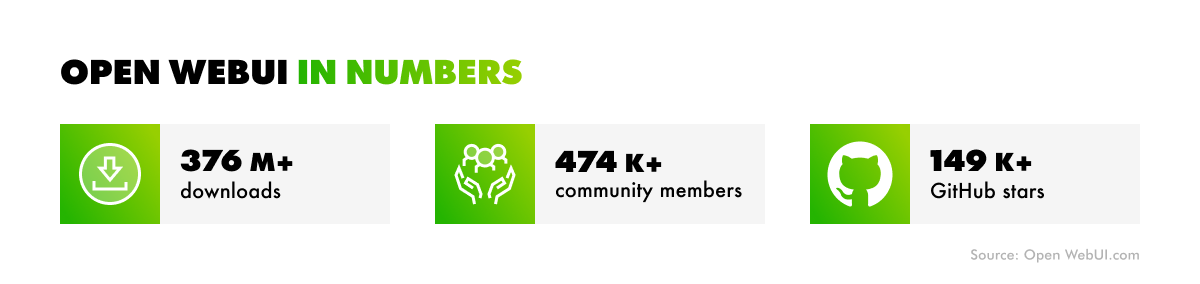
Open WebUI in numbers

But does Open WebUI fit every use case? And does it necessarily bring significant cost savings compared to a SaaS approach to AI model usage?

In this article, we’ll take a closer look at Open WebUI, its core business benefits, and the use cases where the technology fits, as well as those where it doesn’t.

What Is Open WebUI and What Does It Offer to Your Business?

Open WebUI is a self-hosted interface layer that decouples an organization’s AI workflows from any single vendor. It allows businesses to operate their own front end instead of building processes around one provider’s proprietary chat interface. Open WebUI allows them to connect to local models through Ollama or to cloud-based APIs from providers, such as OpenAI, Anthropic, Mistral, and various open-source ChatGPT alternatives, through a single, unified interface. This approach allows organizations to switch providers or run several concurrently, without retraining staff or rebuilding integrations.

How to use Open WebUI
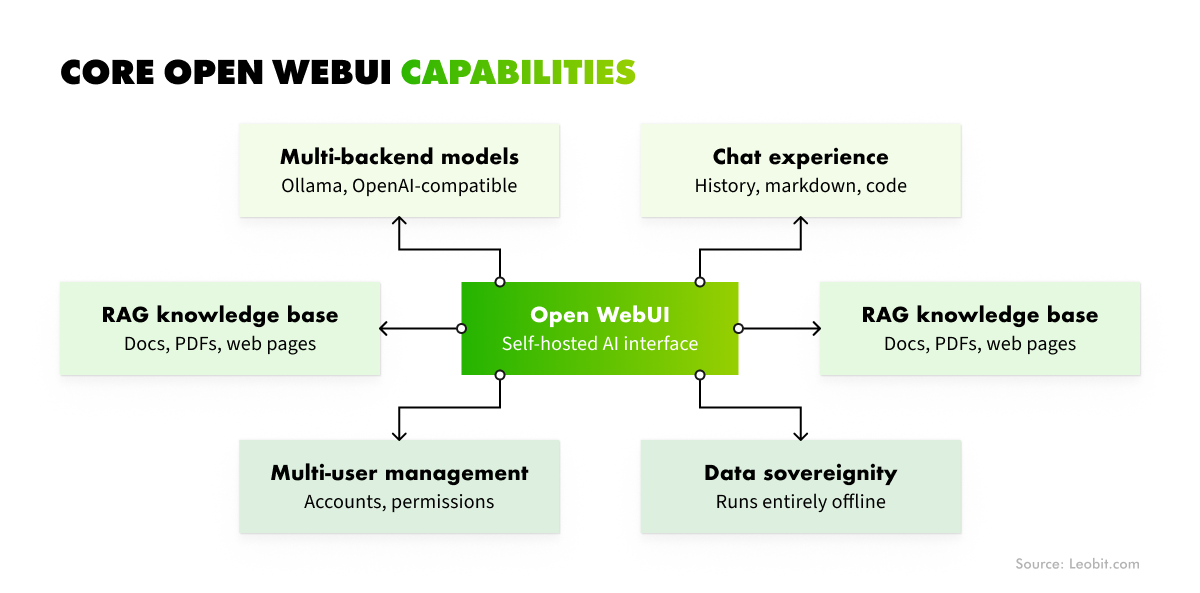
Core Open WebUI features

Key Open WebUI features include chat, model management, document uploads, RAG-based knowledge bases, user and access management, and integrations with different model providers.

Overall, the solution provides teams with a ChatGPT-style experience while eliminating the vendor dependency. As a result, conversations, documents, and usage data stay within the customer’s infrastructure instead of sitting on a vendor’s servers subject to their retention policies and pricing decisions.

 Book Icon

The Open WebUI self-hosted AI interface presents itself as an alternative to managed SaaS AI platforms. These are services like ChatGPT Enterprise or Claude for Enterprise, where the vendor hosts the infrastructure, manages the models, and hands the business a ready-to-use interface.

The table below breaks down how the two approaches compare.

Open WebUI (self-hosted)
Managed SaaS AI Platforms

Pricing model

Infrastructure + engineering time, no per-seat fee

Per-seat licensing, scales with headcount

Data location

Business-controlled infrastructure

Vendor’s servers

Vendor lock-in

Low — swap or mix model providers freely

High — tied to one provider’s models and roadmap

Setup effort

Requires DevOps capacity (Docker/Kubernetes, auth, backups)

Near-zero — sign up and go

Maintenance

Ongoing — updates, security reviews, cert renewals

Handled entirely by the vendor

Compliance fit

Strong for regulated industries needing data residency control

Depends on vendor’s certifications and data policies

Model access

Local (Ollama) and cloud APIs, side by side

Limited to the vendor’s own model(s)

Knowledge base (RAG)

Built-in, but requires tuning for quality

Often built-in, tuned by the vendor

Best for

Technical teams, cost-sensitive scaling, compliance-driven businesses

Non-technical teams, fast rollout, zero-maintenance preference

Overall, there is no right answer on which approach to choose to leverage AI within your organization. Both have tradeoffs and advantages. In the next chapter, we will explore the benefits of Open WebUI in more detail.

Business Benefits of Open WebUI

Open WebUI’s biggest benefit is flexibility: it decouples a business from any single AI vendor. However, Open WebUI’s architecture also provides a set of other specific advantages that matter at the organizational level. Below are the most significant ones.

Cost control

Open WebUI removes per-seat licensing from the equation entirely. For instance, a platform like ChatGPT Enterprise charges per user per month regardless of how heavily that user relies on the tool. Open WebUI shifts the cost structure toward infrastructure and engineering time. Instead of paying a recurring fee tied to headcount, the organization can merely pay for servers, maintenance, and setup. In conditions where total generative AI spending has reached $13.8 billion among companies globally, such a possibility to reduce and control costs can mean a great advantage for a business.

That difference becomes especially relevant to bigger organizations. After all, seat-based pricing scales linearly with every new hire, while infrastructure costs scale with actual usage and can often be optimized through MLOps practices.

Data sovereignty

Open WebUI runs on infrastructure the business controls, so that logs, prompt history, and uploaded documents never leave that environment. Nothing routes through a third-party vendor’s servers, and nothing is retained under a policy the business didn’t write itself.

Such a self-hosting approach is especially relevant to regulated industries, such as healthcare or fintech. It is also an optimal choice for AI-powered systems that operate under strict data residency rules or companies handling client contracts and proprietary source code that can’t legally or contractually leave a controlled environment.

Ability to switch between vendors fast

Open WebUI allows organizations to switch between AI models and providers fast. The interface stays constant regardless of which model sits behind it. In fact, your organization can run GPT-5 for one workflow, Claude for another, and a locally hosted open-weight model for a third. The good thing is that all these workflows will be managed from the same familiar chat window.

If a provider raises prices, deprecates a model, or changes its terms of service, the business can redirect its workflows to a different back end without disrupting the tools its employees already know how to use. This brings organizations flexibility and the ability to handle different workflows with AI models that fit them most.

Knowledge management

Through retrieval-augmented generation (RAG), Open WebUI turns a company’s internal documents, such as policy manuals, technical documentation, past project reports, and onboarding materials, into a searchable, AI-accessible knowledge base. Employees can query company data directly through the interface, with the AI drawing answers from the company’s own material rather than generic training data. This turns Open WebUI into an internal knowledge tool as much as a general-purpose assistant, without requiring a separate enterprise search product.

 Book Icon

Effective governance

Multi-user accounts and granular permissions make a team-wide rollout manageable rather than risky. Administrators can define who accesses which models, which documents feed into RAG for which teams, and how usage is tracked across the organization.

This level of access control offers companies a solid foundation for establishing AI governance and traceability of AI decisions, making adoption more controlled and transparent. Because every model interaction and document access is tied to a specific user and permission set, oversight of AI usage becomes far easier to audit than in an ungoverned rollout. The most important thing is that Open WebUI eliminates the need to build this governance layer from scratch.

Is Open WebUI, Actually, Free?

Open WebUI is an open-source solution, but it doesn’t automatically mean that using it will go without any cost at all. On top of that, the interface itself is free, but the AI capabilities behind it aren’t. Connecting Open WebUI to cloud models still means paying for API usage from providers like OpenAI or Anthropic, and even running open-weight models locally through Ollama requires paying for the hardware to run them on.

There are also other critical cost factors behind using AI capabilities with Open WebUI.

  • Running a production deployment means owning the full stack around the tool, not just the tool itself. That includes managing containers through Docker or Kubernetes, maintaining backups, handling authentication and single sign-on, running periodic security reviews, and renewing TLS certificates before they lapse.
  • Open WebUI evolves dynamically, which can add another layer of maintenance. Frequent updates can include database schema migrations that require a backup beforehand and careful sequencing to avoid breaking a live deployment. To run all updates smoothly, a team should actively track release notes and test updates before rolling them out. Another option is pinning a stable version deliberately and accepting that it will fall behind on new features.
  • Scaling and concurrency can add another layer of engineering overhead. With self-hosted AI models, concurrent requests may end up queued rather than processed in parallel. Solving this problem requires additional tuning to achieve acceptable performance as usage grows.
  • RAG performance is the other place where “free” gets complicated. Retrieval-augmented generation isn’t a plug-and-play feature that works well out of the box because retrieval settings and document chunking strategy both need tuning against the business’s actual documents and actual queries. A knowledge base of long technical PDFs behaves very differently under default settings than a folder of short internal memos. Getting relevant, accurate answers out of RAG typically takes iteration instead of a one-time setup.

So Open WebUI isn’t free, and it’s not always the cheapest option short-term beause engineering overhead and model API costs still apply either way. What it removes is the per-seat SaaS markup, not the underlying cost of AI usage itself. With a deliberate approach to budgeting a team’s engineering time, that trade-off can bring real cost savings in the long run.

Who Should (and Shouldn't) Consider Open WebUI

Overall, Open WebUI is not a universal fit for any organization. Some companies that require more control and flexibility in AI workflows may find optimal Open WebUI use cases. Meanwhile, for companies that require greater cost predictability here and now, it might not be the best option.

Let’s look at when Open WebUI is a good fit, when it isn’t, and where the outcome falls somewhere in between.

Good fit for Open WebUI

Things primarily come down to maturity in managing the infrastructure and the emphasis on control and flexibility. Open WebUI can be an optimal choice for AI workflows in:

  • Companies that already run DevOps infrastructure. The ongoing maintenance it requires, such as container management, backups, and security reviews, fits directly into workflows they’ve already built.
  • Cost-sensitive businesses with large teams, where per-seat SaaS pricing would otherwise grow faster than the value it delivers.
  • Organizations that operate in regulated industries with strict data control requirements and the need to keep prompts, documents, and logs inside infrastructure they fully control.
 Book Icon

Poor fit for Open WebUI

Companies that benefit from the SaaS approach to AI models are exactly the ones most likely to find Open WebUI a poor fit. These include:

  • Organizations that lack technical teams or engineering support required for setting up and maintaining Open WebUI.
  • Companies that, due to strategic reasons or time constraints, require a plug-and-play AI tool with zero maintenance overhead.
 Book Icon

Middle ground for Open WebUI

There is also a hybrid approach that fits businesses that want to preserve the benefits of self-hosting without building internal DevOps capacity from scratch. Such organizations can outsource setup and maintenance to a development partner. With such an approach, they can combine data sovereignty, cost control, and vendor flexibility without diverting internal engineering resources away from their core product. While an experienced team handles the infrastructure, the company can focus on how the tool gets used.

Does Open WebUI fit your business? A decision framework

There are three core questions worth answering to determine whether Open WebUI is the right fit for your business:

1. Do we have infrastructure skills in-house?
Self-hosting only pays off if someone on the team can actually run your infrastructure, covering workflows like container management, backup handling, and keeping up with updates. approach. A negative answer here doesn’t mean rejecting Open WebUI altogether. Outsourcing is a viable path to close that expertise gap without building it in-house.

2. What’s our actual compliance requirement?
Not every business needs the level of data control Open WebUI provides. In some cases, the answer is clear-cut — companies operating in regulated industries with strict data constraints have a definite need for it. In other situations, it’s worth clarifying how important that level of control actually is to the business before treating it as a requirement.

3. What’s the true cost comparison over 12 months?
To answer this question, weigh engineering and infrastructure time against SaaS seat pricing at realistic headcount, rather than comparing a rough estimate to a subscription’s list price. For a small team, SaaS often wins outright; for a larger organization already running infrastructure, self-hosting frequently comes out ahead.

Answering these three questions honestly is usually enough to tell a business which path — self-hosted, SaaS, or a hybrid with an outsourced partner — fits its actual case.

Final Thoughts

Open WebUI won’t work for every team, but for businesses that want tighter control over their data and more flexibility across AI workflows, it’s a strong option. It’s especially effective for large companies looking to escape per-seat pricing on AI SaaS platforms. The downside is that it demands mature DevOps infrastructure and technical expertise required for managing it.

That expertise gap doesn’t have to be a dealbreaker. Leobit brings strong AI experience across the Microsoft, Anthropic, and OpenAI stacks, as well as major AI models from other providers, to help you build the right infrastructure from the start or optimize the existing one for Open WebUI. As a result, you get the full benefits of Open WebUI without the engineering overhead.

FAQ

Open WebUI provides a web-based interface for interacting with AI models without requiring users to work directly with model APIs or command-line tools. It offers a ChatGPT-like experience that can sit on top of self-hosted models or connect to external AI providers. Businesses can use it as a central interface for accessing models, documents, knowledge bases, and AI-powered workflows.

Open WebUI includes a range of features for working with AI models, including chat, model management, document uploads, RAG-based knowledge bases, user and access management, and integrations with different model providers. Currently, it also supports features such as conversation history and customizable model settings.

The Open WebUI self-hosted AI interface for LLMs can connect to Ollama, which acts as the local model runtime. Ollama manages the models and inference, while Open WebUI provides the interface users interact with. This setup allows organizations to run models on their own infrastructure while giving users a consistent web-based chat experience. The two components can be deployed on the same machine or separately, depending on the infrastructure and scaling requirements.

Yes. Open WebUI is a strong fit when an organization wants to give users access to self-hosted AI models through a centralized interface. It can work particularly well for teams that need more control over data, infrastructure, and model deployment.