
Contact us

What Is Azure Functions and How Can It Help Your Business?

Roman Muzyka, Market Data Analyst

13 mins read

azure serverless computing
Blog Calculator Widget Logo

Estimate Your Software Project Cost

Describe your idea — get a budget breakdown in minutes.

Get Your Estimate

Valued at about $12.3 billion in 2024, the global market for serverless architecture is expected to reach roughly $42.4 billion by 2032. That rise is largely a response to the global growth of cloud infrastructure spending, which has reached $110.9 billion in the fourth quarter of 2025, reflecting year-on-year growth of 29%. Serverless computing advantages allow businesses to cut costs on server maintenance, infrastructure setup, and constant resource management.

advantages and disadvantages of serverless computing
Global serverless computing market growth

Among the most prominent serverless platforms, Azure Functions stands out for its deep integration with the Microsoft ecosystem, flexible hosting options, and native support for AI services.

This article covers what Azure Functions is, how it works, and where it delivers the most business value, including workflow automation, real-time data processing, microservices architecture, and AI-powered application development.

An Azure Functions Overview

Azure Functions is Microsoft’s serverless compute service that runs code in response to events such as HTTP requests, scheduled timers, message queue activity, or database changes. When a trigger fires, Azure automatically spins up the function, runs the code, and shuts it back down.

Unlike traditional server-based systems that run continuously regardless of demand, Azure Functions executes only when triggered. It scales on its own, and you’re billed just for execution time, without paying for provisioning or idle time.

When things get more complex (e.g., a process spans multiple steps or needs to remember what happened earlier) Durable Functions handle that. They let you chain and coordinate work without having to manage separate infrastructure for orchestration.

 Book Icon

Overall, Azure Functions’ serverless architecture helps organizations deliver features faster, reduce operational maintenance effort, and dynamically scale services without complex manual infrastructure management.

 Book Icon

Key Characteristics of Azure Functions

Azure Functions is based on a few core design principles that affect how it runs in production and what it costs to operate. Understanding these characteristics helps you identify where the service fits best and how it distinguishes itself from more traditional compute models.

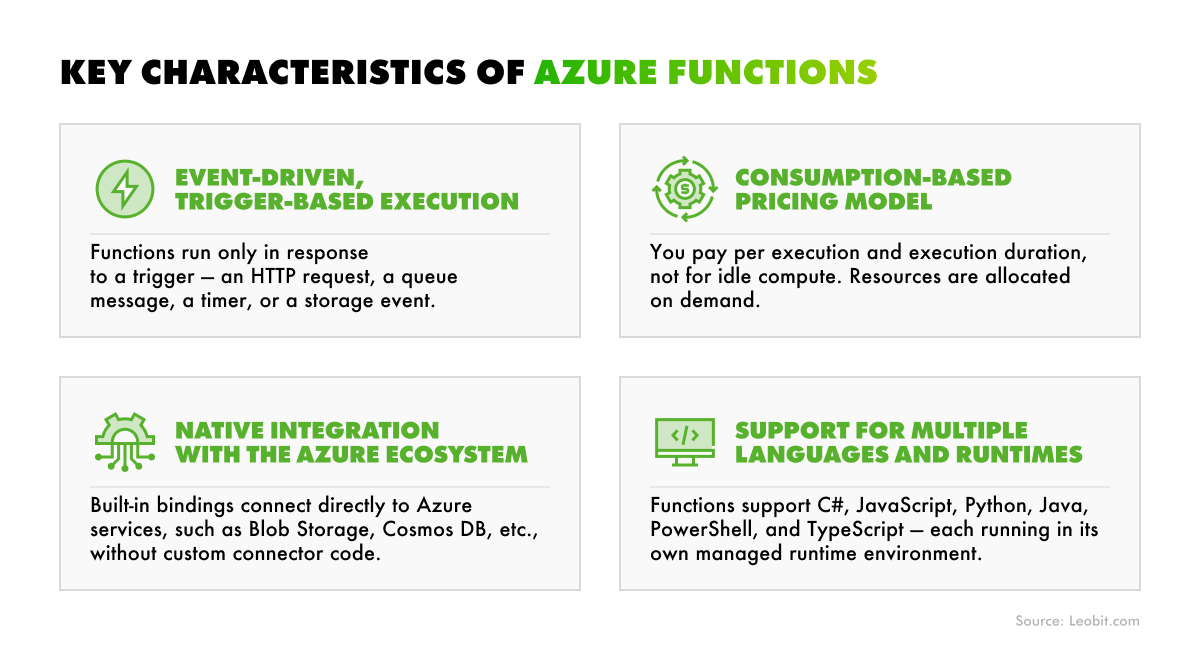
azure function core tools
Essential characteristics of Azure Functions

Below, we examine the key characteristics of Azure Functions, along with their business value, in more detail.

Event-driven, trigger-based execution

Flexera 2026 State of the Cloud Report reveals that organizations estimate cloud spend wastage at around 29%. One of the key reasons for such waste is idle or underutilized capacity. Azure Functions ensures more efficient cloud resource allocation because it runs code only when a trigger happens. The following can serve as Azure Functions triggers:

  • HTTP request
  • Timer firing on a schedule
  • New message arriving in a queue
  • File uploaded to blob storage
  • Change detected in a database.

This event-driven model eliminates idle compute time, meaning your infrastructure is never sitting unused while waiting for work. For businesses, this translates to leaner, more responsive systems that react to events in real time rather than polling for changes or maintaining always-on processes.

Consumption-based pricing model

Inefficient cloud spending adds up quickly, with infrastructure waste reaching an estimated $44.5 billion in 2025.

Azure Functions addresses this problem: billing is calculated based on the number of executions and the resources consumed during each run, rather than a fixed monthly fee for reserved capacity. This approach is especially cost-effective for workloads with unpredictable or variable traffic.

 Book Icon

That said, teams can also choose from alternative hosting plans when needed. The table below outlines the key properties of Azure Functions hosting plans.

Scaling
Billing Model
Best For

Flex Consumption

Automatic, per-function

Per execution + active instance memory; free grant of 250K executions and 100K GB-s/month

Serverless, variable workloads

Premium

Automatic, pre-warmed

Per vCPU-second and GB-second, including pre-warmed instances

High performance

Dedicated

Manual/autoscale

Standard App Service plan rates

Long-running, predictable workloads

Container Apps

Automatic, event-driven

Per Container Apps billing model

Containerized microservices

Choosing a plan comes down to how much control you need, as well as your Azure Functions performance requirements, scalability expectations, and the nature of your workloads.

Light Bulb Logo

One practical consideration worth noting is cold starts – the brief latency that occurs when the function has been idle, and Azure needs to spin it back up. Azure Functions hosting plans address this issue differently. Premium keeps instances warm; Flex Consumption can keep selected functions ready; Dedicated avoids the issue entirely; Container Apps is fully pay-per-use and offers no protection against cold starts.

Native integration with the Azure ecosystem

Azure Functions integrates with other Azure services with minimal configuration. Built-in bindings and connectors handle much of the underlying integration work, reducing the amount of custom code and infrastructure setup required. This makes Azure Functions a strong choice for businesses that already rely on the Azure ecosystem. Ultimately, organizations can quickly extend their existing architecture without building custom integration logic.

A simple example: a file lands in Azure Blob Storage, and that event triggers a function. The function calls Azure AI Vision or Azure OpenAI to process the content, then stores the result in Cosmos DB. No separate processing service, no extra orchestration layer – just a few small pieces wired together.

Support for multiple languages and runtimes

Azure Functions provides native support for numerous languages, each of which can be used in its own isolated runtime. The list of Azure Functions supported languages currently looks as follows:

  • C# (.NET isolated worker model)
  • JavaScript (Node.js)
  • TypeScript (transpiled to JavaScript via Node.js)
  • Python
  • Java
  • PowerShell
  • F#

Additionally, the service allows software engineers to implement a custom handle in virtually any language.

Light Bulb Logo

In practice, this just means people can use what they already know without being bound to a restricted technology stack. A data engineering team might stick with Python, while a back-end team builds in C#.

Optimal Azure Functions Use Cases

Azure Functions excels where workloads are unpredictable, event-driven, or too small to justify dedicated infrastructure.

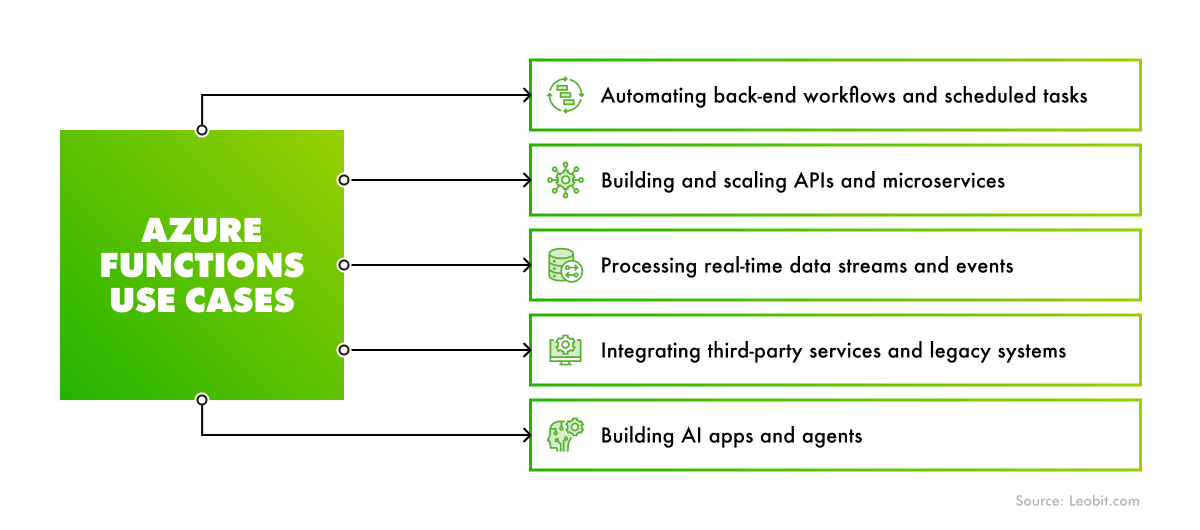
azure functions examples
Optimal use cases for Azure Functions

Thanks to the characteristics mentioned above, Azure Functions is a strong option for the following cases.

Building and scaling APIs and microservices

Azure Functions fits well as a backbone for microservices architectures. Demand for this approach keeps rising, with the global microservices market expected to reach $11.36 billion by 2033, growing at a 21.9% CAGR from 2025 to 2033.

Building a microservices architecture can offer you great agility and scalability, but it also means managing complexity with independent services, inter-service communication, and deployment overhead. Azure Functions simplifies that. Each function can expose a single HTTP endpoint, which makes the structure naturally modular. Teams can independently build, deploy, and scale these endpoints without maintaining a full application server in the background.

In practice, this works well when decomposing monolithic systems into smaller services. Each part scales on its own, depending on traffic, rather than scaling an entire application as a single unit. A financial company, for example, can run payment processing, fraud checks, and account notifications as separate functions, scaling each one independently during peak traffic.

 Book Icon

Automating back-end workflows and scheduled tasks

A function can execute on a fixed schedule using a CRON-based time trigger, run the pre-configured logic, and shut down immediately once the task is completed. This makes Azure Functions a powerful solution for automating repetitive background tasks.

Such scheduled capabilities can be used for tasks like:

  • Generating weekly reports
  • Syncing CRM data overnight
  • Sending scheduling notifications to diverse users

For example, an insurance business can run a function overnight to synchronize customer and policy data across multiple systems. Once the task is finished, the function shuts down automatically instead of continuing to consume resources like an always-on background service.

Building AI apps and agents without managing servers

Azure Functions pairs well with Azure OpenAI, Azure AI Studio, and other services from Azure AI Foundry. This makes Azure Functions a straightforward runtime for AI-powered features, such as document processing, content moderation, semantic search, or voice interaction. In this approach, a function receives a request, calls the relevant model or service, and returns the result within a single stateless execution.

The same approach works for AI agents, where functions handle discrete actions like retrieving data, calling external APIs, or triggering workflows based on model decisions. An AI-powered real estate platform, for example, could use an agent with Azure Functions to handle property inquiries – pull up listings, answer questions, and schedule viewings – all without running a server in the background.

Azure Functions also supports hosting the Model Context Protocol (MCP) server endpoints. This gives teams a lightweight way to expose callable tools to AI agents without running persistent infrastructure.

 Book Icon

Processing real-time data streams and events

Azure Functions handles real-time event processing through native integration with services like Azure Event Hubs, Service Bus, and Event Grid. Each message or batch triggers a function that transforms, routes, or stores the data downstream. The workflow is quite simple and doesn’t require a dedicated stream processing infrastructure. Ultimately, this allows businesses to react to data in real time without the cost and operational overhead of maintaining a purpose-built pipeline service running around the clock.

For instance, a retail company processing thousands of transactions through POS terminals can trigger a function for each completed purchase. It validates the transaction, updates inventory, and flags potential fraud in seconds. The cost of such an event-driven solution scales with usage instead of running continuously regardless of volume.

Integrating third-party services and legacy systems

Azure Functions acts as a flexible integration layer between modern cloud services and older systems that lack native API support. A function can listen for an event in one system, transform the payload, and send it to another system, such as a CRM, an ERP, or a payment gateway.

For instance, in e-commerce, a new order from a web marketplace can be picked up, reformatted, and pushed into a legacy ERP that still relies on structured file imports. This allows the company to save costs on heavyweight middleware and update the integration logic independently.

 Book Icon

Azure Functions vs. AWS Lambda vs. Google Cloud Functions

With the growing demand for serverless solutions, each major cloud provider has released its own serverless compute platform. Therefore, Azure Functions, AWS Lambda, and Google Cloud Functions dominate the global serverless compute market.

The key differences and similarities between the three services are outlined in the table below.

Azure Functions
AWS Lambda
Google Cloud Functions

Best ecosystem fit

Microsoft/Azure

AWS

Google Cloud

Primary supported languages

C#, JavaScript, TypeScript, Python, Java, PowerShell, F#

Node.js, Python, Java, Ruby, Go, .NET, Custom runtimes

Node.js, Python, Go, Java, Ruby, .NET, PHP

Max execution timeout

Unbounded (Flex/Premium)

15 minutes

60 minutes

Pricing model

Per execution + GB-second

Per execution + GB-second

Per execution + GB-second

Free tier

– 250K executions + 100K GB-s/month (Flex plan free tear)
– 1M executions + 400K GBs/month (Standard plan)

1M executions + 400K GB-s/month

2M executions + 400K GB-s/month

VNet / private networking

Yes (Flex Consumption, Premium)

Yes (VPC integration)

Yes (VPC integration)

Container support

Yes (Premium, Dedicated, Container Apps)

Yes

Yes

AI / ML integration

Azure OpenAI, Azure AI services

AWS Bedrock, SageMaker

Vertex AI, Gemini

Orchestration

Durable Functions

AWS Step Functions

Google Workflows

All three platforms have similar core pricing models and comparable feature sets – the decision largely comes down to ecosystem fit. For teams already using Azure, Azure Functions offers the deepest native integrations and the most flexible execution model. For teams using AWS or Google Cloud, Lambda and Cloud Functions offer equally tight ecosystem integrations.

How Can Leobit Help You Leverage Azure Functions?

To design a well-architected serverless solution based on Azure Functions, you will need to navigate non-trivial decisions, such as choosing the right hosting plan for each workload, managing stateful workflows with Durable Functions, securing virtual network connectivity, etc.

Leobit is ready to help you cut through that complexity. As a Microsoft Solutions Partner for Digital & App Innovation, as well as Data & AI, we possess strong expertise in the Microsoft tech stack, including solutions like Microsoft Fabric, Azure Databricks, Azure Data Factory, and various Azure AI Services.

Driven by significant experience in Azure cloud development, our specialists are ready to bring the technical depth needed to design, build, and optimize Azure Functions implementations that align with your architecture and business goals.

Conclusions

Backed by Microsoft, Azure Functions provides a solid serverless foundation for businesses looking to reduce infrastructure overhead, automate workflows, and build event-driven systems without managing dedicated servers. This service can be a useful option for various workflows:

  • Building and scaling APIs and microservices
  • Automating back-end workflows
  • Building AI apps and agents without running persistent infrastructure
  • Processing real-time data streams and events
  • Integrating third-party services and legacy systems

For teams already operating on Azure, it is one of the more straightforward ways to extend existing architecture without significant rework.

Whether you are starting a new serverless project, migrating existing workloads to Azure Functions, or looking to optimize a deployment, we can provide you with necessary support and technical expertise. Feel free to reach out to us to discuss your needs and find out how we can help you benefit from Azure Functions.

FAQ

Durable Functions complement Azure Functions, working as its extension that adds state and orchestration for chaining multiple functions together, waiting for external events, or running parallel tasks. You can use Azure Functions for simple event-driven tasks and apply the Durable Functions extensions when a workflow spans multiple steps or needs to track what happened at each stage.

Azure Functions is built for developers. It works better when you need custom logic, complex processing, or tighter control over how something runs.

Azure Logic Apps is more focused on visual workflows and ready-made integrations. It’s often a better fit for connecting SaaS tools and automating routine business processes without much custom code.

If the workflow is mostly moving data between existing services, Logic Apps is usually easier to manage. If the workflow depends on custom behaviour or heavier processing, Functions is a stronger option.

The Flex Consumption plan bills per execution and resource consumption, so costs scale naturally with usage. The main risk areas are functions triggered at unexpectedly high frequency, inefficient code that consumes more memory or runs longer than necessary, and always-ready instance configurations that add baseline cost. To handle these problems, set up execution budgets, monitor consumption using Azure Cost Management, and optimize function runtime as early as you spot an issue.

Azure Functions gives businesses several ways to secure workloads depending on how the system is used. Teams can protect APIs with identity-based access controls, connect services without storing credentials in code, and centralize traffic management through Azure API Management. For stricter compliance and security requirements, Azure provides advanced network isolation options.