Contact us

Accessibility Testing: A Decision-Maker’s Guide to Doing It Right

14 mins read

Accessibility Testing
Blog Calculator Widget Logo

Estimate Your Software Project Cost

Describe your idea — get a budget breakdown in minutes.

Get Your Estimate

The WebAIM Million 2026 report found that 95.9% of the world’s top one million home pages had detectable WCAG failures, with an average of 56 accessibility errors per page. These issues are more than technical oversights. They create real barriers for potential customers, including 1.6 billion people with disabilities, who make up 22% of the global population and represent over $18 trillion in spending power.
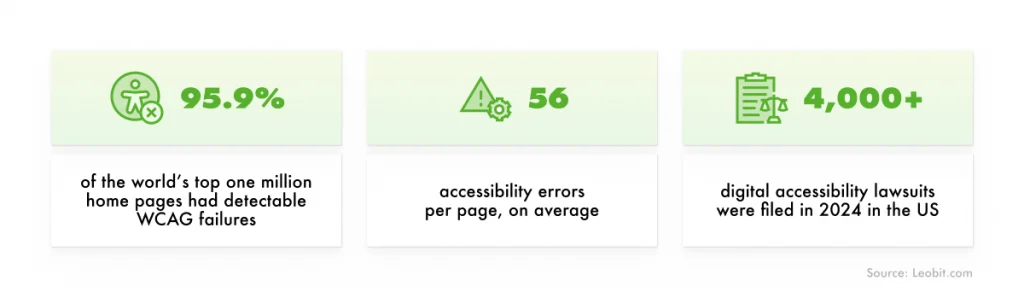
Software accessibility problems in numbers

At the same time, accessibility-related lawsuits continue to be filed by the thousands each year. In the US alone, more than 4,000 digital accessibility lawsuits were filed in 2024. The good news is that accessibility testing can help businesses identify and remove these barriers before they lose customers or face legal and reputational fallout.

In this article, we explain how to test digital products for accessibility properly and why skipping this step can be costly.
What Is Accessibility Testing?

Accessibility testing is the process of checking whether a digital product can be used comfortably and independently by everyone, including people with disabilities. It also helps confirm that the product meets recognized accessibility standards, such as the Web Content Accessibility Guidelines (WCAG).

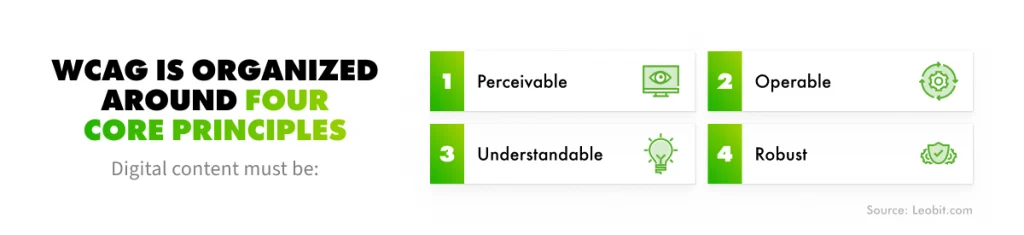
Core principles of WCAG

The barriers accessibility testing uncovers are usually not unusual or highly technical. These could often be everyday usability issues: text that is difficult to read, forms that cannot be completed without a mouse, videos without captions, or navigation that does not work properly with a screen reader.

Such problems affect people with permanent disabilities, but they can also create difficulties for older adults, users browsing on a phone in bright sunlight, and anyone working in a noisy environment or with a poor internet connection.

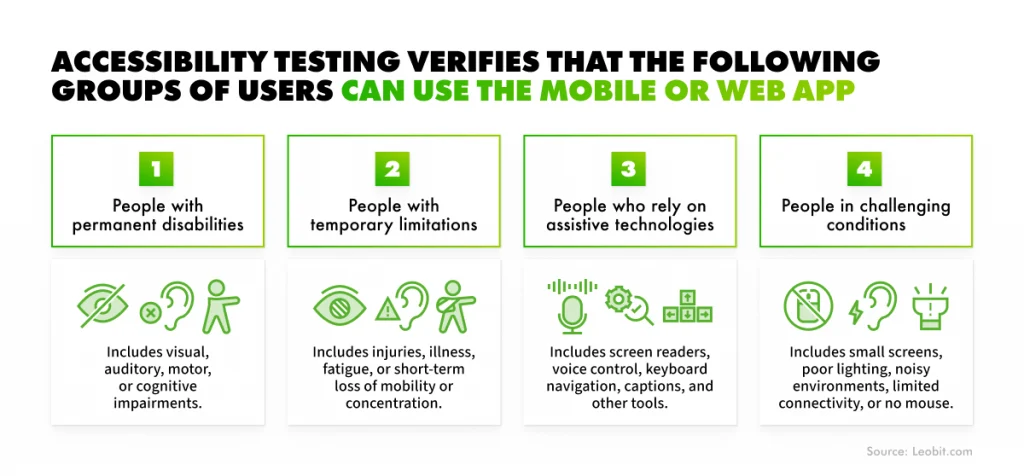
In practice, accessibility testing verifies that users can use the mobile or web app regardless of their visual, auditory, motor, or cognitive abilities. This includes people who:

  • Have permanent disabilities
  • Face temporary limitations due to injury, illness, or fatigue
  • Rely on assistive technologies such as screen readers or voice control
  • Work in challenging conditions, such as on small screens, in poor lighting, without a mouse, or with limited connectivity
Why do you need accessibility testing?

Accessibility testing turns a broad accessibility goal into specific, testable criteria. While designing accessible software is a discipline of its own, testing confirms whether accessibility works in the final product.

 Book Icon

How to Perform Accessibility Testing Properly

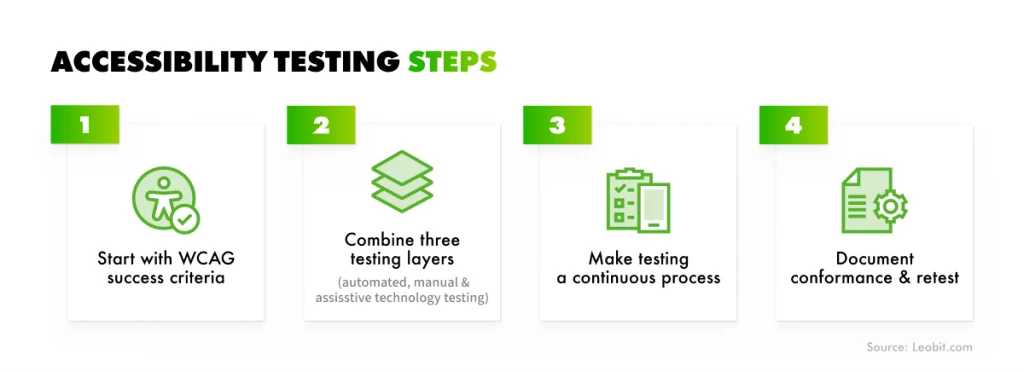
Accessibility testing works best when it is treated as a continuous part of the development lifecycle, not as a one-time check before launch. A proper testing process combines automated scans, manual expert review, and testing with real assistive technologies, all measured against WCAG success criteria.

Here are four steps to help you ensure your software is accessible from the start.

Accessibility testing steps

Start with WCAG success criteria as your baseline

The Web Content Accessibility Guidelines (WCAG), maintained by the World Wide Web Consortium (W3C), are built around four core principles: content must be perceivable, operable, understandable, and robust. Each requirement is defined as a pass-or-fail success criterion, which makes accessibility measurable rather than subjective.

The criteria are grouped into three conformance levels: A (basic), AA (the level most laws and contracts expect), and AAA (advanced). For most products, WCAG 2.2 Level AA is the practical target. We cover what each level requires in the companion article on accessible design, so this guide focuses on the testing method itself.

Combine three testing layers

No single testing method can identify every accessibility issue. A proper accessibility testing process should combine three layers, because each one catches problems that the others may miss.

What it catches
Common tools
What it misses

Automated testing

Missing alt text, low contrast, broken heading structure, unlabeled fields

axe DevTools, WAVE, Lighthouse, Accessibility Insights

Issues that require human judgment, such as whether alt text is meaningful or the focus order is logical

Manual expert review

Keyboard navigation, focus visibility, reading and tab order, zoom and reflow, error handling

Keyboard, browser dev tools, manual WCAG checklist

Barriers that only appear when using real assistive technologies

Assistive technology and user testing

How the product actually works for people using assistive technologies

NVDA, JAWS, VoiceOver, voice control, real users

Very little, although this is usually the slowest and most resource-intensive layer

Automated tools are the right first step because they are fast and repeatable. However, they only identify part of the problem. Even by the most generous measure, Deque’s analysis of more than 13,000 pages found that automated tests identify about 57% of accessibility issues, while coverage by WCAG success criteria is closer to 20–30%.

The remaining issues require human judgment, such as whether the alt text is meaningful or whether the focus order makes sense for a keyboard user. Manual review and testing with real assistive technology cover what automation cannot.

 Book Icon

Make testing a continuous process

Software is never static. Every new feature, content update, design change, or third-party component can introduce new accessibility problems. A pre-release scan can catch some obvious issues, but it will not uncover every barrier. That is why accessibility should be built into the QA workflow from the start rather than added to a final checklist.

Like any other software defect, an accessibility issue becomes more expensive to fix the later it is discovered. A contrast problem caught during design review may take minutes to correct. The same issue found after release can require broader remediation, delay procurement, damage customer trust, or increase legal risk.

This is where many teams struggle. In Applause’s 2025 accessibility survey, 68% of organizations said they lack the expertise and resources to test accessibility independently on an ongoing basis. Closing that gap usually means combining automated checks in your build pipeline with scheduled manual audits, and bringing design and QA together from the first sprint.

Light Bulb Logo

Pro tip: Run automated accessibility scans in your CI pipeline on every build so regressions are detected as soon as they are introduced. Use manual and assistive-technology testing for new or significantly changed user flows. This gives you continuous coverage without making every release depend on a full audit.

Document conformance and retest

Accessibility testing should produce a clear record of what was tested, which standards were used, what issues were found, and how they were resolved. In the US, this is often documented through a VPAT (Voluntary Product Accessibility Template), which helps sales, legal, and procurement teams understand how the product meets WCAG and other accessibility requirements.

Track each defect like any other bug, fix it, and retest. Whenever a user flow changes, regression testing should include accessibility checks as well. A barrier removed in one release can easily return in the next if accessibility is not part of the ongoing QA process.

The Business Benefits of Accessibility Testing

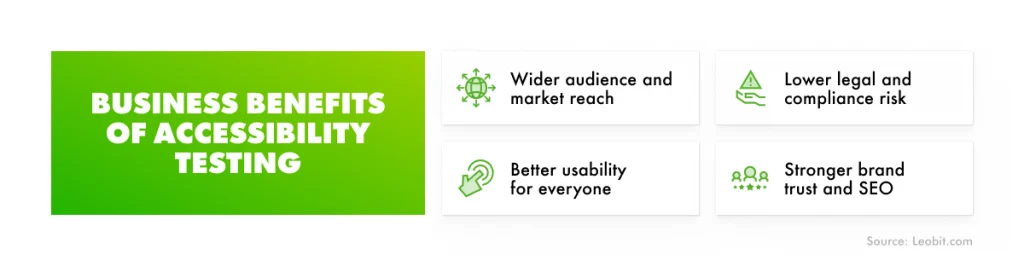
Accessibility testing delivers measurable business value beyond technical correctness. Here are four benefits that matter most to decision-makers.

Business benefits of accessibility testing
  • Wider audience and market reach. Removing accessibility barriers makes your product usable for more people, including customers with disabilities, aging users, mobile users, and people working in challenging environments. This is a significant market opportunity: people with disabilities represent more than $2.6 trillion in disposable income across the US, UK, EU, and Canada alone.
  • Better usability for everyone. Accessibility improvements often make digital products easier to use for all customers, not only those who rely on assistive technologies. Clear navigation, readable content, well-labeled forms, visible focus states, and helpful error messages reduce friction across the entire user journey. As a result, the same work that helps a product pass accessibility testing can also support higher engagement and stronger user satisfaction.
  • Lower legal and compliance risk. Many accessibility regulations and procurement frameworks reference WCAG and, in Europe, EN 301 549. Testing against these standards can help your company demonstrate due diligence and reduce the risk of litigation or financial penalties.
  • Stronger brand trust and SEO. Investing in inclusive products signals customer-centric thinking that can set you apart. This can become a meaningful differentiator, especially as users increasingly expect digital services to work for everyone. In a 2024 Acquia survey of 1,265 users with disabilities, 42% said they would stop using a brand entirely after running into an accessibility barrier. The same technical groundwork helps search engines too, because clean heading structure and meaningful alt text improve how content is indexed, and the usability gains support engagement metrics.

Each of these benefits depends on testing against a recognized standard. Knowing which ones apply to your product is where any serious accessibility effort starts.

Accessibility Standards and Legal Requirements

Accessibility testing is based on internationally recognized standards that turn accessibility from a general expectation into clear, testable requirements. Increasingly, those standards are backed by law, and organizations that ignore them face enforcement actions, litigation, financial penalties, and lost contracts across multiple jurisdictions.

A simplified view of the accessibility compliance landscape looks like this:

Key standard or regulation
What it means in practice

Global benchmark

WCAG 2.2

Defines testable accessibility requirements for digital content

United States, federal sector

Section 508

Requires federal agencies to meet WCAG-based accessibility standards

United States, private sector

ADA

Does not name a technical standard, but WCAG is commonly used as the practical benchmark

European Union

EN 301 549 and the EAA

Apply WCAG-based requirements to ICT products and services, including software, hardware, websites, and apps

United States

In the United States, accessibility requirements differ depending on the type of organization. Federal agencies must comply with Section 508 of the Rehabilitation Act, which has used WCAG 2.0 Level AA as its technical standard since 2018.

Private businesses, nonprofits, and public bodies are primarily covered by the Americans with Disabilities Act (ADA), which was signed into law in 1990. The ADA does not name a specific technical standard for websites or mobile apps. However, WCAG has become the de facto benchmark used by courts, regulators, and settlement agreements.

Two ADA titles are especially important for digital accessibility:

  • Title II applies to state and local governments. In 2024, the Department of Justice issued a final rule requiring public-entity websites and mobile apps to meet WCAG 2.1 Level AA. In April 2026, the DOJ extended the compliance deadlines by one year. Public entities serving 50,000 or more people must now comply by April 26, 2027, while smaller entities and special districts have until April 26, 2028.
  • Title III applies to businesses and nonprofits that are open to the public. It does not set a specific digital accessibility deadline, but courts and DOJ enforcement actions have consistently treated WCAG as the practical compliance standard.

The financial exposure is significant. As of 2024, DOJ civil penalties for ADA violations reached $115,231 for a first violation and $230,464 for repeat violations, with maximum amounts adjusted for inflation each year. Private lawsuit settlements often range from $5,000 to $50,000 before attorney fees and remediation costs. Seyfarth Shaw recorded roughly 8,800 ADA Title III cases in US federal courts in 2024, and major brands such as Domino’s, Target, Netflix, and Peapod have already faced accessibility-related lawsuits.

European Union

In the European Union, the key accessibility standard is EN 301 549, version 3.2.1. It is the harmonized standard for the accessibility of information and communication technology. EN 301 549 incorporates WCAG requirements and applies them to a wide range of digital and physical technologies, including websites, mobile apps, software, hardware, kiosks, and personal computers.

This standard is supported by the European Accessibility Act (EAA), adopted in 2019 and applicable since June 28, 2025. The EAA sets unified accessibility requirements across EU member states and applies to both EU-based companies and businesses that sell covered products or services in the EU market.

Enforcement takes place at the national level, so penalties vary by country. According to Fieldfisher’s analysis of the EAA, fines may reach up to €100,000 in Germany, up to €1,000,000 in Spain, and up to €40,000 in Italy. Authorities may also restrict or remove non-compliant products from the market. In addition, accessibility requirements increasingly affect eligibility for public procurement under EU directives.

In short, WCAG provides the technical foundation, while regional laws define how accessibility requirements apply in specific markets. For most digital products, testing against WCAG Level AA is the most practical way to support compliance and reduce legal risk. The cases below show what can happen when companies fall short.

Real Accessibility Lawsuits and Enforcement Cases

Accessibility obligations are not theoretical. Courts and regulators have enforced them for nearly two decades, across retail, streaming, e-commerce, education, and the public sector.

Year(s)
Where
Outcome

NFB v. Target

2006–2008

US

$6M class-action settlement; site fixed with accessibility experts

NAD v. Netflix

2011–2012

US

US DOJ v. Peapod

2014

US

Settlement: conform to WCAG 2.0 AA, appoint a coordinator, and train staff

NAD v. Harvard & MIT

2015–2020

US

Robles v. Domino's

2016–2022

US

Ninth Circuit held Title III applies to apps and sites; ordered compliance

Vueling Airlines

2024

Spain

€90,000 fine upheld; barred from public funding for six months

Paris court v. French State

2024

France

The government has been ordered to enforce accessibility of the Pronote school platform

French retailers (Auchan, Carrefour, E.Leclerc, Picard)

2025

France

Two of these set the precedents most often cited today. Robles v. Domino’s confirmed that Title III of the ADA applies to websites and apps that connect customers to a physical business, after the Supreme Court declined to hear Domino’s appeal. NFB v. Target established years earlier that a retailer’s website can fall under the ADA when it is tied to its stores.

The recent European cases show the same pattern arriving in the EU. In 2025, disability rights organizations ApiDV and Droit Pluriel pursued major French retailers over inaccessible online grocery services.

How Leobit Approaches Accessibility Testing

At Leobit, accessibility testing is built into the QA workflow on every project. Our ISTQB-certified QA engineers combine automated scans, manual review, and testing against WCAG and WAI-ARIA requirements to identify accessibility issues early and prevent them from reaching production. Instead of treating accessibility as a final pre-release check, we embed it into development and QA from the start.

This approach delivers measurable results. During a modernization project for a UK-based SaaS stakeholder management provider, our team redesigned legacy pages with accessibility as one of the key priorities and conducted a full Lighthouse accessibility audit. The redesigned pages achieved a Lighthouse accessibility score of 100, compared with 68-93 for the legacy pages. As a result, the product improved WCAG conformance and became easier to use across a wider range of user groups.

Final Thoughts

Accessibility testing turns a broad commitment to inclusion into something measurable and actionable. It shows whether your software meets WCAG requirements, where accessibility gaps remain, and what needs to be done to close them.

That clarity brings value far beyond a passing score. It helps reduce legal risk, improves usability, and makes your product available to people who might otherwise be excluded. Since digital products change with every release, the greatest benefits come when accessibility becomes a regular part of the development and QA process, not a one-time task before launch.

If you want a clear picture of where your product stands today, a Leobit accessibility audit is a practical first step. Contact us, and let’s make your software fully accessible.

FAQ

Accessibility testing checks whether a website, web app, or mobile app can be perceived, operated, and understood by users with visual, auditory, motor, or cognitive limitations, measured against standards such as WCAG.

We combine three layers: automated scans for quick technical checks, manual expert review for keyboard and structure issues, and testing with assistive technologies and real users. Our experts run them continuously across the development lifecycle and retest after changes.

Yes, it does. Leobit’s ISTQB-certified QA engineers deliver accessibility testing as part of our software testing services, combining automated scans, manual expert review, and testing against WCAG and WAI-ARIA. We can run a one-time accessibility audit of an existing product or embed accessibility checks into your ongoing development and QA process, so issues are caught before they reach production.