
5 pm CET/ 10 am CST
Live Webinar "The Efficient AI Harness: What Your Project Really Needs"
Contact us

Overview of Microsoft Fabric: Key Features, Limitations, and Use Cases

17 mins read

Overview of Microsoft Fabric
Blog Calculator Widget Logo

Estimate Your Software Project Cost

Describe your idea — get a budget breakdown in minutes.

Get Your Estimate

Released in 2023, Microsoft Fabric has quickly established itself as a strong contender in the market of data platforms. In June 2026, Microsoft reported more than 40,000 paid Fabric customers, up more than 60% year over year. More than 17,000 of these customers already use Fabric together with Microsoft Foundry to connect AI agents to their business data.

What drives Microsoft Fabric’s popularity? When is this platform the right choice? And what sets it apart from platforms for data storage, analytics, and business intelligence (BI)?

In this article, we provide a comprehensive Microsoft Fabric overview with a focus on its strengths, weaknesses, and preferred use cases.

What is Microsoft Fabric?

Microsoft Fabric is a software-as-a-service (SaaS) data and analytics platform that provides data management and analytics features for both business-oriented specialists and data engineers. It supports data integration, data engineering, data warehousing, real-time analytics, data science, and business intelligence in a single environment, on top of one shared data lake, OneLake.

 Book Icon

A key advantage of Fabric is its ability to unify Microsoft Azure’s data storage, processing, and management services within a single platform.

microsoft fabric features
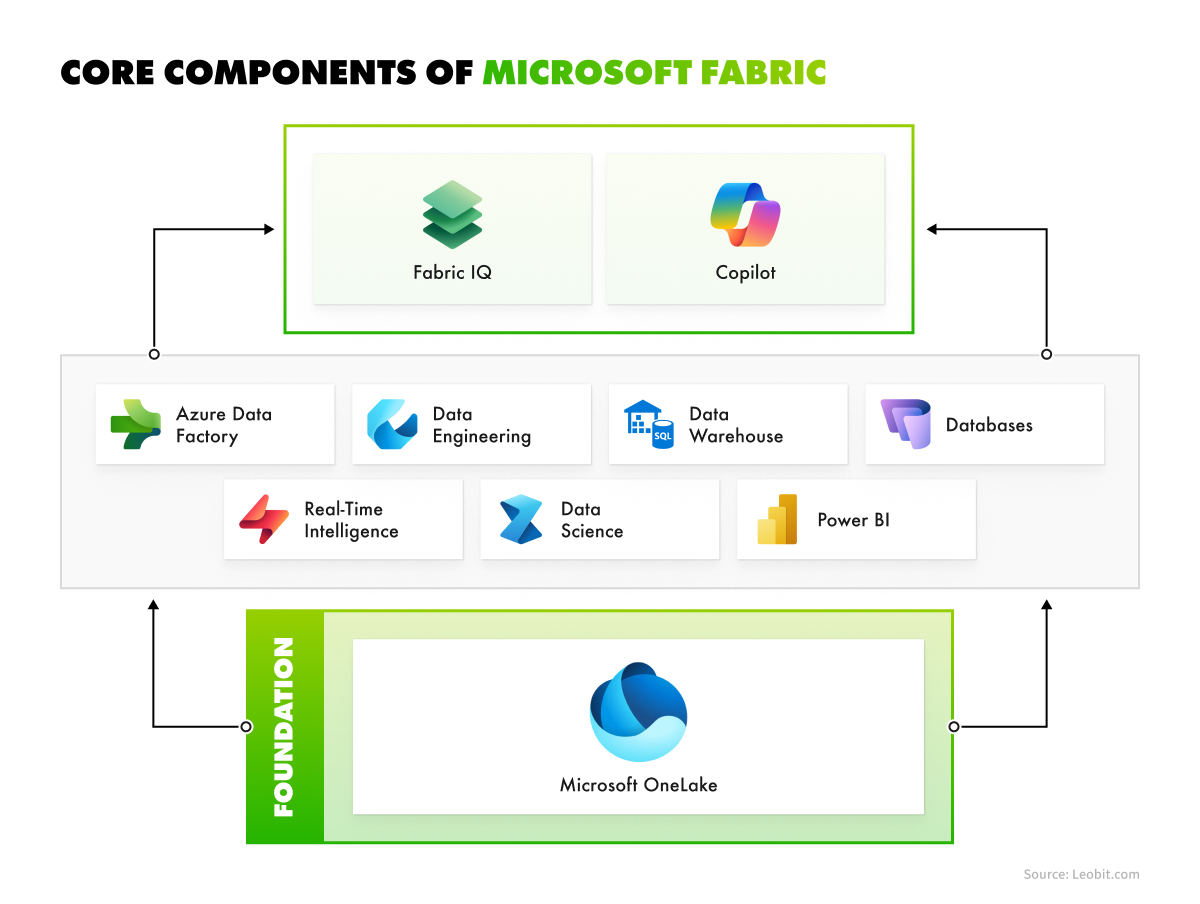
Core Microsoft Fabric components

The key concept behind Fabric’s design is simplicity. The platform provides a convenient interface that allows businesses to combine data from several sources into a single environment. By using a unified platform rather than multiple disconnected tools, companies can reduce complexity, eliminate data silos, and save the time otherwise spent integrating separate services.

What's new in Microsoft Fabric in 2026

Fabric changes fast, and several 2026 releases add new functionality to the solution. These are the key updates that matter most to your business:

  • Fabric IQ. A semantic layer that uses an ontology to organize data into business entities and relationships, so analytics and AI agents work with consistent business meaning. Microsoft also added Planning in Fabric IQ for budgeting, forecasting, and scenario modeling.
  • Fabric IQ in Microsoft Copilot. Announced as generally available at FabCon Europe in September 2026, it lets Copilot users get answers grounded in Fabric business context.
  • Data Engineering Agent (preview). An AI agent that helps engineers migrate and build data pipelines, working across Fabric, GitHub Copilot, and VS Code.
  • Database Hub (early access). A single place to manage Azure SQL, Cosmos DB, PostgreSQL, SQL Server via Azure Arc, MySQL, and Fabric-native databases.
  • Wider governance. Microsoft Purview data loss prevention now covers more structured endpoints in Fabric, including SQL, KQL, and mirrored databases.

These updates give teams and AI tools access to a consistent, trusted view of the business, helping people make decisions faster, reduce governance risks, and spend less time sorting out conflicting numbers.

Key Benefits of Microsoft Fabric

The most important strengths of Microsoft Fabric are tied to its core functionality, such as unified management for data storage, analytics, and BI services, AI development capabilities, and the platform’s lake-centric and open design. Below is a detailed overview of the key advantages of the platform.

Unified functionality for data analytics and management

To make data analytics and other data-related processes truly convenient, Microsoft Fabric combines several workloads that share the same storage, security, and capacity:

  • OneLake. A single, tenant-wide data lake for unified storage, management, and governance.
  • Data Factory. Data integration and pipeline orchestration for ETL and ELT workflows. For a detailed look at ETL vs. ELT and pipeline design, see our guide on when to use Azure Data Factory.
  • Data Engineering. Lakehouses and Apache Spark for processing large datasets.
  • Data Warehouse. A T-SQL data warehouse that stores data in open Delta format in OneLake.
  • Databases. Operational databases, such as SQL database in Fabric, plus mirroring that replicates external databases into OneLake in near real time.
  • Real-Time Intelligence. Event streams and KQL databases for streaming and time-series analytics.
  • Data Science. Notebooks and ML tooling for building and running models.
  • Power BI. Business intelligence and data visualization.
  • Fabric IQ and Copilot. A semantic layer and AI assistance for querying, building pipelines, and generating insights.

Additionally, Microsoft Fabric integrates with a wide range of tools from the Microsoft ecosystem, as well as external platforms. These include services such as Dataverse, Azure Machine Learning, GitHub, and Azure DevOps, among others.

With its unified interface for managing diverse services, Microsoft Fabric simplifies the integration of multiple products and enhances data management convenience. The platform also matures for engineering teams. For example, in February 2026 Microsoft made fabric-cicd, an open-source Python library for deploying Fabric items, an officially supported tool for CI/CD automation across workspaces.

Efficient AI integration

Gartner predicts that by 2027, 50% of business decisions will be augmented or automated by AI agents for decision intelligence. Therefore, strong support for AI development and management capabilities is a must-have feature for a modern data platform.

In the Microsoft stack, Fabric plays the role of the data foundation for AI, while Microsoft Foundry is where teams build and run models and agents. Fabric keeps governed, AI-ready data in OneLake, and Fabric IQ adds the business meaning that agents need to give reliable answers. Copilot in Fabric helps users build pipelines, write SQL and notebook code, and create reports using natural language. This combination is what companies use to build AI agents grounded in enterprise data.

 Book Icon

Unified pricing model for all products

Traditionally, services such as Synapse Analytics, Data Factory, Power BI, and Data Lake are priced and managed separately in Azure. Microsoft Fabric bundles many of these capabilities under a single capacity, which allows you to track a unified price for most services.

Prices in Microsoft Fabric are based on Capacity Units (CUs), the basic units of compute for the platform. Capacities come in SKUs from F2 to F2048. You can choose between two billing options:

  • Pay-as-you-go model. You pay only for the time the capacity runs, with per-second billing and no long-term commitment. At $0.18 per CU per hour, an F2 capacity (2 CUs) running all month costs $262.80. You can also pause the capacity when it is not needed.
  • Reserved capacity model. You commit to a capacity for one or three years and save about 41% compared to pay-as-you-go. A reserved F2 costs about $156.33 per month. A reservation is billed whether the capacity is used or not.

It is important to understand that budgeting for Fabric is more than the SKU price. Plan for these items too:

  • Power BI licenses. On capacities below F64, people who publish and view Power BI reports need individual Power BI Pro licenses. From F64 upward, report viewers don’t need Pro licenses.
  • OneLake storage. Storage is billed separately per GB per month. Mirroring storage is free up to a limit tied to your SKU, for example 64 TB with F64.
  • Overage. Fabric capacity overage lets you pay for consumption above your capacity instead of being throttled. It is billed at pay-as-you-go rates, even on reserved capacities.
  • Autoscale Billing for Spark. An opt-in model that runs Spark jobs on separate serverless compute at pay-as-you-go rates, outside your shared capacity. Reservation discounts don’t apply to it.

With Fabric, you simplify purchasing because one capacity covers compute for most workloads. You can apply the same Capacity Units wherever needed without pre-allocation, scale capacity up or down, and monitor usage and costs from a central dashboard.

 Book Icon

Lake-centric and open design

Microsoft Fabric stores data in a data lake, a centralized repository for structured, semi-structured, and unstructured data. Such a design comes with both advantages and disadvantages. On the one hand, a data lake allows organizations to store diverse types of data in a single, scalable repository. On the other hand, a data lake needs proper governance and organization so it doesn’t become a “data swamp” with poorly organized and poorly searchable information.

Microsoft Fabric addresses this problem with OneLake, a SaaS data lake provided automatically for the whole organization. All Fabric engines read the same copy of data in open Delta Parquet format, so teams don’t need to move or duplicate it between tools

Shortcuts let you link data stored in other locations, including other clouds, without copying it, and mirroring keeps replicas of external databases in sync. For governance, the OneLake catalog and Microsoft Purview provide a unified place for data discovery, metadata, lineage, and security insights.

Main Limitations of Microsoft Fabric

While Microsoft Fabric offers businesses a solid list of benefits, the platform has several weaknesses that you should consider. Here we list some of them.

Functionality limitations

Fabric Data Warehouse covers most T-SQL needs, but it still differs from SQL Server and Azure SQL. Based on Microsoft’s T-SQL surface area documentation, these are the limitations that matter most:

  • Constraints are not enforced. You can add primary keys, foreign keys, and unique constraints only with the NOT ENFORCED option. The warehouse won’t block duplicates or orphan records, so data integrity has to be guaranteed by your pipelines.
  • Limited transaction control. Transactions are supported, but you can’t set the isolation level with SET TRANSACTION ISOLATION LEVEL.
  • Missing database objects. Triggers, materialized views, synonyms, and recursive queries aren’t supported.
    Limited schema changes. ALTER TABLE supports only a subset of operations, such as adding nullable columns or dropping columns. ALTER COLUMN is still in preview.
  • No vector data type. For vector search, you need another service, such as SQL database in Fabric or Azure AI Search.
  • No cross-region connections. The warehouse and SQL analytics endpoint require the source and target items to be in the same region.

Most of these limitations can be addressed with the right approach. For example, data engineers can enforce integrity checks in their pipelines, and teams that need full SQL Server functionality for operational workloads can use an SQL database in Fabric alongside the warehouse.

Performance limitations

Every Fabric capacity has a fixed number of CUs. When workloads consistently consume more than the capacity provides, Fabric starts throttling, which slows down or delays jobs and reports during peak periods. Fabric smooths short usage bursts over time, but sustained overload still requires action.

Microsoft now offers several tools to manage this:

  • Capacity overage to pay for excess consumption instead of being throttled, with a daily limit set by admins.
  • Surge protection to limit background jobs or specific workspaces so they don’t consume the whole capacity.
  • Autoscale Billing for Spark to move heavy Spark jobs off the shared capacity.
  • Fabric Copilot capacity to bill Copilot usage to a separate capacity.

To avoid budget surprises, plan capacity based on real workload patterns, monitor usage with the Fabric Capacity Metrics app, and set overage limits before peak periods.

 Book Icon

Limited fine-grained support

Microsoft Fabric is designed for simplicity, control, and efficient integration. However, this design also introduces certain limitations. Advanced data engineers and architects may find Fabric’s approach restrictive, as it provides limited capabilities for directly configuring infrastructure, fine-tuning resource allocation, or optimizing runtime performance.

Fabric also sets platform limits that larger organizations need to plan for. For example, a workspace can contain up to 1,000 Fabric and Power BI items, and workspace roles are limited to 1,000 users or groups.

These limitations mainly affect scenarios that require highly specialized performance tuning or custom workflows that push the limits of compute and storage. In such cases, teams often combine platforms. For example, data engineers can use Azure Databricks for highly customized ML pipelines while using Microsoft Fabric as the central platform for analytics and reporting.

Comparing Microsoft Fabric against Major Data Platforms

Let’s compare Microsoft Fabric’s critical features and properties against other major contenders in the market of data platforms.

Microsoft Fabric
Databricks
Snowflake
Google BigQuery

Type

SaaS data and analytics platform

Data and AI platform (lakehouse)

Cloud data platform (data warehouse core)

Serverless cloud data warehouse

Primary focus

Analytics, data engineering, BI, AI-ready data

Data engineering, ML, advanced analytics

Data warehousing, data sharing, analytics

Large-scale analytics, BI

Supported data types

Structured, semi-structured, unstructured

Structured, semi-structured, unstructured

Structured, semi-structured, unstructured

Structured and semi-structured natively; unstructured through object tables over Cloud Storage

ML and AI

Data Science workload, Copilot, data agents (preview), Fabric IQ (preview), integration with Microsoft Foundry

Built-in ML lifecycle (MLflow), model serving

Built-in AI and ML functions (Cortex AI Functions)

BigQuery ML (SQL-based models), remote models on Vertex AI, including Gemini

Scalability

Capacity units (F2–F2048), bursting and smoothing, optional Autoscale Billing for Spark

Highly scalable clusters and serverless compute

Elastic multi-cluster warehouses

Automatic serverless scaling

Integration ecosystem

Deep Microsoft ecosystem (Power BI, Microsoft 365, Azure)

Multi-cloud (AWS, Azure, Google Cloud) and open formats (Delta Lake, Iceberg)

Multi-cloud

Google Cloud ecosystem

Pricing model

Capacity-based: pay-as-you-go or reserved

DBU-based consumption; classic compute adds separate cloud VM charges, while serverless includes compute in the DBU rate

Compute credits + storage + data transfer

On-demand (per TiB processed) or capacity-based (per slot-hour, via editions)

Common use cases

Microsoft-centric analytics, self-service BI, cross-functional data platform

Advanced analytics, ML pipelines, large-scale data engineering

Enterprise warehousing, data sharing

Big data analytics, Google Cloud-native analytics

Overall, compared to other major data platforms, Microsoft Fabric stands out as the most integrated option for organizations that already rely on Power BI, Microsoft 365, and Azure.

 Book Icon

Common Microsoft Fabric Use Cases

With a variety of benefits and weaknesses that can be mitigated with the right approach, Microsoft Fabric is an efficient solution for a wide range of use cases. The data platform can become an ideal choice for companies that need:

  • A lake-centric data platform to replace fragmented on-premises or legacy data warehouses with a cloud-native, scalable platform
  • Real-time analytics combined with Power BI reporting
  • An AI-ready data foundation for building ML models and AI agents with Microsoft Foundry
  • Centralized governance and security management for diverse data, which can be achieved with OneLake
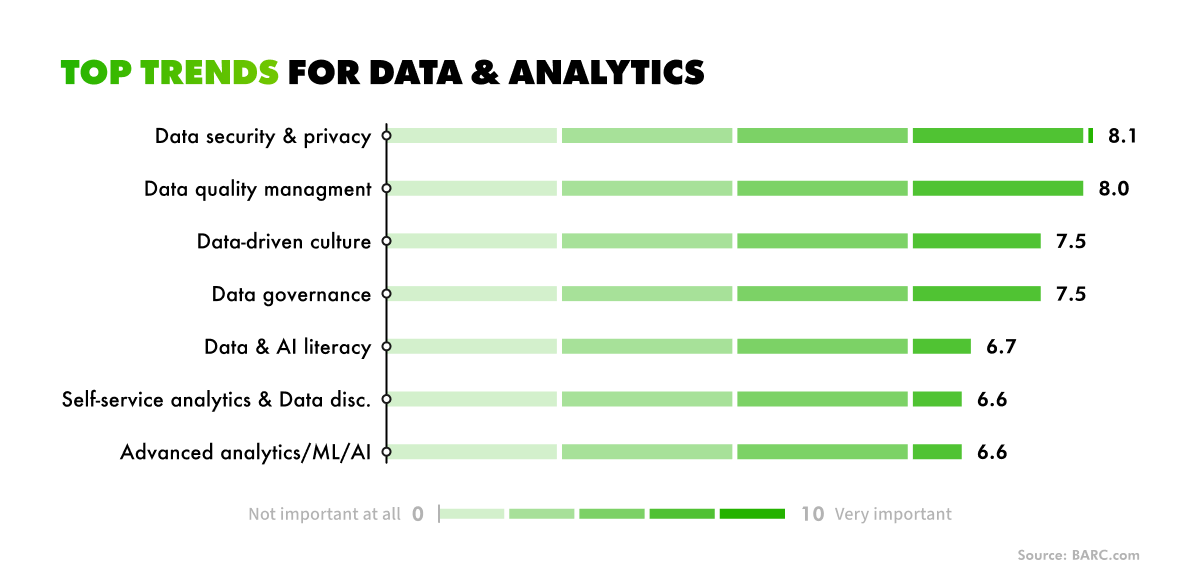
top data and analytics trends
Relevance of top trends for data and analytics

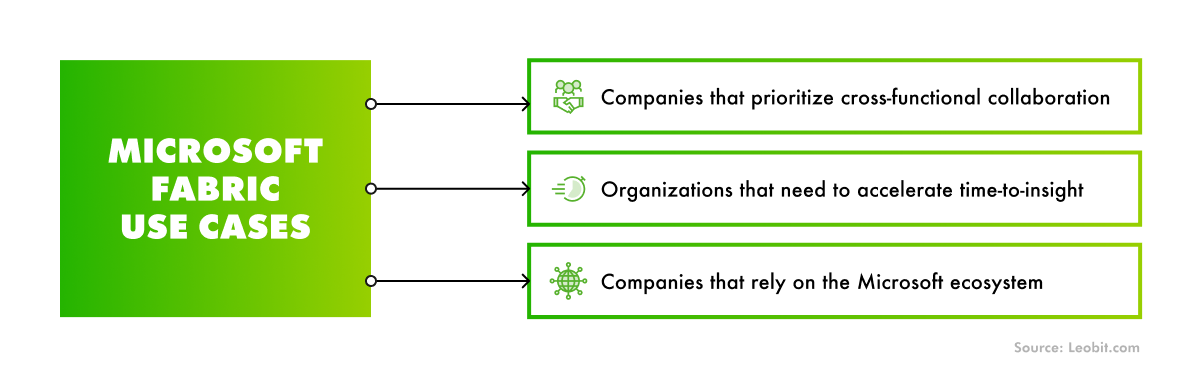
As a secure platform for cross-functional data management and governance, Fabric fits a wide range of scenarios. However, its advantages over other data platforms are especially clear in the three cases below.

data fabric solutions
Ideal Microsoft Fabric use cases

Let’s explore these Microsoft Fabric use cases in more detail.

Companies that prioritize cross-functional collaboration

If you want to establish a corporate culture where data is available for cross-department collaboration, Microsoft Fabric proves to be an efficient solution. In particular, it fits a data fabric architecture— an architectural approach that provides a unified, intelligent, and governed layer connecting data across an organization. Microsoft Fabric provides strong support for the data fabric software architecture because it consolidates diverse data workflows, such as engineering, analytics, and AI development, within a single platform.

By implementing Microsoft Fabric, you can break down data silos and promote interoperability across an organization. To ensure data reliability, integrity, and auditability across business units, you can use Fabric’s features like built-in governance, security, and lineage tracking.

Overall, Microsoft Fabric provides capabilities for establishing a scalable, consistent, and connected data environment with standardized analytics and data formats. This reduces friction between technical and business teams and improves alignment on data-driven strategies.

Organizations that need to accelerate time-to-insight

By automating workflows and reducing reliance on multiple tools, Microsoft Fabric allows teams to deliver insights faster. As noted earlier, it enables the management of diverse workflows and services through a unified interface designed for user convenience. Instead of spending time learning separate systems, handling multiple logins, or manually moving data across platforms, analysts can access storage, processing, visualization, and governance features in one place, which can accelerate the workflow.

The platform also offers built-in features for security and data lineage that are accessible to users without technical expertise. As a result, team members can leverage analytical capabilities of a data platform without involving data engineers, which can ultimately accelerate time-to-insight.

Companies that rely on the comprehensive Microsoft ecosystem

One of Microsoft Fabric’s key strengths lies in its tight integration with the broader Microsoft ecosystem, including Power BI, Azure, and Microsoft 365.

For example, imagine a retail company that uses Microsoft 365 for collaboration, Azure SQL for its transactional databases, and Power BI for reporting. With Fabric, the company can mirror sales and inventory data from Azure SQL into OneLake in near real time, transform it with built-in tools, and publish insights to Power BI dashboards without building separate ETL infrastructure.

 Book Icon

Whether your organization already relies on Microsoft services or is building a Microsoft-powered ecosystem from scratch, Fabric ensures consistent data flows, formats, and standardized billing and licensing.

Why to Choose Leobit for Microsoft Fabric Configuration

Every organization has unique data sources, workflows, compliance obligations, and performance needs, which makes tailoring the Microsoft Fabric platform far more than a straightforward installation. To ensure the platform delivers business value, you need data engineers who understand both Fabric’s technical capabilities and your organization’s data strategy.

Leobit is a Microsoft Solutions Partner in two categories: Data & AI and Digital & App Innovation. Our team includes 78 Microsoft-certified engineers, including Azure Data Engineers and Azure Solutions Architects, and we have delivered more than 100 Azure-based projects. We also hold ISO 27001:2022 certification, which matters when data platforms handle sensitive information.

For example, we built a BI forecasting and analytics solution for a global e-commerce company, with ETL pipelines in Azure Data Factory, an Azure Synapse data warehouse, and Power BI reports. We also apply advanced data management practices in Leona, our AI-based lead scoring and proposal generation solution.

Whether you are evaluating Fabric, migrating from Azure Synapse or Power BI Premium, or building a data platform from scratch, our business intelligence development team can help.

Conclusions

Microsoft Fabric is not a one-size-fits-all solution, but it offers clear value for organizations seeking a unified, Microsoft-native data platform. Its ease of use, integration with the Microsoft ecosystem, and capacity-based pricing make it an efficient tool for organizations that prioritize cross-functional collaboration and fast time-to-insight. With Fabric IQ and the connection to Microsoft Foundry, it is also becoming the data foundation for AI agents in Microsoft-centric companies.

While configuring Microsoft Fabric environments can be challenging, a team with strong cloud and BI expertise can help you build an efficient, business-tailored system.

Whether you need help optimizing your Fabric-based system or want experts to set up your data infrastructure from scratch, contact us and let’s boost your analytics, data management, and business intelligence capabilities.

FAQ

Microsoft Fabric is a SaaS data and analytics platform from Microsoft. It combines data integration, data engineering, data warehousing, real-time analytics, data science, and Power BI on top of a single data lake, OneLake.

They are not alternatives. Power BI is the reporting and visualization layer, and it is part of Fabric. Fabric adds what happens before the report: data ingestion, transformation, storage, and governance. If you only need dashboards on top of existing data, Power BI alone may be enough.

Microsoft Fabric gives users the ability to unify diverse data services under a single platform, provides efficient AI integration, a unified pricing model, and a lake-centric and open design.

Microsoft Fabric can be applied as a preferred data platform for organizations that need to replace fragmented on-premises or legacy data warehouses with a cloud-native and scalable solution, require native integration with Power BI and Azure AI services, or need centralized governance and security management for diverse data. However, the platform truly shines in comparison to other data platforms when it comes to companies that prioritize cross-functional collaboration, need faster time-to-insight, or rely on the Microsoft ecosystem.

Fabric is the optimal choice for Microsoft-centric companies that need BI, data warehousing, and self-service analytics in one place. Databricks gives more control for complex data engineering and ML workloads. Many organizations use both, with Databricks for advanced pipelines and Fabric for analytics and reporting.