This article will walk you through the practical decisions behind a computer vision project to help you choose the model family that will fit your workload.
But let’s start from the basics.
What is Computer Vision?
Computer vision is a branch of artificial intelligence that trains software to interpret and act on visual information from images, video, or live camera feeds. It gives machines the ability to identify objects in a scene and make decisions based on what their cameras capture, work that has traditionally required a person watching a screen.
Under the hood, a computer vision model is trained on large datasets of labeled examples: images annotated to show what each pixel, region, or object represents. The model learns to extract numerical features from raw pixels and map them to categories or coordinates. Once trained, it can run on new images and return a prediction in milliseconds.
Modern systems pair the trained model with classical image-processing techniques for preprocessing and increasingly rely on pre-trained foundation models. These models can be fine-tuned for a specific business problem with far less labeled data than was needed even a few years ago. That shift is what makes computer vision viable for product teams that do not run a dedicated ML research function: you can start from a model that already understands generic visual patterns, then teach it the narrow set of patterns your operation cares about.
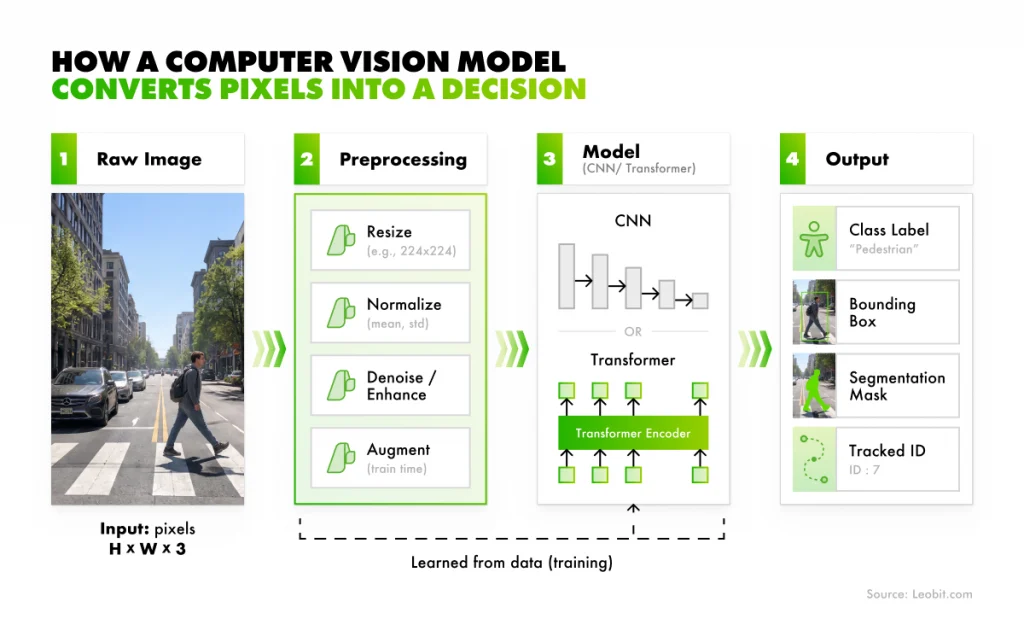
How a computer vision model converts pixels into a decision
The maturity of the field is best illustrated in regulated industries, where reliability and reproducibility are non-negotiable. In US healthcare, more than 1,200 AI medical devices have received FDA clearance and 76% of them work on medical imaging (e.g., radiology, pathology, and ophthalmology applications that read scans like X-rays, MRIs, and retinal photographs).
Outside healthcare, the same engineering pattern powers everything from the cameras on a warehouse loading dock to the sensors on autonomous farm equipment running outdoors. The technology layer is shared. What changes between deployments is the task being asked of the model and the data the model is trained on.
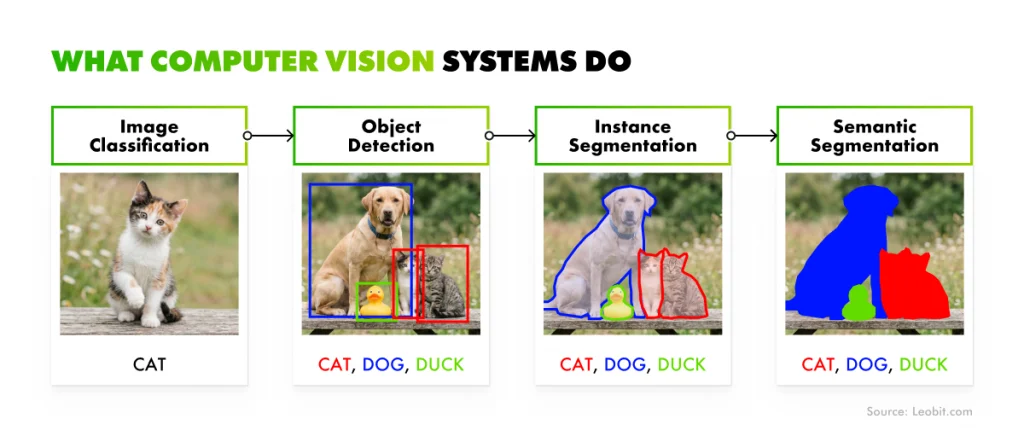
Computer vision splits into four core tasks: classification, detection, segmentation, and tracking. Each one answers a different question about an image or a video stream, and each one calls for different model families, training data, and deployment patterns. Knowing which task you actually need is the first scoping decision in any CV project. Get it wrong, and every later decision (model selection, hardware budget, labeling cost) inherits the mistake.
Computer vision systems’ tasks
Image classification
Image classification assigns an entire image to a single category, without identifying where anything is located within the frame. It fits well when the business question is binary or close to it. For example, is this product defective or acceptable? Does this incoming document belong to category A or B? Classification is often all you need for pass/fail quality control on a sorting line, or document triage in a back-office workflow.
Object detection
This task finds specific items within an image, draws a bounding box around each one, and reports a class label and confidence score for every instance. A good example here is a retail camera that can identify which products sit on which shelf and which slots are empty. Detection is the workhorse capability for most operational video analytics applications.
Segmentation
Segmentation goes far beyond drawing a rectangle, as object detection does. The system here identifies the precise pixel-level shape of each object, which can be especially beneficial when you need accurate measurements or when objects overlap in complex ways. In manufacturing, for instance, segmentation picks up microscopic surface defects that a bounding box would miss entirely. Another example is agriculture, where pixel-level analysis of satellite imagery can estimate crop health or wildfire damage across thousands of hectares.
Object tracking
Instead of asking what is in this frame, object tracking asks what this object is across all frames. This way, it adds the time dimension to detection. Object tracking helps a factory-floor system know that a specific pallet moved from station A to station B. For autonomous driving, object tracking is what lets the vehicle understand that the pedestrian it detected three seconds ago is now stepping into its path.
Picking the right task is the first half of the scoping decision. The second is picking the right model family, which is where we look next.
Which Model Families Power Modern Computer Vision?
Most production computer vision systems today sit on one of four model families: convolutional neural networks (CNNs), the YOLO family of real-time detectors, vision transformers, and open-vocabulary foundation models. Each family has its own strengths and its own production-readiness curve. Understanding the four gives you enough context to have a meaningful conversation with an engineering team without needing to go into the math.
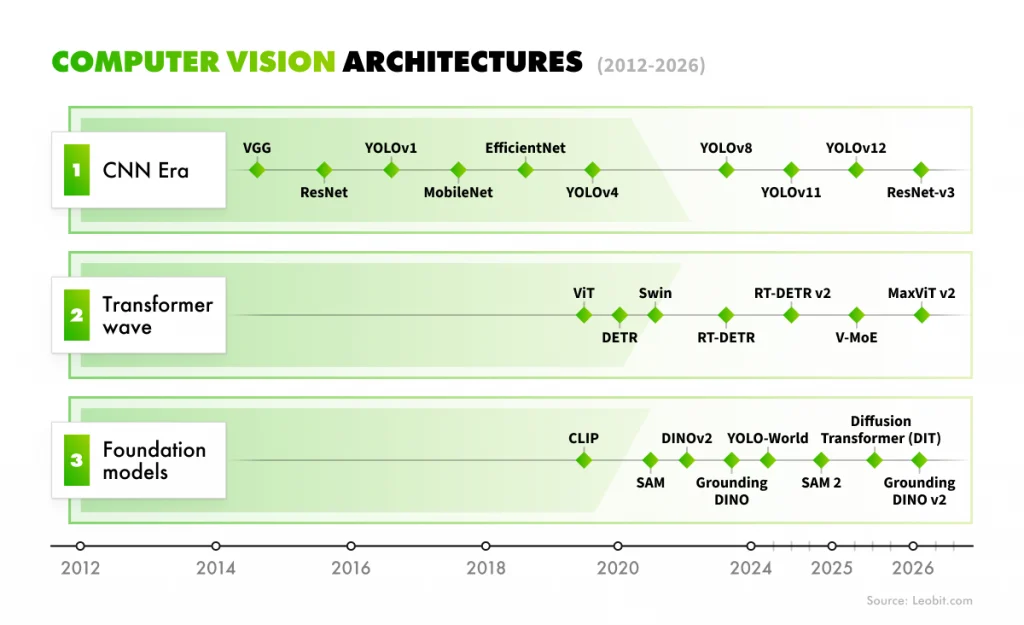
Computer vision architectures
In practice, the families often overlap. For instance, a YOLO detector typically uses CNN components in its backbone, and transformer-based detectors can run on the same edge hardware as a CNN.
Let’s take a closer look at how each of these models is built.
Convolutional neural networks
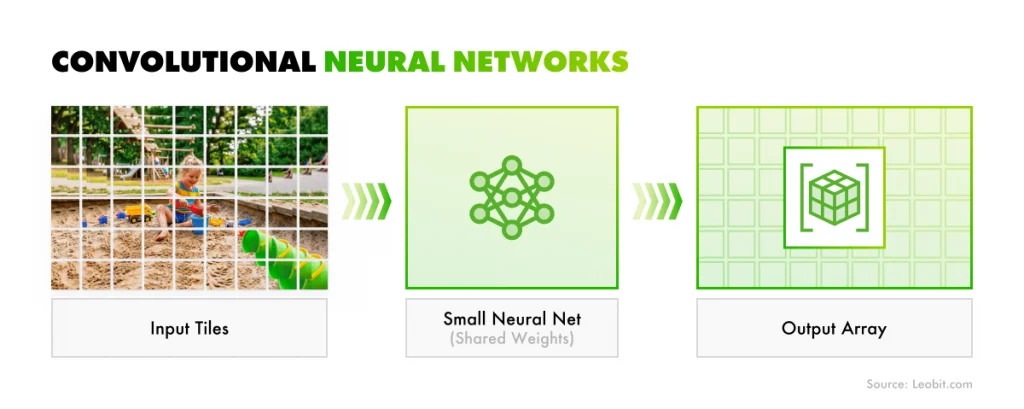
Convolutional neural networks, or CNNs, were the first deep learning models widely used in computer vision. They work by moving small filters across an image to detect visual patterns. In the early layers, these filters identify simple features such as edges, colors, and textures. Deeper layers combine these features to recognize more complex shapes and, eventually, entire objects.
CNNs are still widely used in production because they are efficient, reliable, and well supported by major deployment tools. Many teams continue to use architectures such as ResNet, EfficientNetV2, or MobileNetV3, either as standalone models or as feature extractors within larger object detection systems.
How CNNs work
The YOLO family
YOLO, short for You Only Look Once, has become the practical standard for computer vision systems that need to quickly process video. It was originally designed for object detection, but today the YOLO family supports a much broader range of tasks, including image classification, object detection, segmentation, pose estimation, and tracking.
This broad coverage makes YOLO especially useful for production systems. So your CV development team can work within one familiar framework, reuse the same optimization pipeline, and expand from one capability to another without rebuilding the entire computer vision stack.
Recent YOLO-based models include YOLOv10, YOLOv11, YOLOv12, and YOLO-World, an open-vocabulary version designed to detect a wider range of objects beyond a fixed set of predefined classes.
Vision transformers
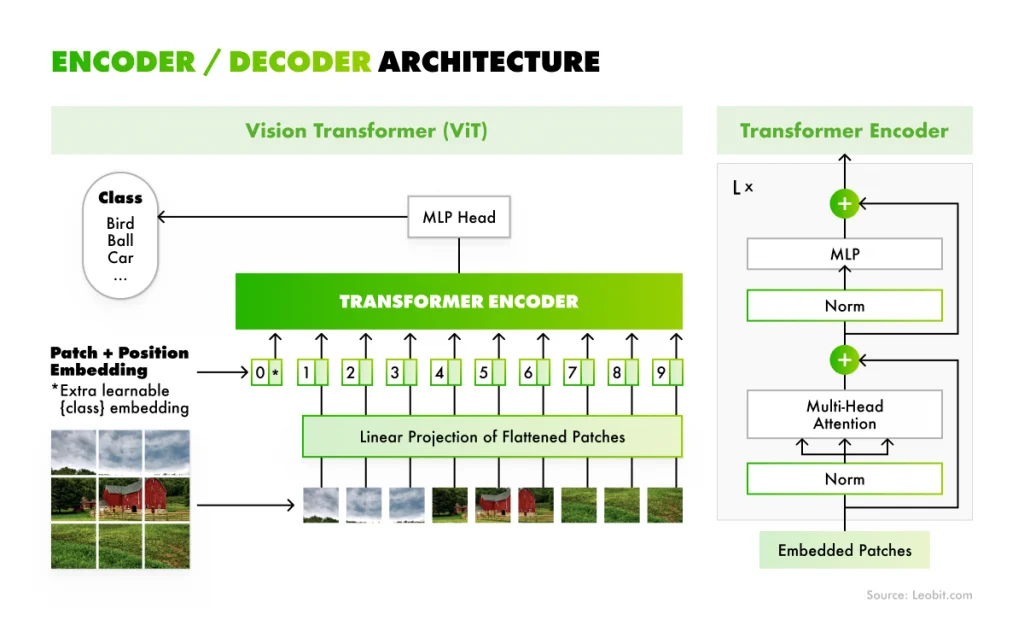
Vision transformers apply the architecture behind large language models to computer vision. Unlike CNNs, which analyze small local areas of an image step by step, vision transformers split an image into patches and examine how those patches relate to one another across the entire image. Thanks to this, they can capture a broader context.
It is especially useful in crowded, complex, or ambiguous scenes where local features alone may not be enough. For example, vision transformers can better understand how different parts of an object or scene connect, even when the image contains many overlapping elements.
Transformer-based models are now increasingly being used in real-world scenarios. For instance, RT-DETR brought transformer-based object detection to real-time speeds, which made it competitive with YOLO on production hardware. Swin Transformer is also widely used as a high-accuracy backbone for segmentation systems.
Encoder/ Decoder architecture scheme
Recent vision transformer models include ViT, DeiT, Swin-T/B/L, RT-DETRv2, and D-FINE.
Open-vocabulary and foundation models
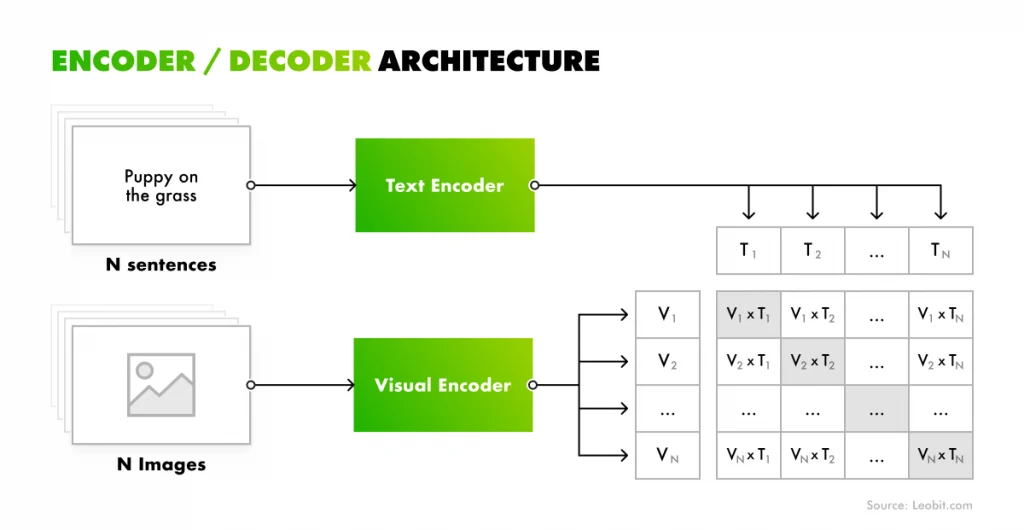
Open-vocabulary models can detect or segment objects based on plain-text descriptions, without being retrained on labeled examples of every specific class. This makes them useful when your need is to recognize a wide and changing range of objects.
CLIP, developed by OpenAI, helped make this approach mainstream by learning visual concepts from large-scale image-text pairs. Models such as YOLO-World and GroundingDINO apply a similar idea to object detection, allowing users to search for or detect objects using text prompts. SAM 2, or Segment Anything Model 2, extends this capability to segmentation by identifying objects that a user points to or describes.
These models are becoming widely applicable for use cases where labeled training data is difficult to collect or where the target object categories can often change. However, you should note that they are still maturing for production use. In many cases, they require careful validation and fine-tuning before they can deliver reliable results in real-world environments.
Encoder/ Decoder architecture scheme
For most production deployments today, the YOLO family and transformer-based detectors remain the mainstream choices. CNN backbones are still important because they often serve as feature extractors inside larger systems. They also remain a strong fit for two-stage detection methods such as Faster R-CNN, which first generates candidate object regions and then classifies each one.
Foundation models are worth monitoring closely, but they should not be treated as plug-and-play replacements for established production models. Teams still need to test them against their accuracy, latency, hardware, and reliability requirements.
Choosing the model family is only the first step. The next decision is selecting the right variant for the target accuracy, available hardware, and latency budget. That pairing is where we turn next.
How to Pick the Right Model for Each Computer Vision Task
The right model for a computer vision project is usually the smallest model from the right family that can meet your accuracy requirements on the target deployment hardware. In other words, the goal is not to choose the most advanced model available, but to choose the lightest model that performs well enough in real-world conditions.
The first step is to choose the right model family, which mostly depends on the task you need to solve. The table below maps the core computer vision tasks to the model families most commonly used for them in production. Segmentation is split into two practical categories because semantic and instance segmentation often serve different business needs.
Two points are worth noting before reading the table.
First, YOLO appears as the primary option in several rows because the YOLO family supports classification, object detection, segmentation, and tracking within one unified framework. For many teams, this means one codebase to maintain, one optimization pipeline, and a more straightforward path for expanding capabilities over time. This is one of the main reasons YOLO has become a default starting point for production computer vision systems.
Second, the “go-to models” column is not meant to cover every possible option. Each task has credible alternatives. The models listed are the ones teams typically consider first when they do not have a specific reason to choose something else.
Once the model family is selected, the final choice comes down to two main trade-offs.
Go-to models
Typical use cases
Classification
YOLO-cls, EfficientNetV2, ResNet
Pass/fail QC, product categorization, medical image triage
Object detection
YOLOv10/v12, RT-DETRv2
Counting, locating, and alerting on conveyor lines, loading docks, and perimeters
Instance segmentation
YOLO-seg, Mask R-CNN, SAM 2
Precise defect mapping, crop damage measurement, and surgical planning
Semantic segmentation
U-Net variants, SegFormer, DeepLabV3+
Land-use mapping, road scene understanding, and satellite imagery analysis
Object tracking
YOLO + ByteTrack or BoT-SORT
People counting, vehicle flow, pallet movement on a factory floor
Speed versus accuracy
Larger model variants usually deliver higher accuracy, but they are also slower and require more computing power. The right balance depends on the deployment environment, not on the model alone. For example, an inspection system that processes 120 units per minute has strict throughput requirements. If the model cannot analyze images fast enough, the entire production line may slow down. In this case, speed and consistency are critical.
A clinical imaging assistant has a different set of priorities. It may be acceptable for the system to spend several seconds analyzing each image, but missing an important finding would be a serious failure. Here, accuracy and reliability matter more than raw speed.
These are very different engineering problems. They should not be solved with the same model size, inference settings, or deployment configuration.
Generality versus specificity
Pre-trained models can recognize thousands of common object categories with strong out-of-the-box accuracy. However, they often struggle with the narrow distinctions that matter in a specific business or production environment.
For example, a generic model may recognize a component, surface, or defect category in general terms. But it may fail to distinguish between an acceptable surface variation and a structural crack on your specific part. These subtle differences are often exactly what the system needs to identify.
That is why fine-tuning on your own labeled data is usually necessary for production-grade performance. It helps the model learn the visual patterns and edge cases that are specific to your operation. In most cases, the added cost of fine-tuning is justified by the improvement in reliability.
Start by benchmarking the smallest model variant that can meet your accuracy threshold before moving to a larger one. Larger models are more expensive to run and harder to maintain on constrained hardware. In production, the accuracy gain from moving from a medium to a large variant is often smaller than the increase in compute cost, so it may not justify itself at scale.
Knowing which task to solve and which model family to use is half the picture. Where the model runs is the other half, and it changes more decisions than most teams expect.
Where Should You Run Your Computer Vision Model?
Computer vision deployments use one of three modes (cloud, edge, or on-premises), and the right choice depends on three concrete factors:
How fast do you need decisions?
How sensitive is the data?
How much bandwidth can you spend?
The table below summarizes the trade-offs.
How it works
When it works best
Watch out for
Cloud
Video or image data is transmitted to remote servers, processed there, and the results are returned over the network
Data volumes are moderate, privacy constraints allow offsite processing, and reliable high-bandwidth connectivity is available at the deployment location
Latency on time-critical decisions; bandwidth costs at scale; regulatory limits on transmitting sensitive data; dependency on connectivity
Edge
The model runs on a compact computing device mounted at or near the camera, with no round-trip to a remote server
Real-time decisions are required, network connectivity is unreliable, data privacy prevents transmission off-site, or bandwidth costs are prohibitive due to the volume of data generated
Edge hardware is significantly less powerful than a server GPU. A model that runs at 100 fps in the cloud may run at 5 fps on a small edge device. Requires careful model optimization. On-device management and firmware updates add operational overhead
On-premises
Powerful servers running on your own infrastructure handle inference internally, with no data leaving the network
Strong data governance requirements, consistent high-volume workloads that justify the infrastructure investment, and internal IT capability to maintain servers
High upfront capital expenditure; full responsibility for hardware lifecycle; requires internal or contracted IT support
Why edge deployment is viable now
Edge deployment has become much more practical in the last few years, largely because of a new generation of AI accelerator chips. Compact devices such as the NVIDIA Jetson Orin Nano can deliver up to 40 TOPS of AI performance at 7–15 watts, which is enough to run many real-time object detection workloads directly on a small, hand-sized board.
This matters because computer vision systems often need to quickly process video and do it close to the source. Running models on edge hardware can reduce latency, lower bandwidth costs, and keep sensitive visual data on-site instead of sending every frame to the cloud.
Adoption is following the hardware improvements. According to Deloitte’s enterprise AI infrastructure survey, 72% of enterprises expect to run AI-at-the-edge deployments at scale by 2028, compared with 36% today. As a result, a growing share of new computer vision projects are being designed with models running directly on edge devices from the start, rather than relying entirely on cloud-based inference.
The hybrid pattern
For many production deployments, the best option can be a hybrid setup. In this model, edge devices locally handle real-time decisions (i.e., close to the camera), while aggregated results and periodic sample data flow back to the cloud for monitoring, model retraining, and business analytics.
For example, an edge device can immediately flag defects on a production line or trigger an alert after a perimeter breach. These tasks need low latency, so they are better handled locally. At the same time, aggregated results and selected sample data can be sent to the cloud, where teams can track system performance, retrain models, analyze trends, and connect computer vision outputs to business workflows.
This approach keeps time-sensitive processing at the edge and leaves non-urgent, compute-heavy, or analytics-focused work to the cloud. It also gives teams more flexibility: they can reduce latency and bandwidth use without giving up centralized visibility and continuous model improvement.
The deployment mode you choose affects the hardware budget, operational overhead, and the model variants you can realistically run. It also influences one of the most important and often underestimated decisions in a computer vision project: the data needed to make the model work reliably with your specific cameras, environments, and operating conditions. That is where we turn next.
Common Problems with Training Data for Computer Vision Models
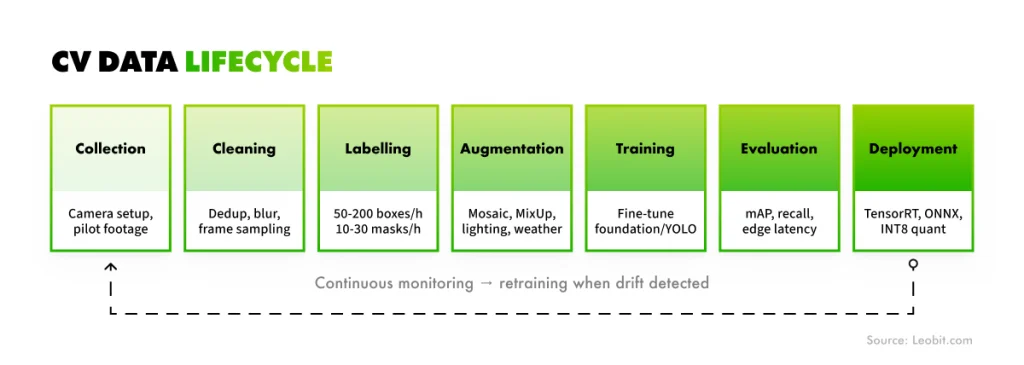
The single factor that most consistently determines whether a computer vision project ships or fails is data, specifically the availability, quality, and representativeness of labeled training data. Architecture, model size, and deployment platform are easier to discuss in a kickoff meeting, but data is what decides whether the resulting system actually works on the cameras and conditions you have. IBM reports that 42% of businesses cite the lack of proprietary data for training their models as one of the major AI adoption challenges. That number lines up with what most CV teams discover the hard way in their first quarter in production.
CV data lifecycle: Scheme
Difference between training and real data
Pre-trained models are built to recognize common object categories under relatively standard conditions. In production, however, the objects you care about may be highly specific, and the environment is rarely ideal.
A model trained on clean, high-resolution images may struggle with lens distortion, glare, poor lighting, or vibration from your installed cameras. Similarly, a model trained on a balanced academic dataset may miss rare defect types if your real production data is uneven or dominated by only a few failure patterns.
The closer your training data is to what the camera sees in production, the better the deployed system will perform.
Training a computer vision system requires human labelers to review thousands of images and mark the objects the model needs to recognize. For object detection, this usually means drawing bounding boxes around each object. For segmentation, it means tracing more precise outlines.
This work is time-consuming and expensive, but the bigger challenge is often domain knowledge. A labeler who cannot distinguish between an acceptable surface variation and a structural defect may create annotations that teach the model the wrong patterns.
In other words, annotation quality depends on how well labelers understand the problem. Adding more labelers will not solve the issue if they lack the expertise to label the data correctly.
Data availability
A computer vision system needs examples of every object and condition it will face in production. This becomes difficult when the target events are rare, such as low defect rates, infrequent equipment failures, or occasional safety incidents. In these cases, simply waiting to collect enough real examples may take too long.
Two practical solutions are commonly used:
Synthetic data generation. Teams create or augment realistic images of underrepresented categories.
Targeted data collection. Cameras are set up to capture every instance of a rare event as soon as it occurs.
Together, these approaches help fill gaps in the dataset and make the model more reliable in real-world conditions.
One useful shortcut is to start with public datasets. The research community has created large, carefully annotated datasets that cover many computer vision domains.
These datasets are best used as a pre-training step before fine-tuning the model on your own data. They do not replace domain-specific data, but they give the model a stronger starting point.
Here, we gathered several publicly available datasets that can be useful.
What's in it
Most useful for
COCO
330,000 images, 80 object categories
Standard benchmark for detection and segmentation models
Pascal VOC
Vehicles, people, and animals in everyday scenes
Detection baseline
ImageNet
14 million images across 21,000 categories
Foundation for most pre-trained classification models
VisDrone
Aerial imagery captured from drones
Aerial and drone-based applications
DOTA
Satellite and aerial imagery with oriented bounding boxes
Remote sensing, vehicle, and infrastructure detection
NIH ChestX-ray14
Chest X-ray images with disease labels
Medical imaging pre-training
ISIC
Skin lesion archive
Dermatology and medical imaging
In practice, pre-training on a large public dataset and then fine-tuning on a smaller, domain-specific dataset is often better than training only on your own narrow dataset. It can also reduce the number of labeled examples you need to collect.
Choosing the right task, model family, deployment mode, and data strategy is only the first step. Turning those decisions into a working computer vision system on your actual cameras and hardware is a different challenge, and it requires an experienced development partner.
How Leobit Can Help with Your Computer Vision Project
Leobit’s computer vision services cover everything from model training and fine-tuning to production deployment on constrained hardware. Our team has experience building detection and multi-object tracking systems on edge devices, including Raspberry Pi and NVIDIA Jetson. Achieving reliable 30+ FPS inference on these boards requires careful model quantization, inference-runtime optimization, and the right architecture choice.
Our work also extends beyond standard RGB cameras. We have developed systems that operate in the infrared spectrum, which brings its own data and annotation challenges. These systems support use cases that visible-light cameras cannot cover, including night-time monitoring, thermal anomaly detection, and industrial inspection.
Here are some of our computer vision projects.
Case study: AI-Powered construction progress tracking app
AI-Powered Construction Progress Tracking App
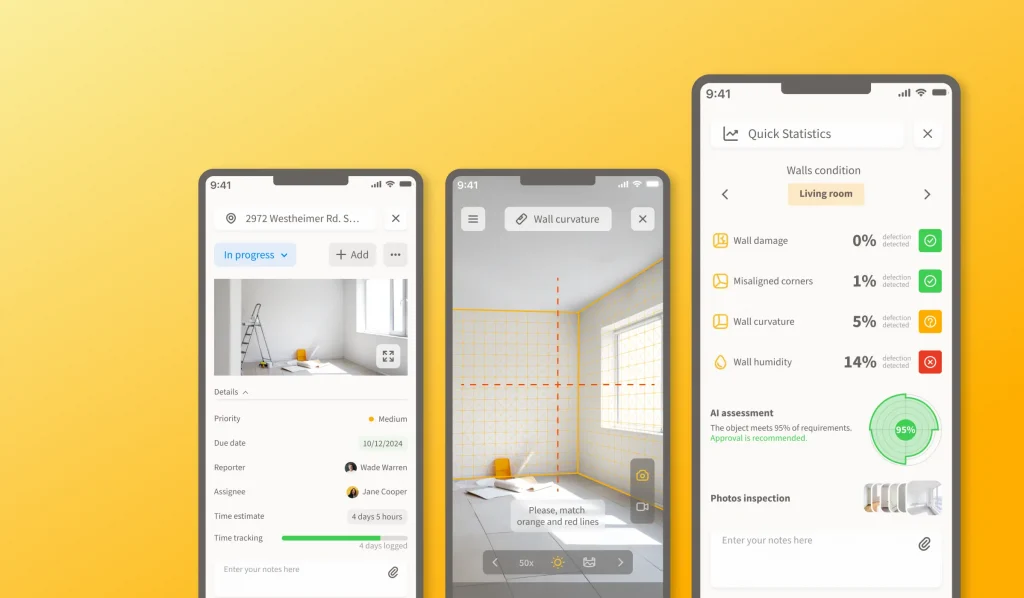
A Nordic construction firm came to Leobit looking to replace manual on-site progress reporting with an AI-driven system. We built a cross-platform Flutter application that lets workers report progress and upload site photos from the field, with custom CV models running on Microsoft Azure GPU servers analyzing every image. The models detect wall cracks, misaligned corners, wall curvature, and other structural defects, and reached 92.7% accuracy on the client’s test dataset.
One detail that mattered as much as the model itself was photo quality. The images workers took on-site were often shot at the wrong angle or under inconsistent lighting, which broke the analysis. We added AR-assisted photo guidance using ARCore on Android and ARKit on iOS, walking the worker through the correct angle and position for each shot before they could submit it. The app also caches photos locally via SQLite and syncs in the background once connectivity returns, an important workaround for sites with patchy coverage. Read more details in our AI-Powered Construction Progress Tracking App case study.
Case study: Smart trichoscopy application with a hardware case
Smart trichoscopy application
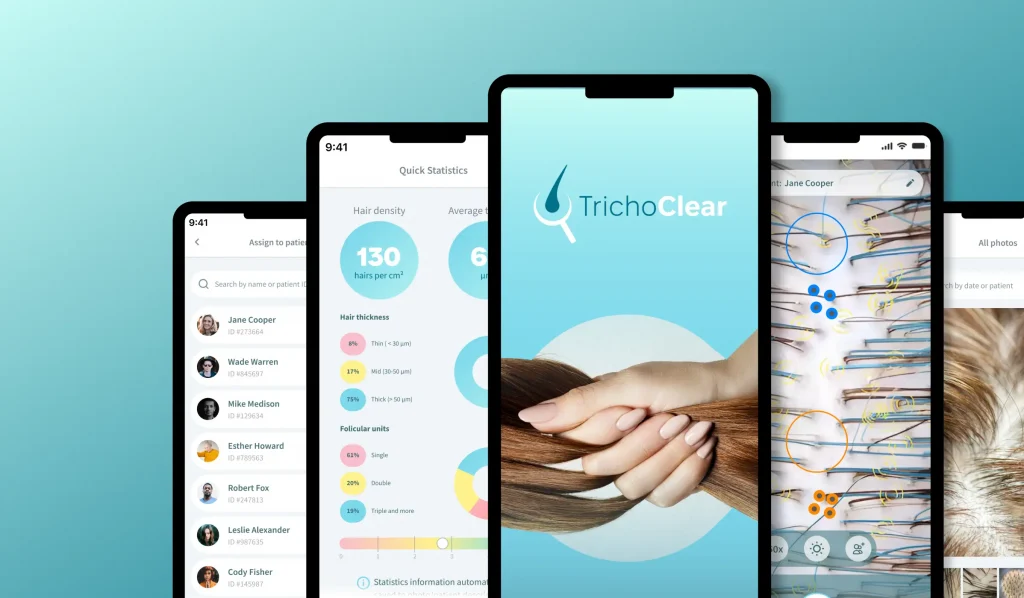
A European healthtech provider specializing in hair research and diagnostics came to Leobit to build a mobile iOS and Android application that pairs with the company’s proprietary computer vision algorithm and a custom hardware case.
We developed the app in Flutter and integrated the client’s CV algorithm via API. The biggest engineering challenge was image fidelity. The external hardware case introduced fish-eye distortion that made raw images unsuitable for analysis, and handling the calibration in Flutter alone would have dropped performance from 30 fps to around 2 fps. We moved the image-processing pipeline (camera calibration using Aruco boards and OpenCV, plus distortion correction) into C++ and called it from Flutter via Dart FFI.
The result: image-processing time dropped from 2 minutes to under 10 seconds per scan, and the app stayed responsive throughout the examination workflow. Check out more details in our Smart Trichoscopy Application With a Hardware Case case study.
Across these projects, one lesson is consistent: the deployment environment shapes every important decision. Teams that define hardware constraints, lighting conditions, and the data pipeline before choosing a model usually reach production faster than those that treat these questions as downstream concerns.
Final Thoughts
Computer vision has reached a level of maturity where technology is no longer the main barrier in most projects. There are capable model families for every common task, the tooling is well supported, and deployment hardware now ranges from cloud GPUs to compact edge accelerators.
What determines success today is how clearly the problem is scoped, how well the training data reflects real production conditions, and how early the deployment environment is treated as a key design constraint.
The teams that reach production fastest often choose the model last. They first define the task, collect representative data, and confirm deployment constraints. Once those pieces are clear, model selection becomes much easier.
Whether you are validating a CV idea with a proof of concept, integrating computer vision into an existing product, or modernizing an aging vision pipeline for new hardware, our AI/ML development team can help with the model and data work that turns an idea into a CV system you can ship. Contact us when you are ready to talk through your specific problem.
FAQ
Image recognition is the task within computer vision, while computer vision is the broader field that also covers detection, segmentation, tracking, and other visual understanding tasks. Image recognition usually means assigning a label to an entire image, such as “defective” or “acceptable.”
The amount of training data depends on the task, the model architecture, and how different your production conditions are from publicly available datasets. For instance, a prototype may need a few hundred to a few thousand labeled examples per class. However, production systems usually need thousands or more, especially when conditions vary or target events are rare.
Use edge deployment when you require real-time decisions, have unreliable network connectivity, or images cannot leave the site. Cloud deployment fits better when bandwidth is stable, and the model needs more compute than a small embedded board can deliver. Based on Leobit’s experience, many production teams end up with a hybrid setup: real-time decisions run at the edge, while aggregated results and sample data flow back to the cloud for monitoring and retraining.
Leobit’s AI/ML team supports computer vision projects across the full lifecycle: from initial scoping and proof of concept, through model selection, fine-tuning, and data pipeline design, to production deployment on cloud, edge, or hybrid infrastructure.
Inna loves making complex tech feel simple. With a strong eye for innovation, she helps businesses turn complicated ideas and data into clear strategies they can actually use. Whether it’s new tools or big trends, she’s all about making technology work for people.
Ivan is an Associate Application Architect with 10 years of experience in the IT industry, progressing from Middle .NET Developer to Lead Software Engineer. He has contributed to the design and delivery of enterprise software systems. He has been involved in development processes, technical problem-solving, and ensuring software quality.
62% of business leaders at mid-sized and large companies believe parts of their business-critical applications are already so outdated that they no longer meet ...
In August 2025, TypeScript overtook Python and JavaScript to become the most used language on GitHub: 2.6 million monthly contributors, up 66.6% in a single ...
Nearly 90% of organizations are already piloting or deploying generative AI in their quality engineering practice, according to the World Quality Report 2025. ...
Lenovo’s 2026 CIO Playbook, with research by IDC, found that 46% of AI proofs of concept (PoCs) have progressed into production, so just over half have ...
MIT’s State of AI in Business 2025 report shows that monthly job listings for forward deployed engineers increased by more than 800% this year, part of a ...
The .NET ecosystem continues to flourish in 2026, with over 478,000 packages on NuGet that have been downloaded over 800 billion times. Numbers from ...
This year’s studies suggest that 31% of organizations across Norway, Sweden, Denmark, and Finland plan to increase spending on external IT service providers ...
Leona, Leobit’s AI agent designed to find promising cooperation opportunities and automatically send requests for proposals (RFPs), has helped our sales ...
15 mins read
We use cookies to enhance your browsing experience. By agreeing, you accept our Privacy and Cookies Policy.
By ignoring or closing this banner, we will only collect essential cookies necessary for the website to function properly.
 Leobit