The gap between average and fast engineering organizations keeps widening. The 2024 DORA report shows that elite teams deploy on demand with a lead time under one day, while low performers ship monthly at best, with lead times stretching to six months.
Micro-frontend architecture is one way to close that gap. It splits a monolithic UI into autonomous, independently deployable web applications, so each team releases on its own schedule.
This article provides a pragmatic reality check to help you determine whether your platform actually needs the transition to micro-frontend architecture and shares a migration strategy you can use.
But let’s start from the basics.
What Is Micro-Frontend Architecture?
Micro-frontend architecture is a web development approach that splits a large user interface into smaller, independently deployable applications, each owned end to end by a separate team. To the user, the product still looks and behaves like a single application. Under the hood, every module has its own codebase and its own release cycle.
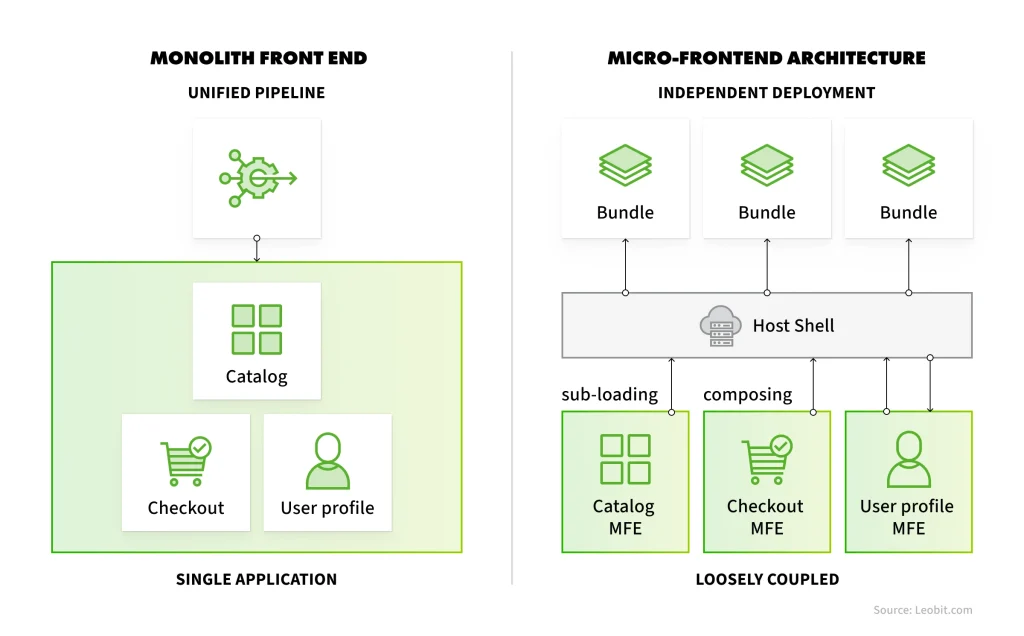
The idea extends microservices thinking to the browser. Instead of one front-end monolith where all features share a single build and release process, each business domain (checkout or search, for example) becomes a self-contained micro-application, often shortened to MFE. A shell application, also called a host or container, composes these modules into one cohesive page and handles shared concerns such as routing and authentication.
Notice what these adopters have in common: many front-end development teams working on one product. Micro-frontends solve organizational scaling problems first and technical problems second.
Monolithic front-end vs. Micro-Frontend architecture
They eliminate cross-team code contention and enforce clear domain ownership. In return, squads get full autonomy to release features on their own schedule without waiting for the rest of the app.
However, micro-frontends are not needed simply because a frontend application becomes large or complex. They become essential when the existing architecture blocks team independence and delays releases. Whether your team actually faces those problems is what the rest of this article helps you determine.
Core Architectural Trade-offs: Micro-Frontends vs. Modular Front end
Choosing micro-frontends means trading operational simplicity for organizational speed. It is a specific response to scaling problems rather than a universal solution. Before making the shift, engineering leaders need to figure out whether their delivery issues are caused by code structure or team dynamics.
When micro-frontends solve real bottlenecks
Micro-frontends become necessary when organizational scale makes monolithic deployment pipelines a bottleneck. They solve real operational friction when:
Multiple autonomous teams are increasingly dependent on one another’s release schedules
Deployment pipelines are jammed with a failure in one domain’s test suite, halting releases for the entire platform.
Heterogeneous tech stacks or legacy extraction require isolated lifecycles during a gradual platform migration.
When two or more of these frictions show up in every release cycle, the coordination cost is already higher than the price of running independent deployments, and micro-frontends start paying for themselves.
Micro-frontends move complexity around rather than removing it: what used to be one build pipeline and one stylesheet becomes a coordination problem across independent modules. Before you commit, several core engineering challenges must be explicitly addressed:
CI/CD pipeline complexity. Managing CI/CD at scale is a significant hurdle. Each module runs its own independent release workflow, which shifts your operational burden from one codebase to a web of micro-applications.
Integration cost & unified design systems. Maintaining a unified Design System is an engineering challenge in its own right. Teams usually solve this with a Headless Design System by publishing UI tokens, CSS variables, and core components as a versioned private NPM package. This allows different stacks like Next.js, Angular, or React to share the exact same visual foundation.
CSS collision and style isolation. A common issue in distributed UIs is style collision, where CSS from one module leaks into another and breaks the layout. Web Components handle this natively via Shadow DOM, but standard SPA setups require explicit isolation techniques, such as scoped CSS or prefixed Tailwind classes, to prevent visual bugs.
Browser Runtime Overhead: Every micro-frontend risks duplicating dependencies, which inflates bundle sizes and slows down mobile users. Teams fix this with Externalized Dependencies, marking heavy libraries like React, React-DOM, or RxJS as external during the build so the browser loads and parses them only once.
A good micro-frontend architecture gives teams speed and freedom, but never at the expense of the user experience. The goal is to let squads ship independently without fracturing the product.
Integration Strategies: How to Combine Independent Parts
There is no universal standard for building micro-frontends. Your choice of pattern depends primarily on your performance targets and necessary level of module isolation.
The key micro-frontend integration approaches are outlined below:
Isolation
Primary use cases
Module Federation
Flexible (Runtime JS)
Large-scale modern SPAs
Web Components
High (Shadow DOM)
Polyglot systems (React + Vue + Vanilla)
iFrame Sandbox
High (Sandboxing)
Legacy migration & Third-party widgets
Build-Time (NPM)
Low (Static)
Shared UI libraries & Design Systems
Server-Side Composition
High (Network)
SEO-driven sites & Page Stitching
Let’s examine each approach in greater detail.
1. Module Federation
Module Federation is a tool that allows front-end teams to independently release functionality while preserving the speed and integrity of a Single Page Application.
Technically, this is achieved through dynamic loading: instead of coupling dependencies at build time, teams host exposed modules on remote endpoints. The main container dynamically downloads and executes these modules without full page reloads, keeping deployments autonomous without sacrificing the user experience.
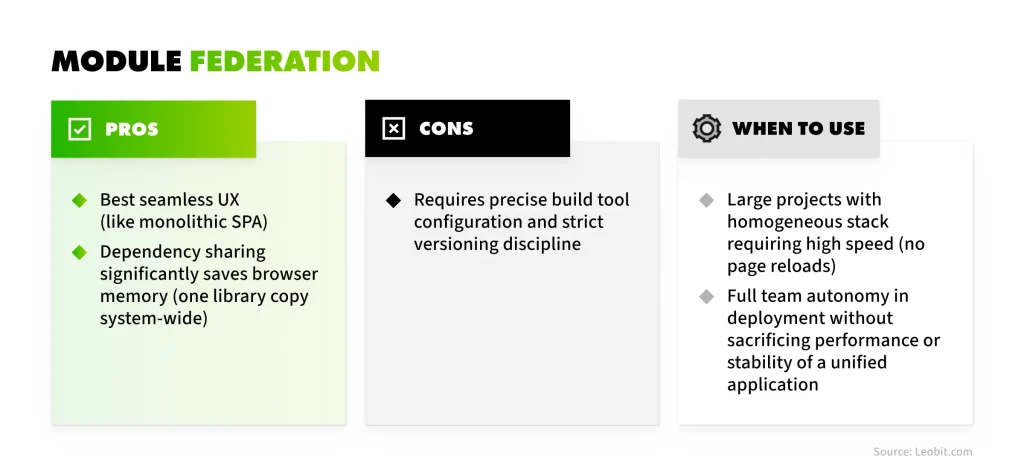
Pros. Superior smooth UX (matching a monolithic SPA), shared dependencies capability which significantly saves browser memory (one library instance system-wide).
Cons. Requires precise build tool configuration and strict versioning discipline.
Choose it in large-scale projects with a homogeneous stack where high performance (without page reloads) and full team deployment autonomy are required without sacrificing system stability.
Module Federation: Pros and cons
2. Web Components
Using native browser standards (custom elements, shadow DOM) allows wrapping any functionality into independent custom tags. This delivers true technological independence: you can build a widget in Angular or Vue and embed it into a React application without the risk of style leakage.
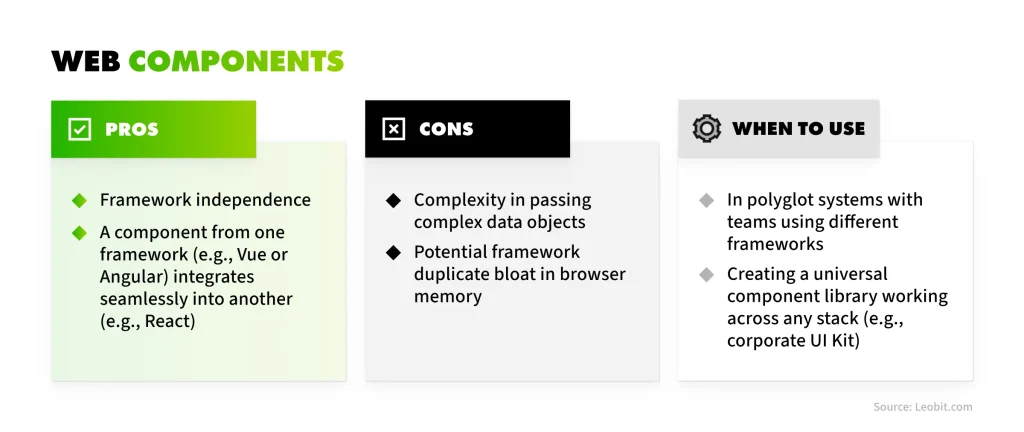
Pros. Framework independence. You can build a component in Vue or Angular and effortlessly insert it into a React application.
Cons. Complexity in passing complex data objects; potential duplication of framework runtimes in the browser memory.
Choose it in polyglot systems where different teams use distinct frameworks, or for building a universal component library that must run across any stack (e.g., an enterprise UI Kit).
Web Components: Pros and cons
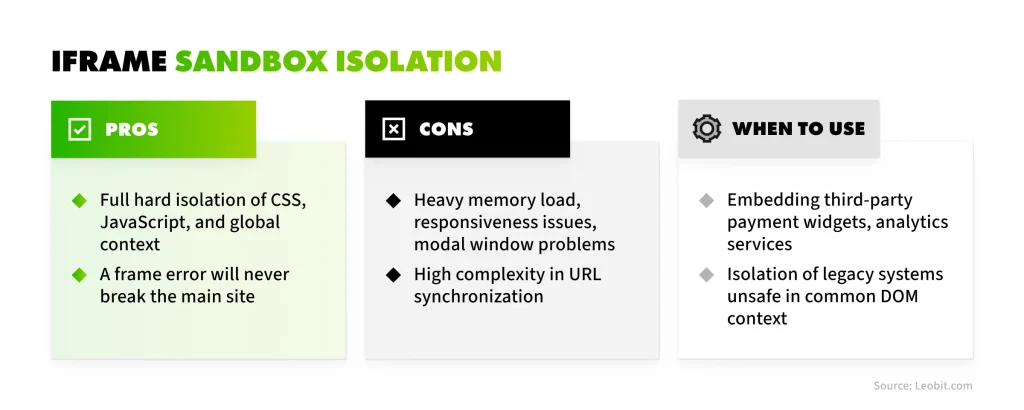
3. Iframe Sandbox Isolation
The oldest and most reliable isolation method, where each module is loaded inside an iframe element. It provides absolute protection against CSS and JavaScript conflicts: a crash inside the frame will never impact the host site. The trade-off for this security includes increased memory consumption, challenges with responsive design, handling modals, and URL context synchronization. This makes it an ideal choice for securely embedding third-party payment systems or non-isolated legacy modules.
Pros. Total isolation of runtime logic and styles. A failure inside the frame cannot break the parent application.
Cons. Heavy memory overhead, responsiveness and modal window challenges, and complex URL synchronization.
Choose it when embedding third-party payment widgets, analytics services, or isolating legacy systems that are unsafe to run within the shared DOM context.
Iframe Sandbox Isolation: Pros and cons
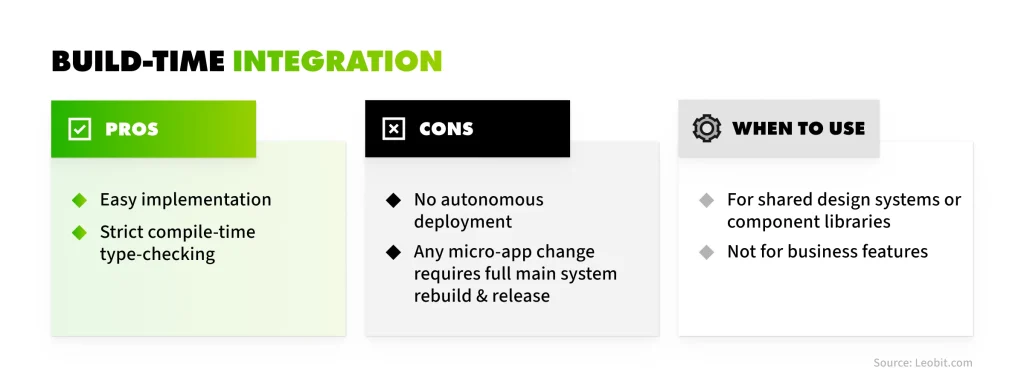
4. Build-Time Integration
In this approach, micro-frontends are published as separate private NPM packages and integrated as dependencies into the host application. This provides strict compile-time type checking and simplicity, but strips away the primary benefit of micro-frontends: independent deployment. Any change in a remote module requires a redeployment of the entire main system. Therefore, this option is typically suited for shared UI libraries rather than business features.
Pros. Simplicity of implementation, strict compile-time type checking.
Cons. Lack of independent deployment. Any change in a micro-application requires rebuilding and releasing the entire main system.
Choose it for shared design systems or component libraries, but not for business features.
Build-Time Integration: Pros and cons
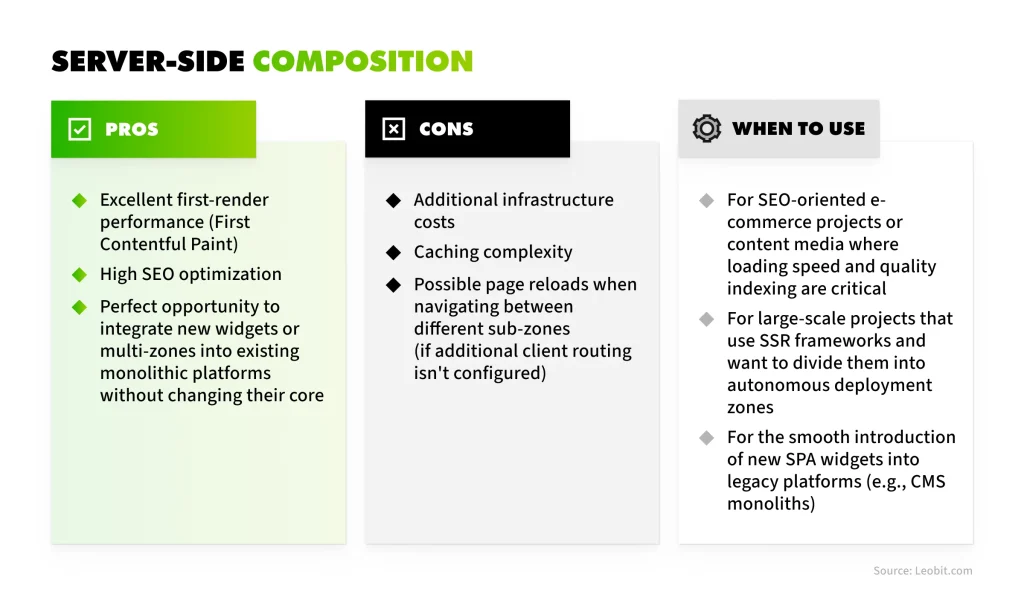
5. Server-Side Composition (Proxy / Edge / SSR)
Server-side composition assembles the page before it ever reaches the user’s browser. Instead of relying on client-side JavaScript to stitch modules together, a web server, a router, an Edge Worker on a CDN, or a BFF gateway (such as YARP in a .NET environment) proxies incoming requests and combines HTML fragments or entire zones into one cohesive layout. This technique is known as page stitching.
A classic example of this approach is Next.js Multi-Zones, where multiple independent Next.js applications (zones) are combined via a proxy layer into a single site mapped by URL paths (e.g., catalog on one app, account dashboard on another).
Alternatively, a core CMS site can function as the base skeleton, while specific paths are proxied to autonomous micro-applications.
Pros. Excellent First Contentful Paint performance, high SEO optimization, and ideal integration capabilities for new widgets or multi-zones into existing monolithic platforms without modifying their core.
Cons. Additional infrastructure costs, complex caching strategies, and potential page reloads when navigating between different zones (unless advanced client-side routing is configured).
Choose it for SEO-driven e-commerce projects or content media platforms where loading speed and indexing are critical; for large-scale projects using SSR frameworks aiming to split them into autonomous deployment zones; for CMS monolith integration; for targeted SPA widgets.
Server-Side Composition: Pros and cons
How We Apply Micro-Frontends Integration Strategies at Leobit
These integration patterns are how we build and ship our own products, and two of them show the choices in action.
The first is the software development cost calculator, our AI-driven estimation tool. It handles multi-step estimation logic and brief file parsing while calculating costs in real time. To integrate this heavy functionality into our primary site without touching core theme files or risking CSS conflicts, we encapsulated it in an iFrame sandbox. The isolated setup lets us update the calculator’s AI engine independently, and it cut deployment iterations by roughly 1.5x to 2x with zero visual regression.
The second is Leora, our AI-powered voice sales assistant, which runs as a standalone micro-frontend composed at runtime. Its script mounts instantly into a host application container without disrupting core CMS performance.
The biggest mistake teams make with micro-frontends is splitting by page layout instead of domain logic. When you decompose by real business verticals rather than UI components, you avoid the overhead of shared global state and keep your deployments truly independent.”
Olesia Kazanivska
Web UI Software Engineer at Leobit
Managing Runtime Complexity: Orchestration, Communication, and Fault Tolerance
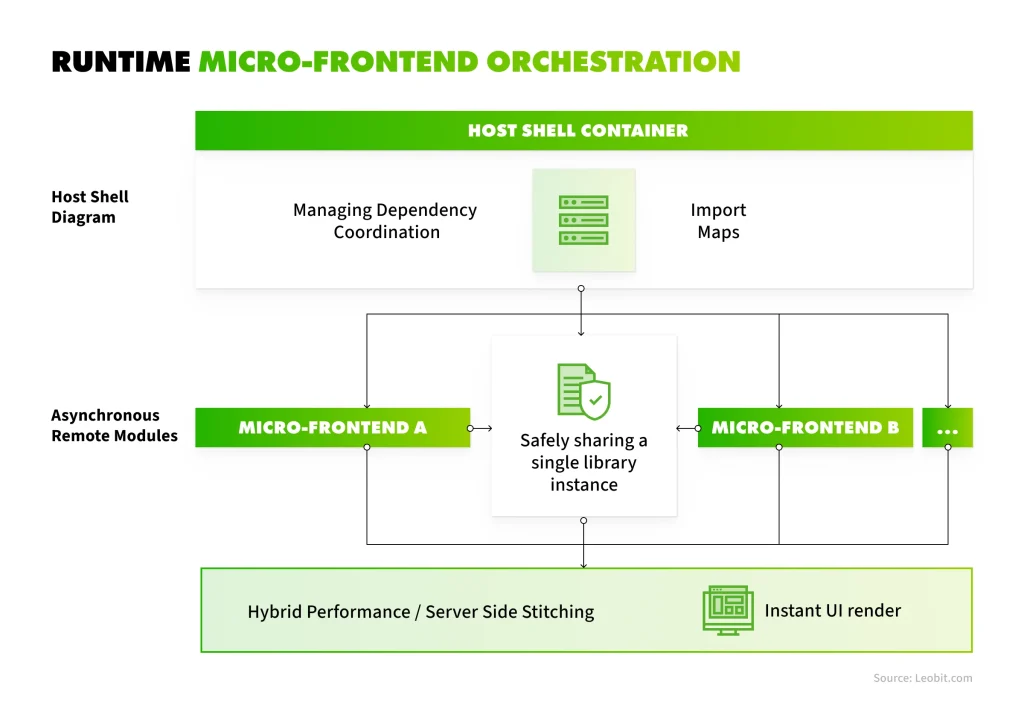
With runtime micro-frontends, the biggest technical hurdle is orchestration. The main shell app has to load and mount separate async modules smoothly, making sure the user experience stays fast and responsive without breaking performance.
A resilient runtime system relies on these core pillars:
Runtime orchestration
Effective orchestration boils down to three primary challenges:
Dependency management. Uncontrolled runtime loading risks version collisions and duplicated libraries (e.g., multiple React instances). Solutions like Module Federation shared scopes or Import Maps enforce singleton core dependencies across all remote modules.
Loading performance & layout stability. Sequential module fetching causes network waterfalls and cumulative layout shifts (CLS). High-performing setups use server-side composition or edge-side stitching to serve pre-rendered HTML before client-side hydration.
Lifecycle management. The orchestrator must reliably handle module initialization, mounting, unmounting, and graceful degradation during network drops.
Runtime micro-frontend orchestration scheme
Inter-module communication
Sharing a global state store (such as Redux or Zustand) across micro-frontends introduces hidden coupling, where a state schema update by one team inadvertently breaks another team’s module. To preserve independent deployability, communication must rely on decoupled contracts:
Use the URL as the single source of truth. Passing parameters through query strings keeps modules synchronized without direct data exchange.
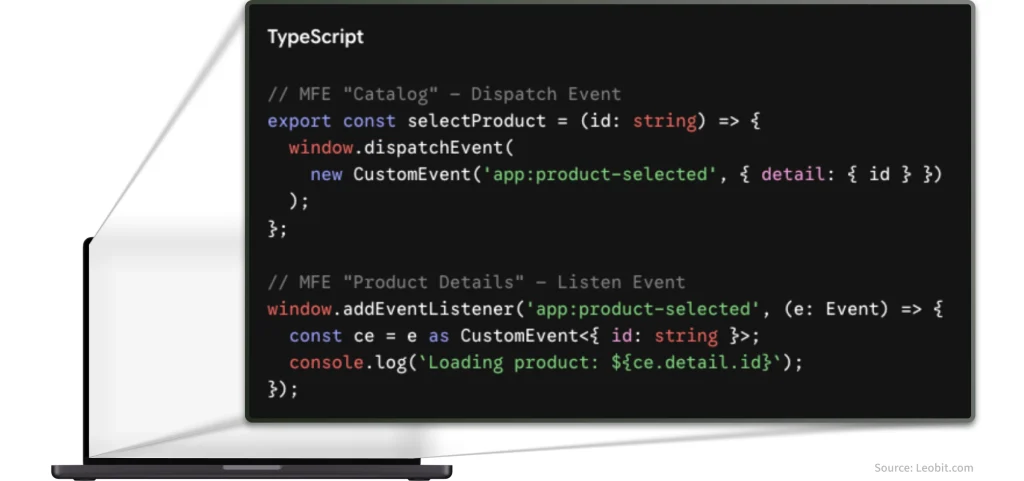
Use native custom browser events. Standard browser Event APIs are ideal for passing asynchronous events between modules.
Inter-module communication
Strict communication contracts allow teams to upgrade dependencies or refactor internal state without cross-team coordination.
Fault isolation & error boundaries
In a monolithic application, a single uncaught exception can trigger a global failure, resulting in a blank screen error. A distributed front-end system relies on fault isolation by wrapping every remote micro-frontend in an Error Boundary.
If a remote module fails due to a JavaScript error or network timeout, the Error Boundary catches the exception, renders a localized fallback UI, and keeps the rest of the application fully functional. Attaching rich metadata (module ID, build version) to these errors and streaming them to observability tools like Sentry or Datadog enables surgical debugging without sifting through noisy global logs.
When to Adopt Micro-Frontends and When to Avoid Them?
Transitioning to micro-frontends is a strategic investment decision. It adds infrastructure and DevOps overhead, so it must be justified by clear business metrics.
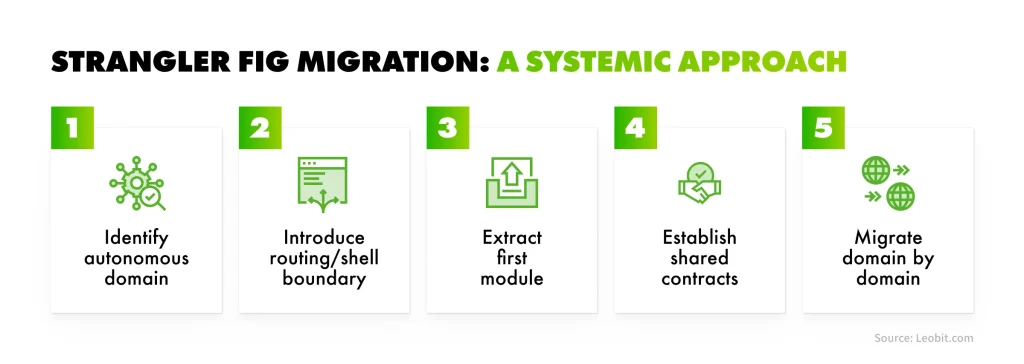
Micro-frontends are often considered an effective way to modernize legacy monolithic interfaces through the Strangler Fig pattern. This approach gradually replaces legacy functionality with independent micro-applications, eliminating the operational risks associated with a complete system rewrite. In practice, this migration follows a structured engineering sequence:
Identify an autonomous domain. Select a low-risk, self-contained business module (e.g., user settings, secondary dashboard, or a payment widget) to serve as the pilot.
Introduce shell & routing boundary. Deploy an orchestration Shell layer with a reverse proxy or client-side router to handle domain traffic routing.
Extract first module. Rebuild and deploy the selected domain as an independent micro-frontend alongside the existing legacy monolith.
Establish shared contracts. Define clear API contracts, authentication flow sharing, and Headless Design System tokens for visual cohesion.
Migrate domain-by-domain. Systematically decompose and migrate remaining legacy features module by module into autonomous micro-apps.
Retire legacy front end. Decommission the original monolithic codebase once all functional domains are fully migrated and decoupled.
Strangler Fig migration steps
While the Strangler Fig pattern provides a safe modernization roadmap, it is far from the only reason to choose this architecture.
Micro-frontend architecture becomes a strategic advantage also in the following scenarios:
Multi-stack development and specialized application integration. The company wants to expand the platform with functionality built on a different stack (e.g., integrating a complex analytical dashboard in Angular or Vue into a React portal), or integrate pre-built autonomous widgets from various teams or contractors.
Independent product verticals. Large e-commerce platforms often assign dedicated teams to core domains like search or checkout. Micro-frontends allow each squad to run A/B tests and deploy updates without waiting for cross-team approval.
Parallel development by third-party contractors. When an external dedicated team or technology partner builds part of the platform, micro-frontends establish a clear engineering boundary, safeguarding the system core while letting external teams operate in their own repository.
Gradual departure from the monolith. Instead of risky and expensive big rewrites of the entire system from scratch, new modules are built side-by-side as autonomous services.
Monolithic Front-end Architecture
Modular Front-end Architecture
Micro-Frontend Architecture
Release Coordination
Centralized release schedules and cross-team testing windows
Coordinated single-pipeline releases, but simplified by automated domain-level CI/CD checks
Decentralized releases; teams deploy independently multiple times per day
Team Autonomy
Medium-Low: teams share pipelines and pull requests
Medium-High: clear domain ownership and strict code boundaries, though deployment remains coupled
High: stream-aligned teams own their code from local dev to production
Failure Isolation
Low: unhandled exceptions can break the application root
Medium; compile-time boundary enforcement prevents bad imports, but runtime crashes can still impact the host page
High; runtime failures are caught within local module boundaries
Operational Complexity
Low: focused on application architecture
Medium: requires active monorepo management, strict folder/module encapsulation rules, and smart CI caching
High: Shifted toward CI/CD infrastructure, governance, and edge routing
Runtime & Performance Overhead
Low: single bundle download and shared browser memory; optimal initial page load speed and conversion rates
Low: highly optimized single-bundle or code-split application with zero runtime dependency duplication
Medium–High: potential bundle duplication (shared libraries downloaded twice) and network latency, which can impact mobile UX or SEO if unoptimized
Testing Complexity
Straightforward E2E integration testing within a single application context
Straightforward E2E testing with fast, localized unit testing enabled by monorepo incremental builds
Shifted; requires integration/contract testing between autonomous modules and host shell
Best-Fit Team Structure
Cohesive teams working on a unified product roadmap
Scaling engineering organizations that require code isolation without DevOps complexity
Multiple autonomous stream-aligned teams following Domain-Driven Design
However, micro-frontends come with real challenges. You should generally avoid this architecture if:
You have a small team. The operational maintenance will easily outweigh any speed gains.
You are at the MVP or early startup stage. Domain boundaries are still shifting, and changing them across distributed apps is painful.
Your app is a tightly coupled UI. The product lacks clearly defined autonomous features or business contexts.
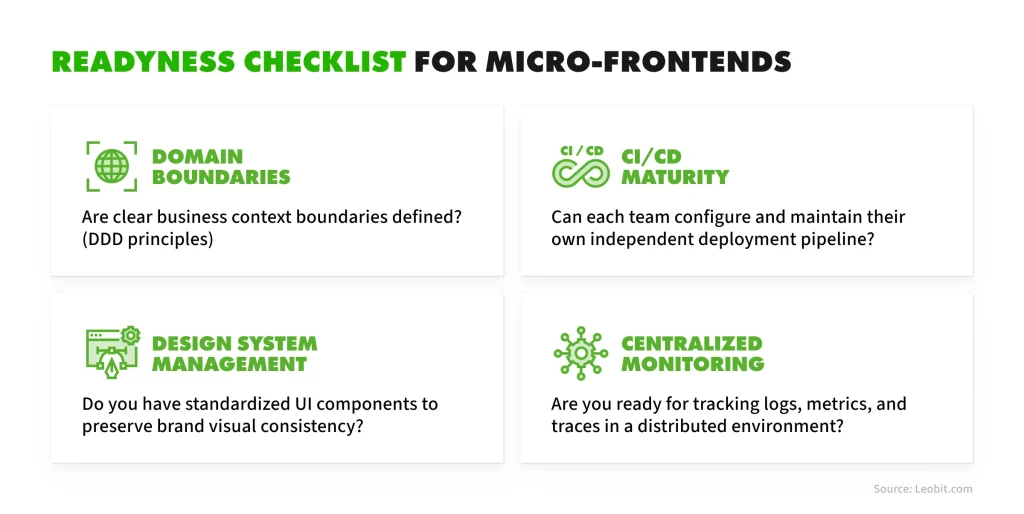
Before making the move, make sure your team checks these four readiness pillars:
Domain boundaries. Clear boundaries of business contexts defined (DDD).
CI/CD maturity. Each team possesses a fully autonomous deployment pipeline.
Design system governance. A shared UI library or token system is established.
Centralized monitoring. Error tracking with MFE version tagging is configured.
Readiness checklist for micro-frontends
Final Thoughts
Micro-frontends are fundamentally an organizational and architectural choice that gives businesses release speed and engineering teams true deployment autonomy. However, this flexibility brings real trade-offs, including extra infrastructure and DevOps overhead, as well as strict governance rules. Moving to a distributed front end is only justified when the organizational benefits of decoupled releases clearly outweigh this operational complexity.
The key to success lies in a pragmatic approach: objectively auditing your CI/CD maturity and choosing the right composition pattern for your domain constraints.Then striking the right balance between team freedom and user experience consistency.
If you are evaluating whether micro-frontends fit your current platform or planning a migration strategy, contact Leobit’s team to map out a clear, low-risk roadmap tailored to your product goals.
FAQ
There is no definitive answer here. Monoliths and micro-frontends take different approaches to achieve operational goals. The decision of which one to use depends heavily on factors such as team scale, organizational structure, release velocity, and the objectives of the final product.
It depends on your requirements. Build-time integration works best for shared design systems, while runtime approaches like Module Federation, Web Components, or Server-Side Composition suit independent team deployments and complex SPAs.
Yes. One of the main advantages of micro-frontends is technical flexibility. Using appropriate integration strategies (like Web Components or runtime composition), teams can successfully run React, Next.js, and Vue components within a single host application.
Our engineering teams support platforms at every stage of their architectural shift. We perform:
Architecture checks. We audit your system to see if micro-frontends solve real bottlenecks or if a modular front end is the better fit.
Shell & Pipeline setup. We set up the core shell application, select integration patterns, and automate shared component releases.
Cross-stack integration. We smoothly join legacy code with modern React, Angular, or Vue applications.
Safe migration. We break down monolithic UIs domain by domain, keeping risks low and performance high throughout the process.
Olesia is a dedicated software engineer specializing in frontend development with extensive experience in TypeScript, React, and Next.js. She excels at building user-friendly interfaces and developing scalable, high-performance web applications. Olesia is passionate about solving complex problems and enjoys collaborating with teams to deliver impactful, high-quality web apps. Committed to continuous learning, she keeps up with web development trends and strives to implement the most effective solutions.
With an estimated annual growth rate of 16.4% through 2035, Europe remains a strong market for custom software development. Countries such as Ukraine, Poland, ...
The .NET ecosystem continues to flourish in 2026, with over 478,000 packages on NuGet that have been downloaded over 800 billion times. Numbers from ...
This year’s studies suggest that 31% of organizations across Norway, Sweden, Denmark, and Finland plan to increase spending on external IT service providers ...
Leona, Leobit’s AI agent designed to find promising cooperation opportunities and automatically send requests for proposals (RFPs), has helped our sales ...
The application you ship today is rarely one deployable unit. It is a set of services, each running closer to the user or the data it depends on, so responses ...
.NET (and its web counterpart ASP.NET) is the most popular framework among professional developers in enterprise environments. In fact, the 2025 Stack Overflow ...
Lviv, Ukraine, June 2026 — Leobit, a .NET, AI, and web application development company, is proud to announce its inclusion in Techreviewer’s list of ...
McKinsey’s 2025 analysis of CIO budgets in the AI era shows that companies generating the highest returns from technology spending are those that make ...
23 mins read
We use cookies to enhance your browsing experience. By agreeing, you accept our Privacy and Cookies Policy.
By ignoring or closing this banner, we will only collect essential cookies necessary for the website to function properly.
 Leobit