Contact us

The Complete Guide to Cloud Migration For Business: From Strategy to Execution

29 mins read

Cloud Migration For Business The Complete Guide to Cloud Migration For Business: From Strategy to Execution
Want a quick tech consultation?
Yurii Shunkin | R&D Director

Yurii Shunkin

R&D Director

Contact us

During the past year, 63% of organizations accelerated their cloud migration efforts, up from 57% in 2023. At the same time, 70% now default to cloud-based services when upgrading or purchasing new technical capabilities. Such a steady increase proves that today, cloud adoption is no longer a question of if, but how fast.

This acceleration reflects a fundamental shift: businesses are no longer experimenting with cloud, they’re building around it. But while the benefits are clear, many still struggle with execution, legacy complexity, or unclear strategy.

This guide breaks down everything you need to know about cloud migration, from the reasons driving it to migration approaches, challenges, and real-world cloud migration use cases.

Whether you’re planning your first migration or optimizing an existing cloud footprint, this guide will help you move with confidence.
Reasons Behind Cloud Migration

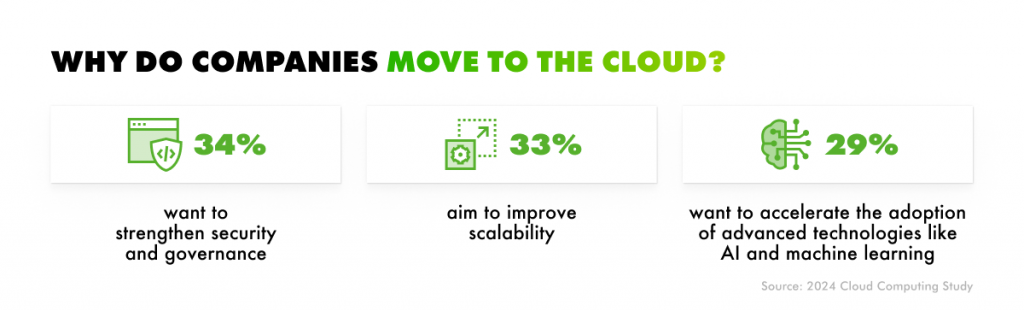
Moving infrastructure to the cloud doesn’t automatically transform a business. What it does provide is a scalable foundation to modernize processes and adapt to change. The latest Cloud Computing Study reveals why more companies are making the shift. Security, scalability, and the adoption of advanced technology top the list of motivations.

Reasons companies move to the cloud

These statistics reveal that many companies view the cloud as more than just a platform for hosting data. Cloud migration is becoming the engine behind business evolution. Yet, most companies are still in transition. The same study states that only 26% are fully cloud-based, while 74% continue to operate in hybrid environments.

So, what exactly drives hybrid cloud migration and cloud adoption, in general?

Here are the major reasons.

Enhanced security

Security remains a top priority and a top business case for cloud migration. According to the Cloud Computing Study 2024, 34% of companies view cloud adoption as a strategic move to strengthen security and governance.

The reason is obvious: cloud providers invest heavily in enterprise-grade security infrastructure. They take over a lion’s share of data protection responsibilities by offering built-in encryption, identity and access management, threat detection, and compliance support across global standards. Real-time monitoring, automated patching, and AI-driven threat intelligence further strengthen defenses, which can be far more difficult to achieve with on-premises systems.

That’s why over 60% of C-level executives and policymakers surveyed in Oracle’s Security in the Age of AI report identified security as the leading benefit of cloud adoption. As attack surfaces grow and threats become increasingly sophisticated, leading cloud providers have better capabilities to evolve in tandem with evolving risks.

Adoption of AI/ML workflows

The Cloud Computing Study 2024 reveals that 29% of companies view cloud adoption as a strategic move to accelerate AI/ML technology adoption. With the cloud’s compute power, storage, and flexible infrastructure, scaling AI initiatives becomes accessible and cost-efficient even for startups and SMBs.

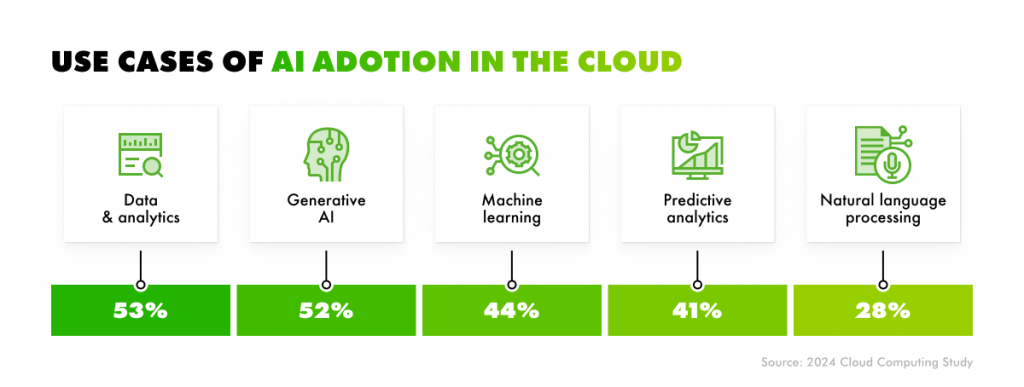
Today, organizations are applying AI in the cloud across a range of use cases, among which data and analytics, as well as generative AI, are the leading reasons.

Use cases of AI adoption in the cloud

Deloitte states that 86% of companies now rely on cloud services specifically for data analytics. The reasons for such popularity are clear. Cloud platforms eliminate the heavy lifting of infrastructure setup. This gives businesses direct access to tools and APIs for training their own models and deploying applications.

Business impact and ROI

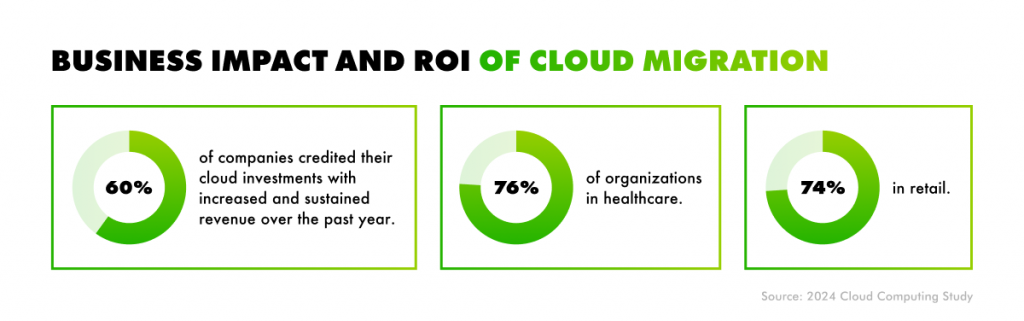
Application migration to the cloud can help companies increase their return on investment. According to the Cloud Computing Study 2024, 60% of companies across industries believe their cloud investments have led to increased, sustained revenue over the past year. The impact is even stronger in certain industries, including healthcare and retail.

Business impact and ROI of cloud migration

Lowered capital and operating expenses

Cloud migration eliminates heavy upfront infrastructure costs thanks to shifting to a flexible, pay-as-you-go model. Take Azure Blob Storage, for example. The Hot tier for block blob data in general-purpose v2 accounts costs roughly $0.0208 per GB/month.

That means storing 1 petabyte of data (1,000,000 GB) would run about $20,800/month, or $249,600/year, with no capital investment required. In contrast, setting up equivalent on-premises storage can cost anywhere from $100,000 to $500,000 upfront, excluding the costs of facilities, electricity, or specialized staff needed to maintain it.

Cloud storage

1 PB = 1,000,000 GB
$20,800 / month
$249,600 / year
No hardware required

On-premises storage

1 PB = 1,000,000 GB
$100,000–$500,000 setup + facilities, power, cooling, staff
Ongoing maintenance

The savings are substantial. According to Enterprise Strategy Group, companies migrating to AWS Cloud Infrastructure saw reductions of up to 66% in compute, storage, and networking costs. While the study references AWS, similar cost benefits apply across major cloud platforms like Azure and Google Cloud.

Increased agility and scalability

Modern businesses need to move fast and scale smart to keep up with the tides. Cloud infrastructure allows you to do so by enabling real-time adaptation, whether you’re launching a new product, handling traffic spikes, or expanding into new markets.

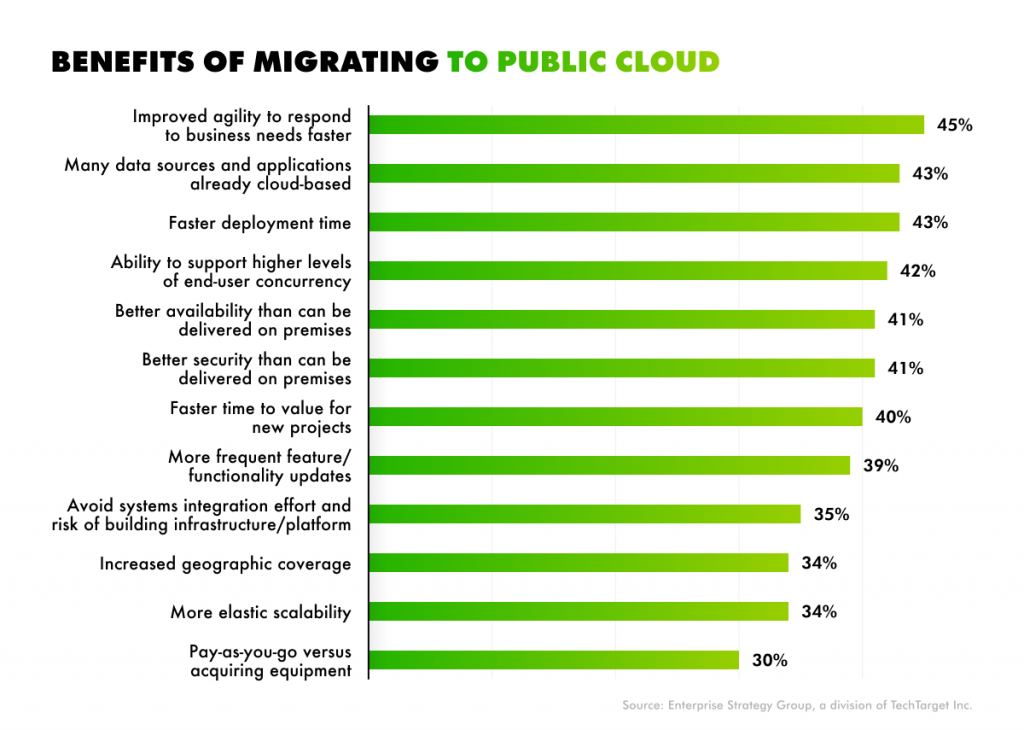
In fact, 45% of organizations surveyed by Enterprise Strategy Group reported that adopting public cloud services improved their ability to respond to business needs more quickly. Scalability is another key driver, with 34% of companies citing elastic scalability as a major benefit of the cloud. This means they can instantly scale resources up or down to match demand without overprovisioning, which, in turn, prevents both downtime and unnecessary costs.

At the same time, 42% noted improved support for higher levels of end-user concurrency, which is critical for businesses with fluctuating user loads, such as e-commerce platforms, SaaS providers, and media streaming services.

Benefits of migrating to the public cloud

Improved reliability and availability

Leading cloud providers, like Microsoft Azure and AWS, offer uptime guarantees ranging from 99.9% to 99.999%, backed by automated failover systems, built-in redundancy, and globally distributed infrastructure.

In practice, this means near-continuous availability. Compare that to on-premises data centers, which typically deliver 95–97% uptime, resulting in 3-6 days of downtime per year. According to the Enterprise Strategy Group survey, 41% of companies state that the public cloud delivers better availability than they could achieve on-premises. This comes as no surprise, since cloud providers minimize maintenance windows and have built-in disaster recovery. So, in case one service fails, the workload seamlessly transitions to another region or zone, often without users even noticing.

Sustainability benefits

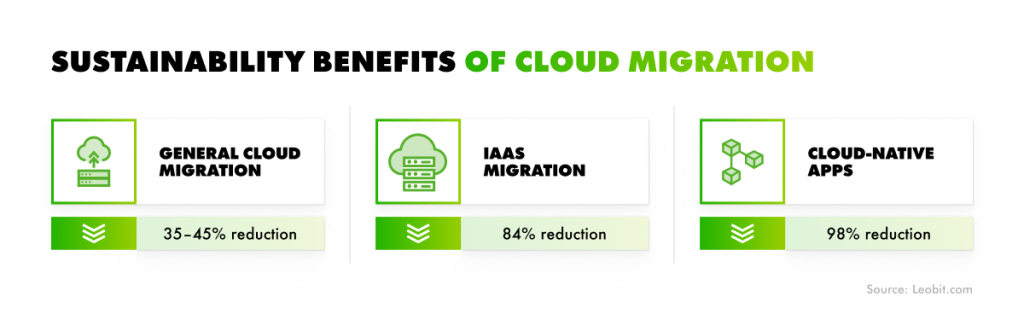
According to Accenture’s “The green behind the cloud” report, companies that migrate to the cloud can cut carbon emissions by 35–45% compared to on-premises IT systems. When migrating to IaaS, the impact is even greater, with emissions reduced by over 84%. And for those who go further by designing applications natively for the cloud, the reduction can reach up to 98%.

Sustainability benefits of cloud migration

The reason behind this is that major cloud providers are setting aggressive sustainability goals. Both AWS and Microsoft Azure plan to operate on 100% renewable energy and become water-positive by 2030. For companies with ESG commitments or net-zero goals, migrating to the cloud is a direct path to measurable sustainability outcomes.

More affordable licensing

Licensing is often one of the most overlooked and most impactful factors in cloud migration economics. While traditional software licenses can be a major part of the total cost of ownership, migrating to the cloud opens the door to significant savings and flexibility.

According to AWS data, licensing costs can be up to 3x higher than running the same workloads in the cloud. Reducing or eliminating these licensing costs has a massive impact on both short- and long-term ROI.

AWS also states that 50% of enterprise databases are strong candidates for migration to license-free, open-source alternatives. When properly managed, licences can become a strategic lever to drive down costs and increase the value of cloud data migration.


Understanding why companies move to the cloud is only part of the picture. Once the decision to migrate is made, businesses face a critical next step: choosing the right cloud migration methods.

Types of Cloud Migration

Migration isn’t a single path; it comes in several forms, each with different technical requirements, risks, and benefits. Selecting the right migration type depends on your existing infrastructure and business objectives.

Let’s take a look at three major types of cloud migration.

Types of cloud migration
  • On-premises to cloud migration. This is the most straightforward and widely adopted path: moving applications, data, and workloads from on-premises infrastructure to a public or private cloud. It’s often a part of a bigger legacy software modernization initiative when you need to replace aging infrastructure or centralize data storage. This approach can include one or a combination of different types of cloud migration strategies, depending on the desired level of transformation.
  • On-premises to hybrid cloud migration. For businesses that need to maintain some on-premises systems (e.g., due to strict data residency laws), a hybrid cloud model can be an option. This setup combines on-premises infrastructure with public or private cloud environments, allowing data and applications to move between them. Hybrid cloud migration can also be an option as a transitional state during phased migrations of legacy applications that are not yet ready for a full cloud transition.
  • Migration between сloud providers. Also known as cloud-to-cloud migration, this process involves transferring workloads from one cloud provider to another (e.g., AWS to Azure migration). Companies typically pursue this type of cloud migration to avoid vendor lock-in or to leverage services unique to another provider (e.g., better performance or availability in certain regions).

Each cloud migration type carries its own risks and rewards. The key is to align your choice with your business objectives, IT capabilities, and long-term strategy.

But when is the right time to migrate?

There’s no universal “perfect moment” to migrate to the cloud, but there are clear signs that the time is right. For most companies, cloud migration becomes urgent not when things are going well, but when legacy systems start holding the business back. Waiting too long can only increase the risks and technical debt. So let’s discover how to approach cloud migration correctly.

Cloud Migration Strategies and Approaches

Choosing the right strategy for cloud migration is just as important as deciding to migrate in the first place. Not long ago, many companies followed Gartner’s original 5Rs model, introduced in the early days of cloud computing. AWS expanded the framework into the 7Rs model, which reflects the broader range of options and more nuanced needs of modern cloud migration use cases.

7Rs cloud migration strategies (Source: Amazon)

Rehost

This is the fastest way to move to the cloud, which presupposes migrating applications without modifying them (a so-called lift-and-shift approach). It’s ideal for legacy systems that need to quickly exit an on-premises data center, or for companies looking to demonstrate cloud value early with minimal disruption.

Best for: Fast migrations with low upfront effort
Trade-off: Doesn’t leverage cloud-native features

Relocate

Relocation, or “lift and optimize,” is a middle ground between rehosting and replatforming. It involves moving applications to the cloud with minimal changes, but unlike pure lift-and-shift, it also includes basic infrastructure-level optimizations (e.g., modifying instance types, storage configurations, or networking setups).

Unlike replatforming, relocation does not require any code-level changes. The application’s core architecture and logic remain intact. This makes it a low-risk and relatively quick cloud migration strategy.

Best for: Virtualized environments where some cloud benefits are required
Trade-off: Still limited in long-term cloud benefits

Replatform

Often described as “lift, tinker, shift”, replatforming goes one step further than relocation. It involves making modest but meaningful changes to the application environment to take advantage of specific cloud capabilities. Still, it doesn’t involve rewriting the entire app or altering its core architecture. You can think of it as upgrading the plumbing, not remodeling the whole house.

Best for: Apps that need performance boosts or reduced management overhead
Trade-off: Requires moderate effort and testing

Redesign

Also known as refactoring or rearchitecting, redesigning is the most technically involved and transformative approach to cloud migration. It means rebuilding the application (partially or entirely) to fully use cloud-native technologies and architectures, such as microservices, serverless computing, containers, event-driven systems, and CI/CD pipelines.

Unlike rehosting or replatforming, this strategy goes beyond moving what’s already built. Redesign aims to rethink how the application works to improve its flow.

Best for: Strategic apps critical to business growth and innovation
Trade-off: Higher cost and complexity, but maximum long-term value

Repurchase

This strategy involves replacing existing software licenses with modern, cloud-native solutions. It is frequently motivated by the goal of streamlining operations, reducing maintenance costs, or leveraging advanced features not available in legacy applications. A typical example of the repurchase strategy involves moving from an on-premise Virtual Desktop Infrastructure (VDI) to a fully managed, cloud-based VDI service.

Best for: Organizations looking to modernize quickly, eliminate legacy software dependencies
Trade-off: Must ensure feature parity and data compatibility

Retire

Not every application deserves a place in the cloud. In many environments, some systems are obsolete, underused, or simply redundant. Migrating them to the cloud only adds unnecessary cost and complexity. That’s where retirement comes in.

This strategy involves identifying and decommissioning applications that no longer deliver business value. It could be a legacy framework that’s been replaced by a modern built-in alternative, or a feature that’s used little to no.

Best for: Legacy or redundant apps with low business value
Trade-off: Must ensure dependencies are properly handled

Retain

In some cases, it makes sense to keep certain applications or systems on-premises, at least for now. This is known as retaining, and it’s a common part of a hybrid cloud strategy. Applications may be retained because they perform business-critical functions that would be too costly or risky to migrate immediately. Or, it can be due to compliance requirements or integration dependencies. In other cases, retaining works as a strategic decision to postpone migration until a later phase.

Best for: Apps that aren’t cloud-ready or have strict on-premises requirements
Trade-off: Delays full cloud benefits, but maintains control


Businesses typically adopt a hybrid approach to cloud migration, often implementing strategies sequentially. A Red Hat survey indicates that 47% of companies plan to replatform applications before refactoring them. Similarly, 38% employ a staged migration, beginning with rehosting, progressing to replatforming, and finally, refactoring. This strategic phasing ensures the migration supports both immediate requirements and future objectives.

Challenges of Migrating to the Cloud: What Can Go Wrong And How To Prevent It

While the benefits of cloud migration are widely recognized, the path to realizing them isn’t always smooth. Many companies underestimate the complexity involved, which may lead to budget overruns and technical setbacks.

In fact, according to EY’s global cloud study, 36% of business leaders recognized the cloud’s potential to enable business model transformation but struggled to implement migration effectively. The lesson? Cloud success requires more than technology, it demands planning, skills, and change management.

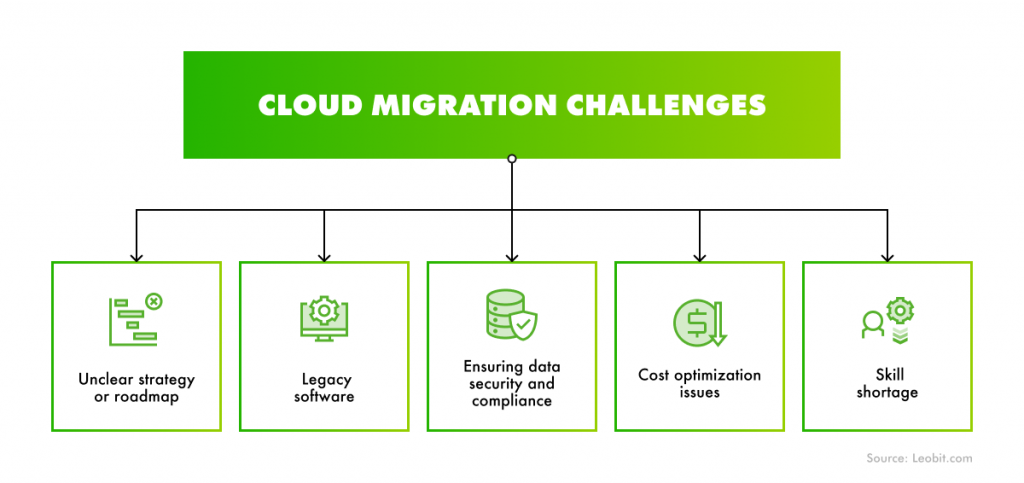
Below are the most common cloud migration challenges companies face, along with practical ways to avoid them.

Cloud migration challenges

Unclear strategy or roadmap

Jumping into cloud migration without a structured, end-to-end plan is one of the most common and costly mistakes. According to McKinsey, companies without a clear migration roadmap overspend by an average of 14% annually on migration-related costs. In addition, 38% of organizations experience project delays exceeding a full quarter.

To prevent such a situation, start with a detailed software assessment. It will help you define a cloud migration strategy that aligns with your business goals. Conduct a full workload inventory, assess each application using the 7Rs framework, and define success metrics. Your roadmap should be phased, include risk mitigation steps, and provide clear timelines, ownership, and decision checkpoints.

Legacy software

Legacy applications are among the biggest obstacles to cloud migration. Older systems may be tightly coupled, poorly documented, or built on outdated tech stacks that can be hard to move to cloud environments. Some require significant refactoring, while others depend on hardware or integrations that can’t be replicated in the cloud.

According to Accenture, 40% of companies say that modernizing legacy applications is a major barrier to achieving their desired cloud outcomes. When these systems remain untouched, they hinder migration efforts and limit the value the cloud can deliver.

Dealing with legacy software requires determining which workloads should be rearchitected, replatformed, repurchased, or retired. For applications too complex or risky for a full rewrite, we, at Leobit, suggest using incremental modernization patterns. They allow for a gradual transition of functionality without disrupting business operations.

One effective approach is the Strangler Facade pattern. In practice, this involves placing a facade between the legacy system and the new cloud‑ready components. The facade intercepts requests and intelligently routes them to either the existing legacy application or the newly developed modules. This allows teams to modernize the system piece by piece, reducing risk and avoiding the pitfalls of a large, high‑stakes “big bang” rewrite.

Data security and compliance

Security and compliance are two of the most critical and most misunderstood challenges in cloud migration. Many companies hesitate to move sensitive workloads to the cloud due to concerns about data exposure, regulatory violations, or loss of control.

However, the perception that the cloud is inherently less secure than on-premises is outdated. In fact, according to an Enterprise Strategy Group survey, 41% of companies now say that cloud provides better security than on-premises hosting. Still, cloud security must be intentionally designed and continuously managed.

To be on the safe side, start by embracing a shared responsibility model: cloud providers secure the infrastructure, but it’s up to your organization to secure data, identities, and configurations. To manage compliance effectively, align your cloud environment with relevant frameworks and regulations, such as GDPR, HIPAA, SOC 2, or ISO 27001. Leverage provider-native tools like Azure Policy or AWS Config to enforce governance and automate audits.

Additionally, build compliance into your migration roadmap. This includes:

  • Identifying data residency and sovereignty requirements
  • Classifying data and applying the right controls before migration
  • Performing regular security posture reviews post-migration

When implemented properly, cloud security can outperform traditional data center setups, delivering not just protection but also continuous visibility, faster threat detection, and stronger resilience.

Cost optimization issues

While the cloud promises lower infrastructure costs and greater financial flexibility, many companies find that cloud spending quickly spirals out of control without the right guardrails in place.

According to the 2025 Flexera State of the Cloud report, 84% of organizations now identify managing cloud spend as their top cloud challenge. It comes as no surprise, since cloud makes it easy to spin up new resources, but just as easy to forget about them.

To keep cloud costs under control, treat cost management as a continuous process, not a one-time optimization. Key steps include:

  • Tagging resources for visibility across teams and projects
  • Setting budgets and alerts at the account or workload level
  • Using reserved instances or commitment-based pricing for predictable workloads
  • Right-sizing compute, storage, and database instances based on usage patterns
  • Automating shutdown or scaling for non-production environments
  • Regularly reviewing usage reports and cost breakdowns

Cloud providers offer native tools like Azure Cost Management or AWS Cost Explorer to help monitor and forecast spending. However, if you have a hybrid cloud, you can also adopt third-party FinOps platforms to unify cost control across multi-cloud environments.

Without active cost governance, cloud expenses can quickly erode the very ROI that initially made migration attractive.

Cloud Cost Optimization comprehensive ebook

6 expert strategies for cost optimization

Download e-book

Skill shortage

According to Gartner, global end-user spending on public cloud services is projected to hit $723.4 billion in 2025, up 21.5% from the previous year. However, with this growth comes a significant talent shortage. IDC warns that by 2026, over 90% of organizations will face IT skills shortages, with an economic impact estimated at $5.5 trillion globally. A large share of these gaps will be in cloud-related roles.

The competition for cloud expertise is already reshaping hiring strategies. Karat’s 2024 Tech Hiring Trends report found that 81% of U.S. engineering leaders plan to hire experts from abroad to fill critical roles. Outsourcing cloud development can be a solution to tech talent shortages and ensure skilled and experienced developers have your back.

When to Consider Switching Cloud Providers

As your business evolves, the cloud provider you started with might no longer align with your goals, technical needs, or budget. Switching cloud providers, also known as cloud-to-cloud migration, can be a strategic move, but it should be driven by clear business and technical reasons.

Here are the most common scenarios where switching makes sense:

  • Cost efficiency. If your current provider’s pricing model doesn’t scale well with your usage or lacks competitive offerings in reserved instances, storage, or bandwidth, switching may unlock substantial cost savings. Pay attention to hidden costs, such as data egress and long-term storage.
  • Performance or availability issues. Latency problems, downtime, or poor support can make staying with a provider risky, especially for applications that require high availability or real-time responsiveness. Moving to a provider with better regional presence or stronger SLAs can resolve performance bottlenecks.
  • Limited services or innovation. If your current provider lags behind in AI/ML, or serverless capabilities, you may be missing out on strategic opportunities. Providers like AWS and Azure often differ in how quickly they roll out innovations. As of November 2025, Microsoft Azure has been leading the AI race, especially in generative AI. This success is largely attributable to Azure’s tight integration with OpenAI models and its extensive portfolio of AI technologies, including DALL-E for image generation, advanced voice synthesis, and various other powerful tools.
  • Vendor lock-in or lack of flexibility. Heavy reliance on proprietary tools can limit portability and increase switching costs. If you’re locked into a single ecosystem and want to adopt a multi-cloud or hybrid strategy, moving away from a restrictive provider may give you greater architectural freedom.
  • Compliance or regulatory needs. Data sovereignty laws, industry regulations, or government mandates might require workloads to be hosted in specific regions or under particular conditions. Switching providers may be necessary to meet those obligations.
  • Mergers, acquisitions, or strategic shifts. Organizational changes may often trigger IT consolidation efforts. If different business units use different providers, standardizing on a single platform or moving to a better-fit provider can simplify operations and reduce overhead.

Before switching, conduct a full cost-benefit analysis that accounts for data transfer costs, app reconfiguration, and potential downtime. Cloud-to-cloud migration is a major initiative, but when executed for the right reasons, it can improve long-term alignment with business goals.

Why Switch to Azure from GCP?

Moving from Google Cloud Platform to Microsoft Azure can make strategic sense in some cases. Azure offers advantages that better align with the needs of mid-market and enterprise customers, especially those with complex requirements, Microsoft-centric stacks, or growth plans that exceed what GCP typically supports.

So why migrate to Azure? Here are several reasons:

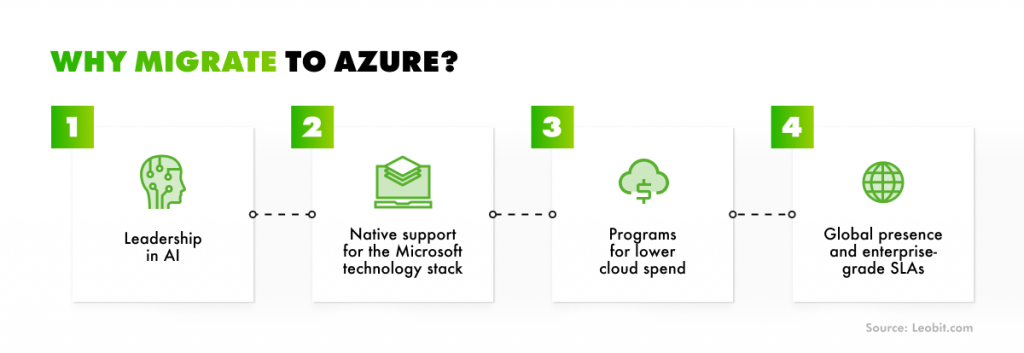
Why migrate to Azure
Reasons to migrate to Azure
  • Leadership in AI. As we already mentioned, Microsoft Azure is emerging as a clear leader in enterprise AI. While Google Cloud offers similar tools, it lags behind Azure in areas such as voice and large language models.
  • Native support for the Microsoft technology stack. While AWS and GCP support Microsoft workloads, they often lag behind in feature parity and version support. GCP, for example, had not yet supported .NET 9 as of December 2025, more than a year after Azure made it available. Azure also integrates deeply with Microsoft 365, Entra ID, Defender for Cloud, and other enterprise tools.
  • Programs for lower cloud spend. Azure stands out with cost-saving programs like Azure Hybrid Benefit, which lets businesses apply existing on-premises licenses to reduce cloud costs. This is especially valuable in hybrid environments, where infrastructure is shifting gradually to the cloud. Combined with reserved instances, it can cut Windows Server VM costs by up to 80%. Azure also supports Bring Your Own License (BYOL) across a range of Microsoft products.
  • Enterprise-grade SLAs. Azure sets itself apart with enterprise-grade SLAs and the broadest global presence among major cloud providers. Core services like Azure Entra ID and Azure SQL Database come with uptime guarantees of 99.99% or higher, offering the reliability critical for businesses where downtime is not an option.
  • Global presence. As of 2025, Azure spans over 70 regions worldwide, providing organizations with the flexibility to meet their data residency, latency, or compliance needs. While GCP continues to expand, Azure’s mature and widespread infrastructure still provides a strategic edge for enterprises with strict geographic or regulatory requirements.

Why Switch to Azure from AWS?

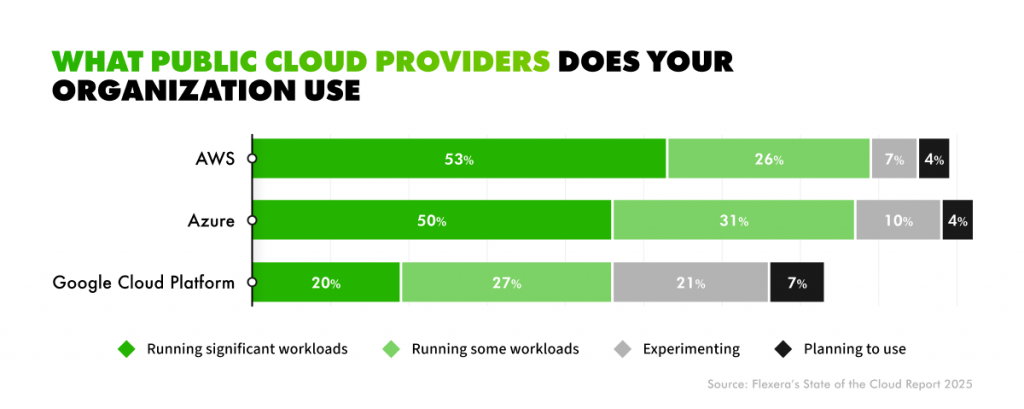
Many businesses already using the cloud ask: If you’re on AWS, why consider moving to Microsoft Azure? The answer lies in the evolving competitive edge that Azure offers for enterprise-scale solutions. According to the 2025 State of the Cloud report, AWS still leads in running larger workloads (53% vs. 50%), yet Azure comes out on top in overall adoption when smaller workloads are included (81% vs. 79%).

AWS, Azure i Google Cloud Platform usage comparison

Based on Leobit’s in-depth research, here are the reasons you may consider switching AWS for Azure:

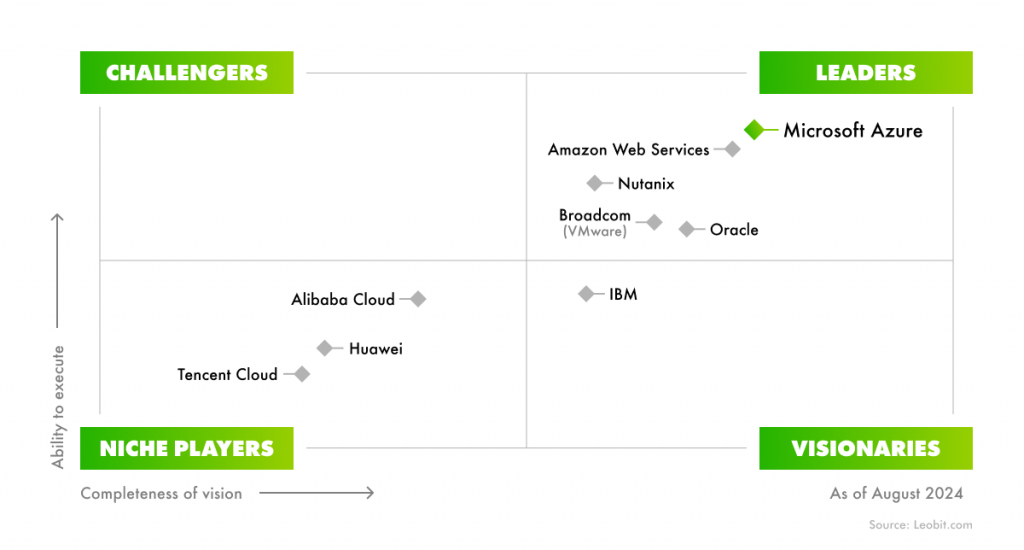
Microsoft was once again recognized as a Leader in the Gartner® Magic Quadrant™ for Distributed Hybrid Infrastructure
Microsoft was recognized as a Leader in the Gartner® Magic Quadrant™ for Distributed Hybrid Infrastructure
  • Unified management of identity and access. At the core of Azure’s enterprise offering is Microsoft Entra ID, a unified, cloud-based identity and access management (IAM) solution that seamlessly integrates with Azure, Microsoft 365, on-premises systems, and other cloud platforms. In contrast, AWS’s IAM tools, like IAM and Cognito, offer flexibility but lack the same level of native integration and consistency across services. Managing identity across AWS and third-party systems often requires custom configurations, which adds complexity, operational overhead, and increases the risk of misconfigurations.
  • Application and development integration. Azure offers deep integration with key business tools, including Office 365, Dynamics 365, Power Platform, and Visual Studio. Azure DevOps further streamlines the software development lifecycle with a unified toolset for planning, coding, building, and deploying. In contrast, AWS often requires stitching together multiple separate services, increasing complexity, setup time, and the risk of misconfiguration for development teams.
  • Easier MVP launches for startups. Azure makes it easier for startups to launch MVPs by offering a more flexible and sustainable free tier. While AWS provides credits for new accounts that typically last 6–12 months, Azure combines an initial credit with a range of “Always Free” services, including platform services and a full DevOps toolchain. This gives startups more room to build, test, and iterate long-term without immediate cost pressure after the first year.
  • Better user experience as a PaaS. Azure focuses on immediate deployment with ready-to-use, business-oriented services. In contrast, AWS offers greater flexibility and granular control, which often necessitates more manual configuration. As development shifts toward speed, containerization, and rapid delivery, Azure’s approach better aligns with these needs.

To better understand the capabilities of each cloud platform, we prepared a detailed comparison table of GCP vs. AWS vs. Azure.

GCP
AWS
Microsoft Azure

Global reach

~40+ regions (as of 2025)

~35+ regions

70+ regions (widest coverage)

Hybrid cloud support

Basic (via Anthos, limited compared to Azure)

Moderate (via Outposts, EKS Anywhere)

Strong (Azure Arc, Stack, hybrid-ready tooling)

Microsoft integration

Limited

Moderate

Native (deep integration with Microsoft 365, Entra ID, etc.)

AI/ML capabilities

Strong (Vertex AI, Gemini)

Strong (SageMaker, Bedrock)

Leader (OpenAI integration, Copilot, DALL·E, voice, LLMs)

PaaS offerings

Developer-focused, modular

Flexible, highly configurable

Out-of-the-box, business-ready PaaS (App Services, Logic Apps)

DevOps & CI/CD

Cloud Build, limited ecosystem

CodePipeline, CodeBuild, CodeDeploy

Azure DevOps, GitHub integration, streamlined toolchain

Cost optimization tools

Active Assist, Pricing Calculator

Trusted Advisor, Cost Explorer

Azure Cost Management + Hybrid Benefit, BYOL

Free tier

90-day trial, always-free limited resources

12-month free tier (~$200 credits), some always-free services

12-month trial + “Always Free” services (PaaS, DevOps)

Identity & Access management

IAM, Identity-Aware Proxy

IAM, Cognito

Microsoft Entra ID (unified across Microsoft stack)

SaaS ecosystem

Google Workspace, limited enterprise reach

Broad third-party marketplace

Microsoft 365, Dynamics 365, Power Platform integration

Marketplace and third-party tools

Moderate selection

Largest ecosystem (wide marketplace support)

Strong, especially for Microsoft-aligned tools

Compliance & Certifications

Meets most global standards

Extensive compliance portfolio

Strongest alignment with enterprise and government standards

Support for .NET/.NET Core

Lagging (e.g., .NET 9 delayed)

Supported

First to support latest versions (e.g., .NET 10)

How Can Leobit Help With Cloud Migration for Businesses?

Cloud migration and modernization are among Leobit’s core strengths. With over a decade of experience and a team of 40+ Azure and AWS-certified specialists, Leobit delivers cloud migrations services tailored to particular use cases and business goals.

As a long-term Microsoft Solutions Partner for Digital & App Innovation, we follow best practices in cloud consulting, architecture design, and cost optimization. We focus on low-risk, high-impact transitions, giving your team confidence at every stage of the migration journey.
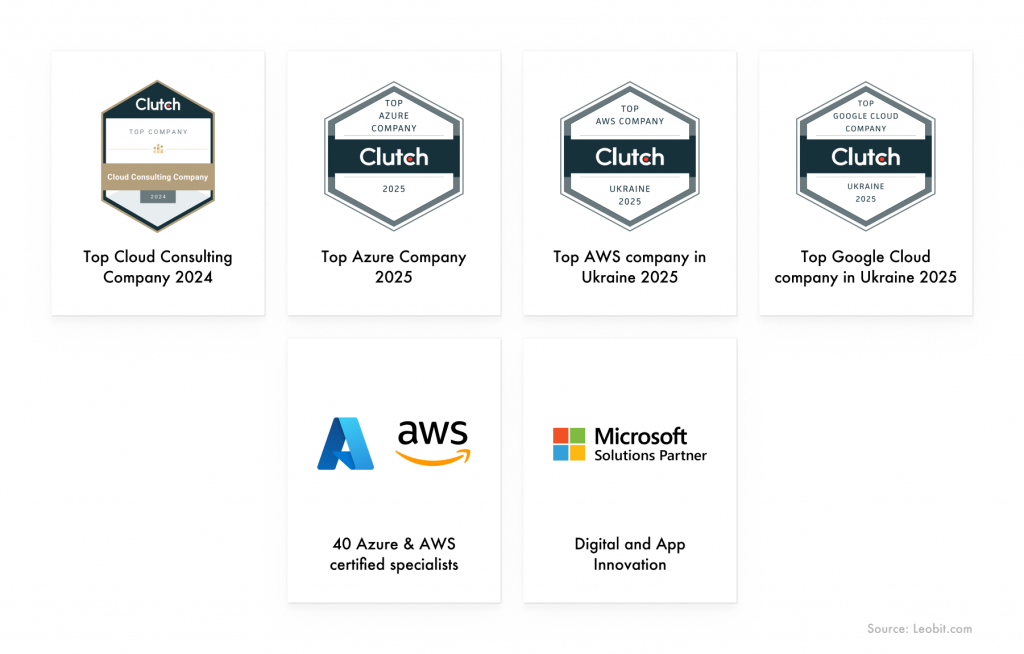
Leobit was recognized by Clutch as a Top Cloud Consulting Company, a Top Azure Company, a Top AWS Company, and a Top GCP Company
Over the past several years, we’ve successfully delivered 60+ cloud projects, including complex cloud-to-cloud migrations, infrastructure modernization, and the development of cloud-native SaaS platforms. Whether you’re moving your workloads from on-premises or from cloud to cloud, we have the hands-on experience to do it right.

Here are several real-life examples of successful cloud migrations we performed for our customers.

  • SaaS Stakeholder Management Software. For the UK’s leading stakeholder engagement platform we performed a detailed technical audit. Based on the outcomes, began modernizing the customer’s platform by migrating from Azure-hosted virtual machines to cloud-native services and replatforming workloads to Azure App Service and Azure SQL. Using Azure’s cloud-native services, including App Service, Elastic Pools, and Front Door, the platform now seamlessly scales to support customer growth while achieving up to 99.99% availability through multi-zone redundancy.For this project, Leobit was named a winner of the 2025 Cloud Computing Awards in the “Business Cloud Transformation” category.
  • Healthcare practice management platform. Leobit successfully modernized the infrastructure for a Canadian telehealth SaaS provider, which supports virtual care for clinics and patients. This modernization included migrating the architecture from EC2 to Amazon ECS, which resulted in improved resource utilization and enabled automatic scaling. By moving from virtual servers to the cloud, the provider achieved faster operations and optimized infrastructure maintenance costs. Our technical contribution helped the solution get acquired by Canada’s largest owner and operator of outpatient health clinics for $4.75 million.
  • Payment processing platform. We supported the on-premises-to-cloud migration of an Australian payment‑processing SaaS solution trusted by central banking institutions. Our team also applied a.NET-based microservices architecture and containerization tools, such as Docker and Kubernetes, to ensure a flexible, resource-efficient deployment of the app in the AWS cloud. The migration helped our client achieve PCI DSS Level 1 Certification and reduce infrastructure costs.

So, whether you’re planning a migration from scratch or optimizing an existing cloud footprint, Leobit offers the technical depth, strategic guidance, and delivery experience to ensure your cloud journey is efficient, secure, and aligned with your business goals.

Summary

Cloud migration has become a strategic priority for businesses worldwide, with many companies accelerating their migration efforts. The reasons are clear, since cloud improves data security and democratises AI/ML implementation.

However, migrating to the cloud and realizing its full benefits is rarely straightforward. Many companies struggle with outdated legacy systems, cost overruns, poor workload planning, and a shortage of cloud expertise. Others face compliance concerns, integration issues, or performance gaps post-migration. Without a well-defined roadmap and hands-on experience, even the most promising migrations can stall.

That’s where Leobit comes in. As a Microsoft Solutions Partner with over 40 AWS and Azure-certified engineers and 60+ successful cloud projects delivered, Leobit can help you navigate every stage of migration, from initial assessment to optimization. So, whether you’re tackling complex architecture challenges or aiming to scale a SaaS platform in the cloud, contact us and we’ll provide strategic guidance to make it happen.

FAQ

Cloud migration is the process of moving applications, data, and IT workloads from on-premises infrastructure or one cloud environment to another. It enables businesses to take advantage of cloud benefits like scalability, cost-efficiency, improved performance, and faster innovation.

The duration depends on the size and complexity of the environment. A simple rehost (lift-and-shift) migration might take a few weeks, while complex, phased migrations with modernization can take several months. A proper audit and roadmap are key to setting realistic timelines.

Cloud migration strategies often fall under the 7Rs classification: rehost, relocate, replatform, refactor (redesign), repurchase, retire, and retain. These help businesses choose the best migration path for each application or workload.

Leobit offers full-cycle cloud services, including architecture planning, migration execution, modernization, and optimization. With 40+ certified Azure and AWS specialists and 60+ successful projects, Leobit helps clients de-risk migration and unlock the full potential of cloud platforms.

Post-migration, the focus shifts to optimization – right-sizing resources, improving performance, automating scaling, enhancing security, and reducing cloud costs. Continuous monitoring and cloud-native modernization help maximize long-term value.