Contact us

Blazor vs. React: Which Technology Should You Choose for Front-End Development?

21 mins read

Should You Choose Blazor over React Blazor vs. React: Which Technology Should You Choose for Front-End Development?

Want a quick tech consultation?

Yurii Shunkin|R&D Director at Leobit

Yurii Shunkin

R&D Director at Leobit

Contact Us

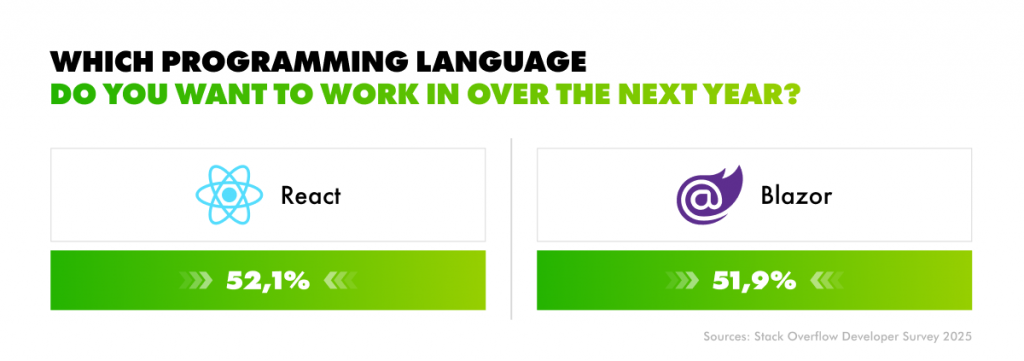
52.1% of developers admire React, while 51.9% say the same about Blazor. That near-parity is telling that both React and Blazor are now highly regarded by the developer community. They also signal that Blazor has moved from “interesting alternative” to a serious contender for production systems.

Blazor vs. React Adoration rate: Stack Overflow Developer Survey 2025

For business owners, this raises a practical question. If both web frameworks are actively used, which one will better cater to your business needs?

Instead of focusing on syntax or development peculiarities, in this article, we’ll compare Blazor and React through a business lens to help you make a decision that aligns with your company’s strategy and operational specifics.

What is Blazor?

Blazor is a modern web framework developed by Microsoft in 2018 that allows teams to build interactive web applications using C# and .NET, with a single technology stack across both the back end and the front end. That means shared code and fewer handoffs between specialized teams. For companies that already use .NET, adopting Blazor for front-end development can reduce development costs.

Like React or other contemporary UI libraries, Blazor is declarative. Developers define the UI in code, and the framework efficiently updates it as the application state changes. This makes software easier to scale and maintain in the long run.

Although web development with Blazor doesn’t require JavaScript in most situations, it is fully interoperable with it on both the client and server sides. This is one of the reasons for Blazor’s popularity. Thanks to it, companies can still use JavaScript libraries and components in Blazor-based apps.

Though Blazor is a relatively new framework, its adoption curve suggests it’s moving well beyond early experimentation. The number of live websites using Blazor grew from 10,097 at the end of 2021 to 32,384 in January 2026. As of today, Blazor powers websites of such renowned brands and companies as Ferrari, Frankfurt Airport, Celonis, BurnRate, and many others.

Companies that use Blazor

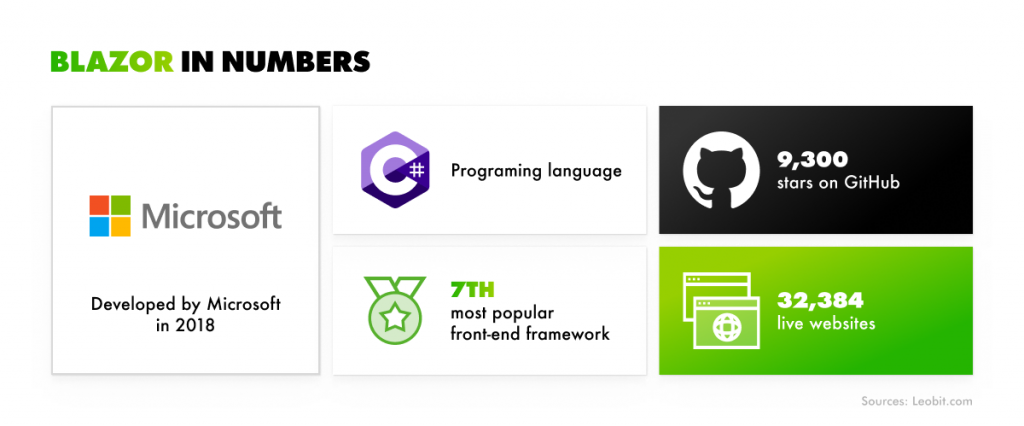
The growth of usage across developers supports this trend. The Stack Overflow Developer Survey shows Blazor usage rising from 4.46% in 2022 to 7% in 2025, placing it as the 7th most popular front-end framework worldwide.

Blazor in numbers
Blazor in numbers

What is React?

React.js is a popular JavaScript library introduced by Meta in 2013 for building interactive user interfaces, primarily for web applications. It allows teams to create reusable UI components that manage their own state. React can be easily combined with other technologies for back-end development and automated testing, and can even work side by side with the Blazor front-end framework.

React follows a declarative approach to UI development and lets developers break a page into small, separate components that developers can reuse on different pages. Thanks to it, they don’t need to redraw each page from scratch. This reuse of components helps teams build and update interfaces much faster and more consistently.

Around 85% of developers use React for single-page applications, which makes it a natural fit for dashboards, SaaS platforms, internal tools, and consumer-facing products that require fast interactions and rich user experiences.

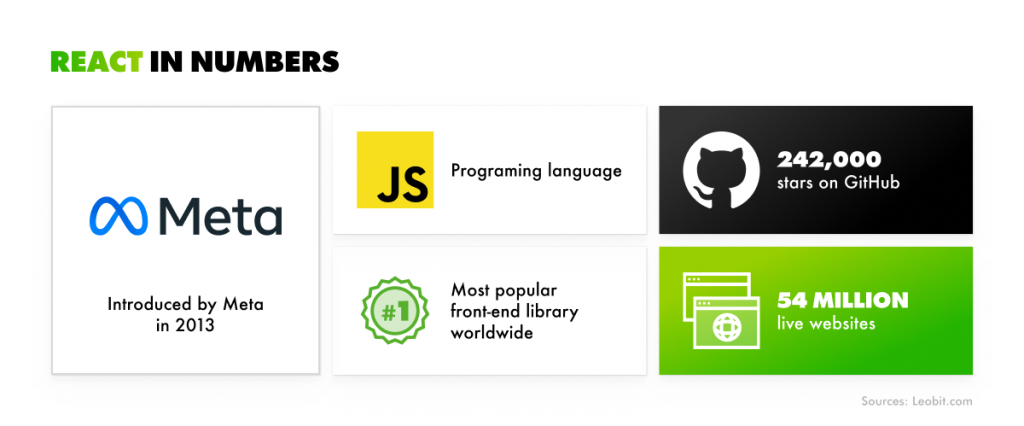
As of January 2026, React dominates the web. It is used by 7.7% of all websites powered by JavaScript, which represents 6.2% of all existing websites. That percentage corresponds to over 54 million live websites running React today. Developer usage supports this position. According to the Stack Overflow Developer Survey, 44.7% of developers use React, making it the most popular front-end library worldwide by a wide margin.

React in numbers
React in numbers

However, every cloud has a silver lining. The downside of React, which we’ll explore later, is that React often requires a larger, more fragmented tech stack, especially compared to full-stack alternatives like the Blazor framework.

Why compare Blazor with React?

Both Blazor and React serve for building custom web applications, dashboards, SaaS platforms, internal tools, and customer-facing websites. To a user or a client, the end result often looks the same. The difference, however, lies in how it is achieved.

Blazor vs. React comparison is not about which framework is “better” in absolute terms, but which will suit your business needs best. So let’s compare Blazor and React side by side to help you choose the technology that will best cater to your needs.

Blazor vs. React: An In-Depth Comparison

To help you understand the peculiarities and differences of these two powerful front-end technologies, this section compares Blazor and React through the lens of performance, cost, scalability, and long-term maintainability.

Programming language

Blazor is built on C#, a strongly typed, mature language designed for large-scale systems. For .NET developers and teams, C# is familiar, predictable, and well-suited for developing complex business logic on the back end. The Blazor framework allows developers to use C# to build interactive front-end components. Thanks to it, developers can reduce duplication and lower the risk of inconsistencies between client and server.

React relies on JavaScript, with TypeScript now widely adopted to add type safety. This stack is extremely flexible and expressive, but it also comes with trade-offs. Due to JavaScript’s loose foundations and rapidly evolving ecosystem, the cognitive load of the application can be increased. This tends to be the case in large or long-lived codebases. TypeScript helps, but it introduces another layer of tooling and configuration that teams must maintain (which we’ll cover later in the article).

That said, neither approach is inherently better in isolation. The right choice will heavily depend on your company’s existing technology stack and future plans.

Ecosystem, community, and long-term viability

Blazor may have a smaller ecosystem than React, but it seamlessly integrates with a huge, mature, and extremely powerful .NET ecosystem. That makes it easy and seamless to integrate, for example, the latest AI-oriented .NET features into applications. Moreover, Blazor’s future is closely tied to Microsoft’s platform strategy. Microsoft has explicitly positioned Blazor as its primary long-term investment for web UI development in .NET.

As of today, Blazor has approximately 9,300 stars on GitHub, and its component ecosystem is active and well-supported. MudBlazor, one of the most widely adopted Blazor UI libraries, has nearly 7,000 commits and over 10,000 GitHub stars. What’s more, Blazor applications can directly reuse .NET libraries without wrappers or bridges. This can be especially relevant when you need to share complex business logic, or validation rules across different parts of the application. Instead of rewriting the same functionality for the front end and back end, teams can rely on a single, proven .NET codebase.

React’s ecosystem is more mature than that of Blazor, and it is much larger. It has 242,000 stars on GitHub and can boast of hundreds of UI libraries and thousands of individual components across open‑source and commercial ecosystems. It has Redux and MobX libraries for state management, Next.js for server-side rendering, and React Native for mobile app development. So whether you need analytics, testing, UI components, or performance monitoring, chances are React already has multiple proven options.

Architecture and rendering models

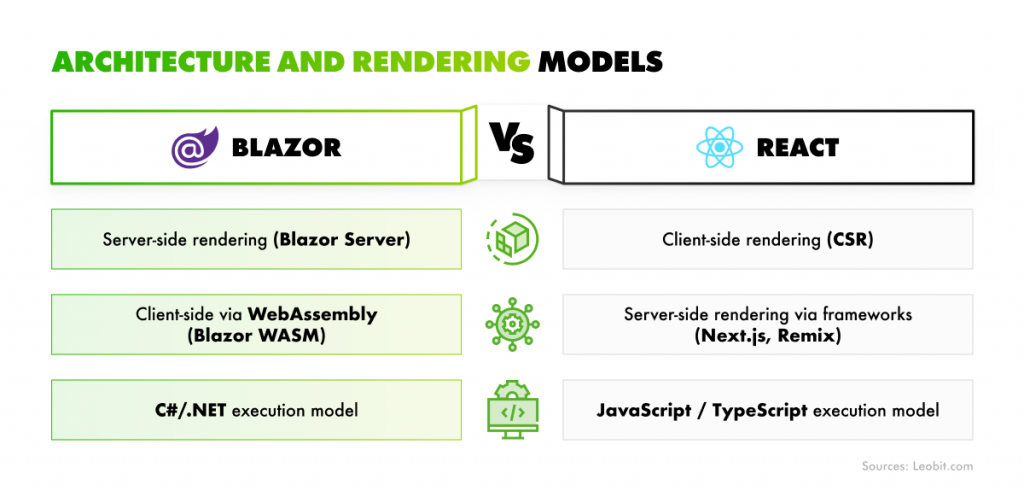
Blazor and React both follow a component-based architecture, but they significantly differ in their technologies and execution models.

For instance, Blazor offers two major rendering options and Auto mode, which combines both approaches to better fit specific use cases instead of forcing teams to choose a single model upfront.

  • Server-side rendering (SSR). In this so-called Blazor Server model, the application runs entirely on the server. So, the UI is rendered on the server, and updates are sent to the browser over a persistent connection. This allows for fast initial load times and keeps business logic centralized, which can simplify security and maintenance. However, because each connected user consumes server resources, scalability heavily depends on server capacity and connection management.
  • WebAssembly client-side rendering (CSR). In this model, all the processing is performed on the client side within the user’s browser using WebAssembly, which is a type of code that can be run in modern web browsers. Using WebAssembly helps enhance scalability and server load management. Yet, it often results in larger initial downloads and potentially slower startup times, especially on low-powered devices or slow networks.

React, in turn, offers a very scalable rendering system. Just like Blazor, it also offers two options. However, these two can be combined into a hybrid approach:

  • Client-side rendering. Traditionally, React applications render entirely in the browser. The server delivers a minimal HTML shell, and React builds the interface dynamically on the client side. This approach works well for highly interactive applications but can impact initial load time and search engine visibility if not optimized.
  • SSR with frameworks. To address these limitations, React is commonly paired with frameworks such as Next.js, which enable server-side rendering and hybrid approaches. Pages can be rendered on the server for faster initial loads and better SEO, then enhanced with client-side interactivity.
Blazor vs. React: Architecture and rendering models

In a nutshell, Blazor provides a structured path to rendering that is closely woven into the .NET ecosystem. React offers a lot more architectural flexibility, giving developers a choice to use a combination of rendering options that depend on the specific requirements associated with a particular product.

Security considerations

Both React and Blazor applications can be secure, but neither is secure by default. Their security depends far more on how they are designed, configured, and maintained than on the framework itself.

In Blazor Server, for instance, applications run in server memory, with multiple user sessions hosted within the same server process. Each interaction is processed in its own “circuit,” which is responsible for isolating sessions using its own dependency injection scope.

While this makes it possible for Blazor Server apps to provide deep and dynamic user experiences, this approach is not without its challenges in terms of app architecture. Microsoft itself does not advise co-hosting apps on the same server and sharing state using singleton services without strict safeguards in place. The major reason is that this could result in serious security issues, such as the exposure of one user’s information to another.

Another important consideration is resource management. If not properly managed, Blazor applications can be vulnerable to CPU exhaustion. To mitigate this issue, developers usually rely on built-in request timeouts and connection limits. Such protections are not in place by default in Blazor Server applications. This means developers must establish these parameters before engaging in CPU-intensive activities.

React applications also encounter a variety of security issues. A serious unauthorised remote code execution vulnerability was found in React Server Components in December 2025. Such a problem arose due to the decoding of payloads in React Server Function endpoints and took almost a week to fix. This situation indicates the potential posed by constantly evolving ecosystems as well as the React community’s readiness in addressing such issues.

Vercel, the company behind Next.js, is not as mature as Microsoft in terms of enterprise governance and security processes. As a result, responses to critical incidents may take longer—as was the case in the previous incident, where the response took more than a week. For organizations operating in regulated or security-sensitive environments, such delays can introduce additional risk and should be carefully considered when choosing a technology stack.

That said, neither React nor Blazor is “automatically secure”. Blazor demands strong server-side design and resource management, and React is very much dependent on keeping up with changes in a very dynamic environment. In both situations, security is less about the framework itself and more about how carefully your developers address it.

Performance considerations

Application performance depends on multiple factors, including:

  • Rendering model
  • Network conditions
  • User devices
  • Application complexity

For both Blazor and React, understanding these trade-offs is more important than comparing raw performance metrics in isolation.

Once deployed, both of these technologies offer good runtime performance for business applications. Initial load time is where their differences become more noticeable. Blazor WebAssembly applications have a larger startup payload because the .NET runtime and assemblies should be downloaded for your app to start running. This can lead to slower first load performance if your users’ network is slow or they use low-powered devices.

That said, Microsoft continues to reduce the size of these assemblies with every new release, and this trend is expected to continue. In practice, with modern internet speeds and increasingly capable client devices, the initial download size is rarely a significant concern for most production applications.

Blazor Server gets around this problem because it renders everything, including UI, on the server, and your pages can render very quickly with minimal initial download.

React applications usually have faster initial load times, especially in applications that use client-side rendering and optimized JavaScript bundles. When combined with server-side rendering or hybrid approaches, the initial content can be displayed almost immediately.

As you can see, both Blazor and React can deliver responsive, reliable performance when built with the correct rendering model and optimization practices.

Tooling and infrastructure costs

Both frameworks are free to use since they are open source. However, infrastructure costs are more affected by architectural choices than by the frameworks used. Blazor Server-based applications require more server resources because they are always connected to the server for execution, whereas Blazor WebAssembly/React-based applications distribute the workload between the client and the server.

React applications, in addition, may require supplementary services for server-side rendering, build pipelines, and deployment, which may incur extra operational expenses based on their scales and deployment.


The selection of the best front-end framework is not necessarily a question of technical capabilities, but rather of its suitability to business needs, the development team’s skills, and the product strategy in the long term. Although Blazor and React can create modern, high-quality web applications, they do so in different ways.

So let’s outline the best use cases for each technology.

When to Use Blazor

Blazor is the preferred choice for teams seeking a cohesive, future-proof platform that emphasizes architectural clarity, faster development, and long-term flexibility.

Choose Blazor if you:

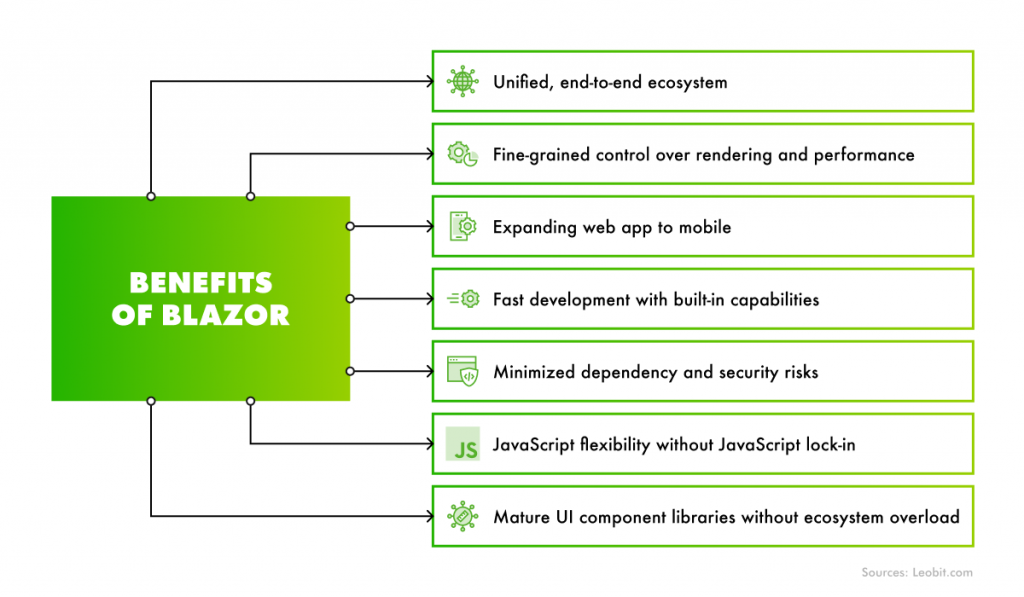
  • Want a unified, end-to-end ecosystem. Blazor is part of the broader .NET platform, which means the back end, front end, tooling, and cloud services work together by design. This tight integration reduces architectural friction and makes it easier to build, secure, and maintain enterprise-grade applications, especially when using Microsoft Azure.
  • Need fine-grained control over rendering and performance. Blazor supports WebAssembly, SSR, CSR, static web apps, and PWAs out of the box. Teams can even decide on a per-page or per-component basis whether logic runs on the server or in the browser. This allows them to tailor performance and scalability to real business use cases rather than fixed architectural constraints.
  • Expect the product to grow beyond a web application. If a web product later needs a mobile or desktop version, Blazor fits naturally into the .NET ecosystem. Using .NET MAUI, teams can reuse skills, patterns, and in some cases code, to build cross-platform mobile or desktop applications without starting from scratch.
  • Value fast development with built-in capabilities. Blazor includes dependency injection, data streaming, routing, and isolated CSS styling as first-class features. This reduces the need for additional libraries and configuration, allowing teams to focus more on business logic and less on wiring infrastructure together.
  • Want to minimize dependency and security risks. With more functionality available out of the box, Blazor reduces reliance on large numbers of third-party packages. Fewer external dependencies mean fewer potential vulnerabilities, less update churn, and lower long-term maintenance effort.
  • Want JavaScript flexibility without JavaScript lock-in. While Blazor does not require JavaScript for most scenarios, it allows developers to reuse existing JavaScript code or entire libraries when needed. This ensures teams never get stuck due to framework limitations and always have an integration path when needed.
  • Need mature UI component libraries without ecosystem overload. Blazor offers well-supported component libraries similar to those used in React projects. Although the React ecosystem is larger, most real-world applications standardize on a single UI library, making Blazor’s component availability more than sufficient for most business needs.
Benefits of Blazor
Benefits of Blazor

When to Use React

React is the better choice when teams prioritize flexibility, ecosystem depth, and the ability to evolve an application gradually, from a simple interface to a large, modular system.

Choose React if you:

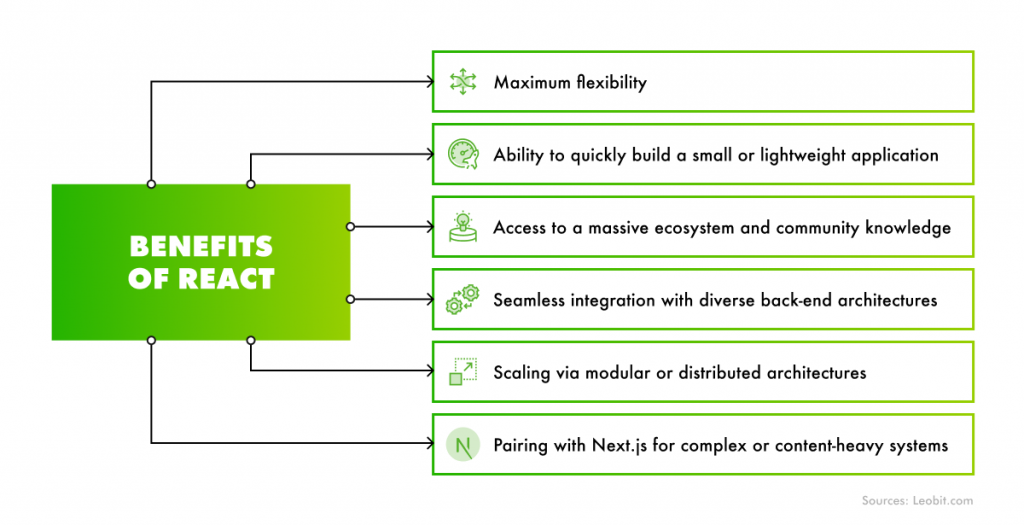
  • Want maximum flexibility instead of a predefined structure. Since React is not a full framework but a library, it imposes very few constraints. Teams are free to choose their own state management solutions, UI component libraries, form-handling tools, testing frameworks, and build systems. This freedom allows each project to be tailored precisely to its requirements, without being locked into a single architectural path.
  • Need to quickly build a small or lightweight application. React does not require heavy infrastructure or complex setup, allowing teams to move fast with minimal overhead. This is one reason React is so commonly used by startups and for developing early-stage products like MVPs.
  • Want access to a massive ecosystem and community knowledge. React has one of the largest developer communities in the industry. Many common challenges have already been solved. React also offers mature libraries, patterns, and best practices available for almost every use case, which, in many cases, can shorten problem-solving cycles.
  • Need seamless integration with diverse back-end architectures. React works equally well with REST APIs, GraphQL, microservices, and event-driven back ends. For each back-end approach, React has multiple mature client libraries available, giving teams flexibility in how they handle data fetching, caching, and synchronization.
  • Want a structured framework option for large applications. For complex or content-heavy systems, React can be paired with Next.js. It introduces an opinionated architecture and advanced rendering methods such as SSR, SSG (static site generation), and ISR (incremental static regeneration). Each of these models offers specific performance, SEO, and scalability benefits.
  • Plan to scale via modular or distributed architectures. React supports advanced scaling patterns such as monorepositories and modularized applications. Different parts of a large system can be developed independently, encapsulated as separate modules or packages, and later combined into a single product. This enables parallel development and long-term architectural flexibility.
Benefits of React
Benefits of React

To help you better understand the differences between these two technologies, we’ve prepared a comprehensive comparative table.

Blazor
React

Core concept

Full-featured framework built on .NET, covering frontend, backend integration, and infrastructure patterns

UI library focused on building interfaces, designed to be combined with other tools

Primary language

C# and .NET

JavaScript with strong TypeScript support

Ecosystem structure

Opinionated and cohesive, with many features built in

Highly flexible and modular, with many choices per project

Rendering models

WebAssembly, Server-side, CSR, SSR, static web apps, PWA

Client-side rendering by default; SSR, SSG, ISR via frameworks

Per-page / per-component rendering control

Supported out of the box

Possible, typically via frameworks and configuration

Back-end integration

Back-end agnostic. Tight integration with .NET and Microsoft Azure

Back-end agnostic (REST, GraphQL, microservices, etc.)

Cross-platform potential

Can be extended to mobile and desktop using .NET MAUI

Primarily web-focused; cross-platform requires separate stacks

Development speed

High productivity due to shared code, built-in DI, routing, security, and styling

Fast for small apps; complexity grows as tooling increases

Dependency management

Fewer external dependencies required

Heavy reliance on third-party libraries

Security posture

Strong by default, but requires careful server-side architecture

Depends heavily on dependency management and updates

Component ecosystem

Mature but smaller set of UI libraries

Very large and diverse component ecosystem

Testing ecosystem

Integrated with .NET testing tools

Rich ecosystem for unit, integration, and E2E testing

Learning curve

Easier for existing .NET teams

Beginner-friendly with extensive learning resources

Best fit for

Enterprise systems, long-term platforms, .NET-first organizations

Startups, MVPs, highly customized or modular applications

AI tooling compatibility

Works well with AI-assisted development and CLI tools

Excellent compatibility with AI agents and code generators

However, choosing between Blazor and React requires more than a feature comparison. You will need real-world experience with both technologies in production. This is where Leobit’s hands-on expertise across the Microsoft and JavaScript ecosystems makes the difference.

How Leobit Can Help You Choose Between Blazor and React?

As a Microsoft Solutions Partner, Leobit has been actively using Blazor in custom web development since 2020. Our team has built more than 20 Blazor-based applications for a wide range of use cases, from early-stage startups to complex enterprise platforms. This hands-on experience allows us to assess when Blazor’s unified .NET ecosystem, flexible rendering models, and long-term scalability deliver the greatest business value.

Leobit has been named a Top .NET Developer 2025, a Top ASP.NET Developer 2025, and a Top Azure Company 2025 by Clutch, reflecting deep expertise across the Microsoft technology stack.

At the same time, Leobit has strong expertise in React development. We have delivered dozens of React-based solutions, including more than 15 projects paired with Node.js back ends and over 25 projects with .NET back ends. Our extensive experience using React for custom software development has also been recognized by Clutch, which named us Top React Developers in 2025.

Thanks to Leobit’s practical insight into architecture design, performance trade-offs, and peculiarities of both Blazor and React, we can help you choose and implement the right technology to ensure you invest in a solution that scales with your product. This dual experience ensures our recommendations are technology-agnostic and driven by what best fits your product goals and growth plans.

To Sum It Up

Blazor and React are both mature, production-ready front-end development technologies that have shown good results in custom web development. Yet they approach it from different perspectives. The difference between them is not about which one is “better,” but about which aligns more closely with your business context and long-term product vision.

Blazor is a logical choice if you are already using the .NET ecosystem and want to have a unified technology stack across both back end and front end. Its flexible rendering models and potential to extend beyond the web into cross-platform applications make Blazor a solid choice for building long-term, enterprise-oriented solutions.

React has its own advantages: a flexible framework and ecosystem that are modular by nature. Its component-oriented architecture, along with its vast ecosystem and easy integration with various back-end technologies, make it suitable for startups.

With years of hands-on experience delivering production-ready applications in both Blazor and React, Leobit understands the strengths and trade-offs of each technology. This practical insight allows us to guide clients toward the approach that best supports their business and technical goals. Just contact us, and we can help determine the best front-end technology for your project.

FAQ

There are no definitive answers here. Blazor and React take different approaches to achieve the same objectives. However, the decision of which one to use depends on factors such as the current technology stack and the objectives of the final product.

Yes, we can. With hands-on experience developing production applications with both technologies, Leobit considers performance, security, and expansion requirements before making a recommendation.

Leobit has been using Blazor in production environments since 2020 and has successfully deployed more than 20 Blazor-based projects for various industries and of varying complexity. We are also a Microsoft Solutions Partner with extensive expertise in the .NET ecosystem, including Azure, ASP.NET, and system development.

Leobit has delivered over 35 React + Node.js and more than 15 React + .NET solutions, covering everything from lightweight interfaces to complex, scalable platforms. This experience has been recognized by Clutch, which named Leobit a Top React Developer in 2025.

Absolutely. Leobit regularly works in mixed environments where React or Blazor must integrate with existing systems, APIs, or cloud platforms. This dual expertise allows the team to modernize legacy applications, migrate between technologies, or design hybrid architectures without locking clients into a single approach.