Choosing the right front-end framework is no longer just a technical decision. It directly affects development speed, hiring, scalability, and long-term costs. Two options that often come up, especially for .NET-focused teams, are Blazor and Angular. While both can be used to build custom web applications, they follow very different approaches.
According to Statista, Angular remains more popular globally, with 18.2% usage compared to 7% for Blazor. Despite this, Blazor has been gaining attention, particularly among companies already invested in the .NET ecosystem. Its ability to use C# across the entire stack and reduce the need for separate front-end and back-end development makes it an attractive option for many business applications.
So the real question is not which framework is better overall, but which one fits your project and business goals.
In this article, we’ll break down the key differences between Blazor and Angular, including development cost, performance, maintenance, and security, to help you make a practical, informed choice.
What is Blazor?
Blazor is a modern web UI framework from Microsoft that lets developers build interactive web applications using C# and .NET instead of JavaScript. Introduced in 2018 by Steve Sanderson, the creator of Knockout.js, Blazor allows you to write both the client-side UI and server logic in the same ecosystem, which is one of its biggest advantages for teams already working with .NET.
At its core, Blazor is a component-based framework similar to modern JavaScript frameworks like Angular, React, or Vue.js. It enables developers to build the UI from reusable components written with Razor syntax, combining HTML and C#.
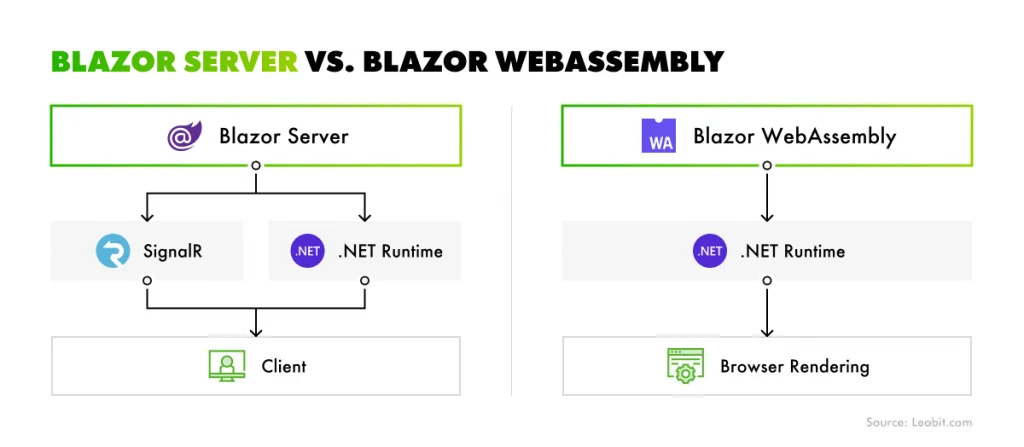
Blazor supports two main hosting models:
Blazor Server. The UI runs on the server, and updates are sent to the browser in real time via SignalR.
Blazor WebAssembly. The entire application runs directly in the browser using WebAssembly.
This flexibility allows teams to choose between server-driven performance and fully client-side applications.
Blazor Server vs. Blazor WebAssembly
Although Blazor is newer than frameworks like Angular, its adoption has been steadily growing.
According to the Stack Overflow 2025 Developer Survey, 7.1% of developers reported using Blazor last year, and 51.9% said they plan to use it in 2026. This places Blazor as the 7th most popular front-end framework in the survey, showing strong interest from the developer community.
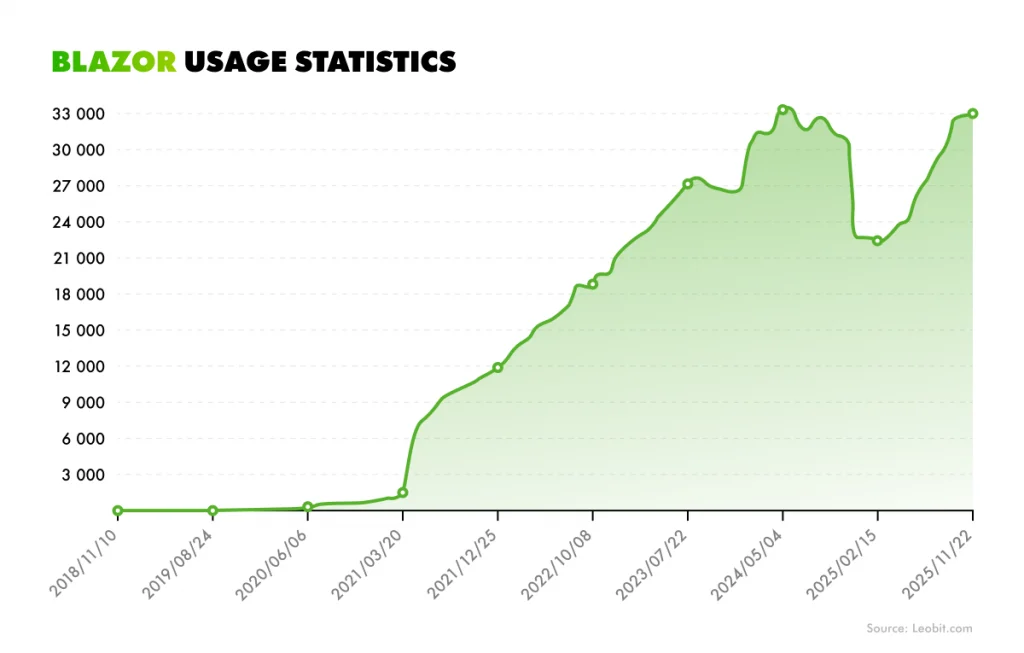
Industry usage data also shows a clear growth trend. The statistics from BuiltWith indicate that the number of websites using Blazor has been rising significantly over the past few years. The total number of sites detected by the framework across the Internet has grown from a few thousand in 2020 to more than 33,000 today.
Blazor usage statistics
Blazor’s rapid adoption started around 2021, when Blazor WebAssembly matured. After that, usage continued growing steadily through 2022–2024. Even with small fluctuations in the middle of 2025, the overall Blazor usage remains strongly upward. This growth is largely driven by organizations that already use the .NET ecosystem, where Blazor enables teams to reuse existing C# skills rather than build separate JavaScript front-end teams.
Angular is a TypeScript-based framework for building single-page web applications (SPAs) developed and maintained by Google. It is open-source, free to use, and designed for building large, scalable web applications. The modern version of Angular was first released in 2016 as a complete rewrite of AngularJS. Although the names are similar, Angular and AngularJS are fundamentally different frameworks with different architectures, languages, and performance models.
Angular uses TypeScript as its primary language and provides a complete framework out of the box. It includes tools for routing, state management, form handling, HTTP communication, and dependency injection. Because of this, Angular is often described as an opinionated framework, meaning it provides a structured way to organize large applications.
Angular has been one of the most widely used front-end frameworks for several years. According to the Stack Overflow 2025 Developer Survey, 19.8% of professional developers reported using Angular in 2025, and 44.7% of developers plan to use it in 2026. These numbers place Angular among the most widely used front-end frameworks, especially in enterprise environments where long-term support, structure, and tooling are important.
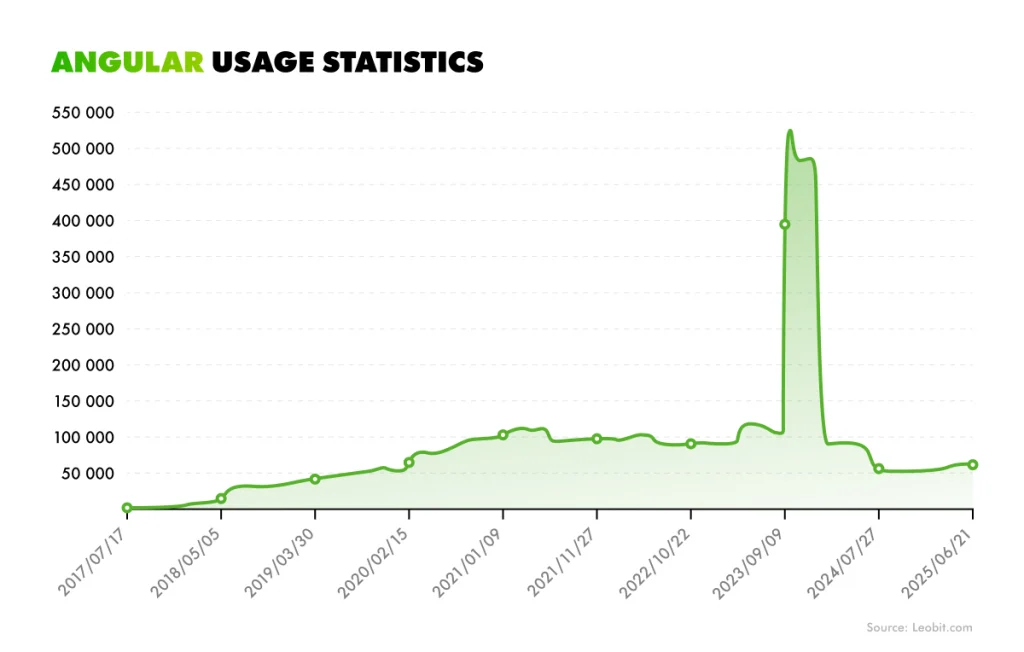
Usage data from BuiltWith also provides insight into how Angular is used across the web. The chart below shows that Angular adoption grew rapidly between 2017 and 2021, when it became one of the dominant frameworks for large web applications. Usage then stabilized and gradually declined as newer frameworks like Blazor entered the ecosystem.
Angular usage statistics
Despite these fluctuations, Angular still maintains a large installed base, with approximately 59,333 live websites currently built with Angular. This long-term adoption is largely due to Angular’s strong enterprise ecosystem, structured architecture, and backing from Google.
Blazor vs. Angular: A Detailed Comparison
Choosing between Blazor and Angular comes down to how each framework performs in real-world scenarios. In this section, we’ll compare them across the factors that matter most for businesses and development teams, including cost, performance, SEO, maintenance, and security.
Instead of focusing on theory, we’ll highlight practical differences that impact how your product can be built, scaled, and maintained over time.
Development cost and timeline
One of the most noticeable differences between Blazor and Angular comes down to how much effort it takes to build and coordinate a project. With Angular, you’re usually working with two separate layers: a front end written in TypeScript and a back end built with technologies like .NET, C#, Java, or Node.js. This means you also need to hire back-end developers or rely on a full-stack developer who can move between both worlds. In practice, this may often induce extra coordination. Teams need to agree on APIs, keep data contracts in sync, and spend time aligning changes across both sides.
Blazor simplifies this setup. Because everything runs on C# and .NET, the same developer can handle both the UI and the server logic. With Blazor, it’s easier to prototype features without waiting for another layer to catch up. There’s less back-and-forth between teams, fewer misunderstandings around how things should connect, and generally less overhead in managing the project. Fewer people involved also means fewer meetings and less coordination effort.
In short, Blazor often helps smaller teams move faster with fewer resources, while Angular is better aligned with projects that already assume a split between front-end and back-end development.
User experience & performance
When comparing Blazor and Angular, performance isn’t a simple “faster vs. slower” discussion. The two frameworks follow very different execution models, and each one performs best in different scenarios.
Blazor offers two distinct approaches, which alone make it more flexible but also more nuanced.
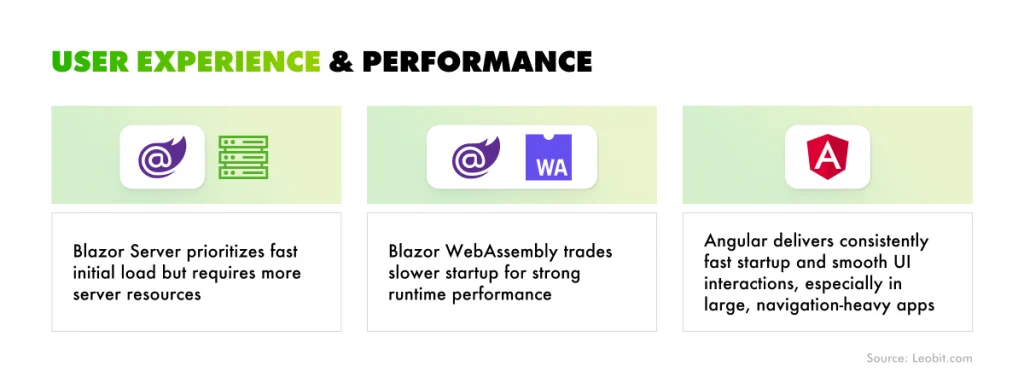
Blazor Server runs most of the application logic on the server. The browser acts more like a thin client, receiving UI updates over a persistent SignalR connection. As a result, the initial load is very fast. Based on Leobit’s experience, a first visit typically takes around 0.5 to 1 second, and returning users can see load times closer to 0.3 to 0.5 seconds. The trade-off is on the server side. Every connected user maintains an active connection, which increases resource usage. This model works well for applications where fast initial load matters, such as public-facing websites or platforms that rely on search engine visibility.
Blazor WebAssembly, on the other hand, behaves more like a traditional front-end framework. The app runs directly in the browser using C#, which means it needs to download a compact .NET runtime first. Based on Leobit’s tests, that initial load can take around 8 seconds, which can be noticeable. However, once cached, subsequent loads drop to around 2.5 seconds. After that, the experience feels much closer to a desktop app. Since the user’s machine handles the processing, interactions are fast and smooth.
Because Blazor compiles to WebAssembly, it can handle heavy computations much more efficiently than JavaScript. Tasks like data visualization or file processing can feel noticeably smoother.
Angular, in turn, relies on TypeScript, which is compiled into JavaScript before it reaches the browser. Thanks to this, there’s no additional runtime to download, and applications can start quickly. Typical Angular bundles range from about 150KB to 500KB, so users often see near-instant loading, especially on modern connections.
Angular is optimized for standard user interface interactions. Clicking buttons, navigating between pages, and updating views all feel fast and predictable. It also supports lazy loading, which means only the code needed for the current page is loaded. Thanks to this, even large applications stay responsive because users aren’t forced to download everything upfront. Where Angular can struggle is in computation-heavy scenarios. Since JavaScript is interpreted, tasks like complex data processing or intensive calculations may not perform as efficiently as WebAssembly-based solutions.
In simple terms, the difference looks like this:
Blazor vs. Angular: usage experience and performance
Choosing between them depends on what matters more for your project: startup speed, runtime performance, or infrastructure cost.
SEO (Search Engine Optimization)
In a typical single-page application, the browser initially receives a mostly empty HTML file along with a JavaScript bundle. The content only appears after the browser executes that code. While modern search engines like Google can process JavaScript, delays in rendering can still affect how quickly and reliably pages are indexed.
Angular applications can address this with server-side rendering (SSR) and hydration. With this approach, the server sends fully rendered HTML first, so search engines can immediately read the content. At the same time, JavaScript loads in the background and takes over once ready, enabling a smooth, interactive experience. When implemented correctly, this balances SEO and user experience quite well, though it adds complexity to the setup.
Blazor approaches SEO differently because it offers two hosting models. With Blazor Server, you can render pages as plain HTML on the server before sending them to the browser. This is ideal for SEO because search engines receive fully formed content with minimal client-side processing required. It works especially well for public-facing websites, content-driven platforms, or any project where discoverability is a priority.
Blazor WebAssembly behaves more like a traditional SPA, similar to Angular. The browser still needs to execute code to render the UI, which introduces the same SEO challenges. While pre-rendering is possible, it requires additional configuration and isn’t as straightforward as the server-based approach.
In practice, many teams use a hybrid strategy with Blazor. Public pages like landing sections or blog posts are rendered on the server for better indexing, while more interactive parts of the application, such as dashboards or internal tools, run on WebAssembly where SEO is less important.
Blazor vs. Angular: SEO considerations
If search visibility is a core requirement, server-side rendering, whether through Blazor Server or Angular SSR, should be part of the architecture from the start.
Long-term maintenance
From a business perspective, maintenance is about how much time and money you’ll spend keeping the product stable and evolving it over time.
Blazor simplifies long-term maintenance by keeping everything within the .NET ecosystem. With Blazor Server, most of the logic lives in one place, and there’s no need to maintain separate front-end and back-end codebases. This reduces duplication, lowers the chance of inconsistencies, and makes updates easier to manage. Even with Blazor WebAssembly, where part of the app runs in the browser, you’re still working within a unified technology stack. That consistency makes it easier to onboard developers, reuse code, and maintain the system over time.
Angular takes a different approach. Because of the separation of the front end from the back end, you need to maintain two distinct layers. This gives flexibility, but it also increases complexity. Updates often need to be coordinated across both sides, and changes in APIs or data structures can impact multiple parts of the system.
Angular itself also evolves quickly, which is both a strength and a drawback. Regular updates improve performance and features, but they require ongoing attention to keep the application up to date.
Security
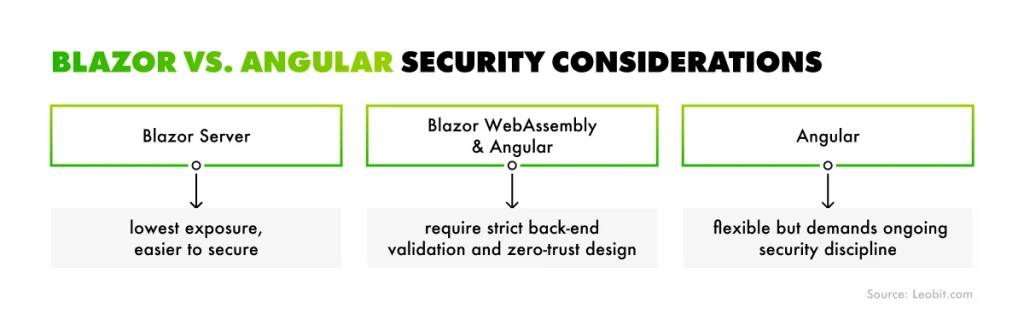
Blazor and Angular approach security from different angles because they expose different parts of the application to the client. Neither is secure by default. The difference is how much risk is exposed and where you need to control it.
With Blazor Server, the application runs entirely on the server. The browser only receives UI updates through a SignalR connection, so the core business logic is never exposed to the user. This significantly reduces the attack surface. It also reduces duplicated logic across front-end and back-end, which lowers the chance of inconsistencies or missed validations. For businesses dealing with sensitive data, this model is generally safer and easier to control.
Blazor WebAssembly shifts execution to the browser, similar to Angular. The code is compiled into WebAssembly, which makes it harder to reverse-engineer than JavaScript, but it’s still running on the client side. That means it’s vulnerable to the same types of attacks. In practice, this requires a zero-trust approach, where every request from the client must be validated on the server.
Blazor also supports a hybrid model, combining server-side rendering with client-side execution. This adds flexibility, but also increases complexity. In these cases, patterns like Back End for Front End (BFF) are often used to keep authentication and authorization secure and centralized.
Angular applications run fully in the browser. The client becomes part of your execution environment, which means users can inspect and even modify application behavior using developer tools. Because of this, no client-side logic can be trusted, and all validation and authorization must be enforced on the server.
Like any large open-source ecosystem, Angular occasionally faces vulnerabilities. Several security issues were detected in early 2026, such as SSRF header injection or Open Redirect via X-Forwarded-Prefix. All the issues are already patched but the advantage of an open-source project is that you have a workaround on how to bypass the issue until it’s fixed. While these challenges are typically resolved quickly, they highlight the need for continuous updates and active maintenance.
What’s more, in single-page applications, users can modify client code using developer tools, so you must always treat client-side communication as not secure requests. You must duplicate all the security checks and authorization on the back-end API.
Blazor vs. Angular: security considerations
Project fit
When choosing between Blazor and Angular, the key question is not which one is “better,” but which one fits your type of product and business goals.
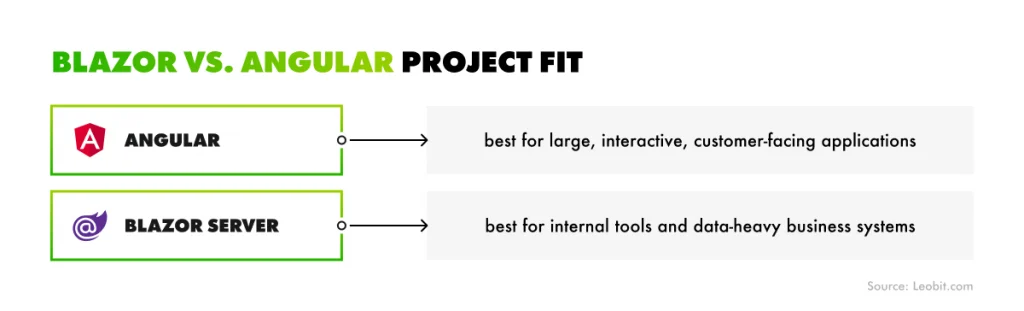
Angular is one of the most widely used and scalable frameworks for public-facing applications. It works especially well for products with rich user interfaces, complex navigation, and dynamic interactions. Features like reactive forms, RxJS streams, and a mature ecosystem make it a strong choice for platforms such as e-commerce sites, social networks, or streaming services.
Its adoption reflects this focus. Over 1.1 million websites are built with Angular, which shows how well it performs in large-scale, user-heavy environments. It also scales well from a team perspective. With structured architecture and a powerful CLI, Angular makes it easier to manage bigger development teams and maintain consistency across large codebases.
Blazor is typically a better fit for a different category of applications. Because it allows shared logic between client and server, there’s no need to duplicate validation rules or business logic across layers. This simplifies development and reduces long-term maintenance effort. As a result, Blazor is particularly well-suited for internal systems and business applications, such as CRM platforms, dashboards, HR systems, or compliance tools.
In these cases, the priority is not flashy UI or instant first load, but handling complex data and business processes reliably. Blazor performs well here, especially with server-side processing, where heavy tasks are handled on the server, and the client simply receives updated results.
Angular vs. Blazor: Project fit
Adoption numbers reflect this positioning. Blazor is used by a much smaller number of websites, around 6,867, which aligns with its focus on specialized, often non-public-facing systems rather than mass-market platforms.
When is Blazor a Better Choice?
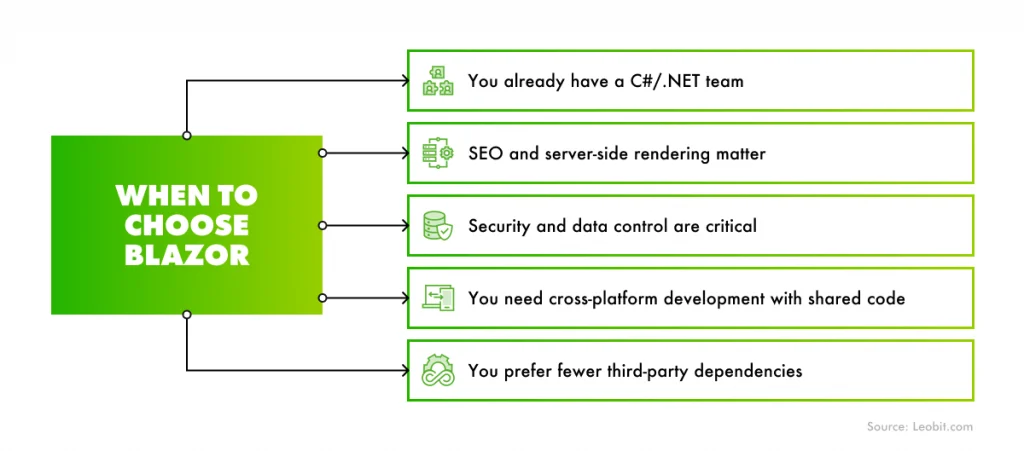
Blazor is the right choice when you prioritize rapid development, strong back-end control, and full integration with the .NET ecosystem. Choose Blazor if you:
Have a C#/.NET team. If your developers are experienced with C#, Blazor allows them to work across both front end and back end without switching languages. This speeds up development and reduces complexity, especially since business logic and validation can be shared instead of rewritten.
Need strong SEO and server-side rendering. With Blazor Server, pages are rendered on the server and delivered as HTML. This makes content easier for search engines to index and improves visibility for public-facing pages, while still keeping all core logic on your servers.
Require high security and data control. Blazor Server keeps business logic off the client, which reduces exposure and simplifies security management. This makes it a strong fit for applications like CRMs, admin panels, or inventory systems where sensitive data is involved.
Want cross-platform development with shared code. With Blazor Hybrid and .NET MAUI, you can reuse Razor components across web, desktop, and mobile applications. This can significantly reduce development time if you plan to support multiple platforms.
Prefer fewer third-party dependencies. Blazor relies heavily on built-in .NET functionality, which reduces the need for external libraries. This can simplify development and lower security risks associated with third-party packages.
When to choose Blazor over Angular
But you should know that because Blazor Server maintains a persistent SignalR connection for each user, it requires more server resources. As your application scales, infrastructure costs may be higher compared to client-heavy frameworks like Angular.
When Should You Choose Angular?
Angular is a strong choice when your project requires scalability, a rich front-end experience, and a mature ecosystem. Feel free to choose Angular if you:
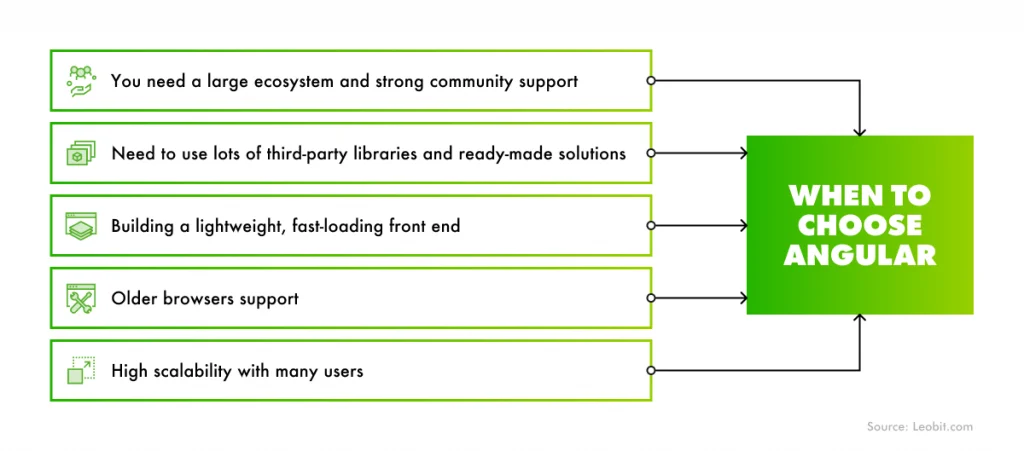
Need a large ecosystem and strong community support. Angular has one of the biggest communities among front-end frameworks. It has 1001 open issues that are to be addressed and 29454 resolved ones. With thousands of resolved issues and active contributors, it’s much easier to find solutions, documentation, and experienced Angular developers. Its global usage is also significantly higher than Blazor, which makes hiring and long-term support more predictable.
Rely on third-party libraries and ready-made solutions. The Angular ecosystem includes a wide range of packages, from advanced UI components to complex data visualization tools. This allows teams to build features faster without starting from scratch. Many of these libraries are open-source and widely tested in production.
Want a lightweight, fast-loading front end. Although Angular itself is a large framework, the final application can be highly optimized. The compiler removes unused code, so users only download what they actually need. This helps keep load times fast, especially when combined with techniques like lazy loading.
Need support for older browsers. Angular supports a feature called “polyfills” which provides modern web functionality in older browsers or environments that do not support it natively. This is important for products with a broad or less tech-updated user base.
Expect high scalability with many users. Angular runs on the client side, which reduces the load on your servers. Since the server mainly delivers static files, hosting can be simpler and more cost-effective, often using CDNs. This makes Angular a good fit for applications expecting large numbers of concurrent users.
By default, Angular applications are single-page apps, which can make SEO more challenging. While it’s possible to implement server-side rendering and hydration, it requires additional setup. Angular is often a better fit for platforms where SEO is less critical, such as user dashboards or web apps behind authentication.
When to choose Angular over Blazor
In short, Angular is ideal for large-scale, user-facing applications where performance, flexibility, and ecosystem support are more important than tight back-end integration or server-side control.
Leobit’s Expertise with Blazor and Angular
Choosing the right technology is only part of the decision. What matters just as much is who builds your product and how efficiently they do it. Leobit brings hands-on experience with both Blazor and Angular, backed by long-term work with enterprise and startup clients.
As a long-standing Microsoft Solutions Partner, Leobit has been offering Blazor app development services since 2020. Over the years, the team has delivered solutions across different industries and project sizes, from early-stage MVPs to complex enterprise systems. This includes strong expertise in building scalable applications within the .NET ecosystem, supported by a team of 78 Microsoft-certified engineers.
That expertise is also reflected in industry recognition. Leobit has been named among the Top .NET Developers in 2025, Top ASP.NET Developers in 2025, and Top Azure Companies in 2025 by Clutch, which highlights consistent delivery quality in the Microsoft stack.
On the Angular side, Leobit brings more than 10 years of experience, starting from AngularJS through to modern Angular. The team has completed 65 Angular projects, including 55 that combine Angular with .NET back ends, a common architecture for enterprise applications. Our company has also been recognized as a Top Angular Developer in 2024, reinforcing its position as a reliable partner for front-end and full-stack development.
Leobit has also built strong expertise in modernization and migration. This includes migrating legacy systems from technologies such as React, jQuery, and AngularJS to the latest versions of Angular.
Blazor and Angular are both powerful frameworks for front-end development, but they solve problems in different ways. Angular is a mature, widely adopted solution built for large-scale, user-facing applications. It offers a strong ecosystem, proven scalability, and flexibility for teams that are comfortable working with separate front-end and back-end layers. If your product depends on rich UI interactions, broad device support, and handling large numbers of users, Angular is a reliable choice.
Blazor, on the other hand, focuses on simplicity and integration within the .NET ecosystem. It allows teams to use a single language across the stack, reduce duplication, and keep tighter control over business logic. This makes it especially effective for internal tools, enterprise systems, and data-driven applications, where development speed, security, and maintainability matter more than front-end flexibility.
In the end, the best choice depends on your team’s expertise, product type, and long-term goals. The right framework is the one that helps you deliver value faster while keeping your system maintainable and secure as it grows. Contact Leobit and we’ll help you choose the right framework for your web project.
FAQ
No, it’s not. Blazor is not a replacement for Angular. They target different use cases. Angular remains stronger for large, interactive, public-facing applications, while Blazor is growing in areas like internal tools and .NET-based systems.
Angular typically loads faster initially because it delivers optimized JavaScript bundles. Blazor WebAssembly can be slower on first load, but once running, it can handle heavy computations more efficiently. Blazor Server, on the other hand, offers very fast initial load times but depends on server resources.
Yes, it is. Blazor is particularly well-suited for enterprise systems, especially if your team already uses .NET. It simplifies development by allowing shared logic across the stack and provides strong control over security and data handling.
Yes, you can. With Blazor Hybrid and .NET MAUI, you can reuse a large portion of your codebase to build mobile and desktop applications. Angular, in contrast, typically requires additional frameworks (like Ionic) for mobile development.
Andrii is a full-stack developer mainly focused on the .NET + Angular combination with deep knowledge of React, MYSQL, and main AWS services. He is passionate about designing scalable APIs and implement responsive user interfaces. Andrii is constanty learning new technologies and frameworks and ready to share his knowledge by providing hands-on industry insights.
Inna loves making complex tech feel simple. With a strong eye for innovation, she helps businesses turn complicated ideas and data into clear strategies they can actually use. Whether it’s new tools or big trends, she’s all about making technology work for people.
Microsoft Azure stands at the forefront of the growing AI adoption and analytics market. In particular, nearly 60% of CIOs across industries plan to increase ...
In the race to innovate and deliver software faster, quality is often pushed to the back burner. But this strategy carries real financial consequences. ...
The growing AI adoption helps businesses automate and enhance many workflows, but it also has a downside. By accelerating software development lifecycles, AI ...
ASP.NET remains among the top five most-used web frameworks and web technologies in the world according to Stack Overflow. The framework also maintains a ...
Research from Bain & Company shows that 44.9% of executives see a clear correlation between flexible, modular architecture and improved productivity. ...
The global cross-platform application development market is expected to reach $546.7 billion by the end of 2033, thriving at around 16.7% CAGR. With its mature ...
52.1% of developers admire React, while 51.9% say the same about Blazor. That near-parity is telling that both React and Blazor are now highly regarded by the ...
The choice between PHP and ASP.NET would seem to be relatively straightforward on the surface and complicated the moment you look at real data. PHP powers ...
The pace of change in software development has never been higher, and 2026 will raise the bar again. We are quickly approaching a world where AI feels as ...
21 mins read
We use cookies to enhance your browsing experience. By agreeing, you accept our Privacy and Cookies Policy.
By ignoring or closing this banner, we will only collect essential cookies necessary for the website to function properly.
 Leobit