 Leobit
Software Testing Services
Ensure precise software quality at every stage with Leobit’s software testing team. Our customized QA approach protects your users’ experience and minimizes issues from development to deployment.
100+
QA projects delivered

Clutch Top 1000 Companies

Platinum Partner

Digital & App Innovation

ISO 9001:2015

ISO 27001:2022

Silver Stevie Award 2025

Top 1000 Companies 2025
Top .NET Developer 2025

Global Business Tech Awards

Apps & Software

Digital & App Innovation

Platinum Partner
What are Software Testing Services?

At Leobit, our software testing services are driven by the deep expertise and industry experience of our highly skilled ISTQB certified QA engineers. We ensure the highest quality and performance of software products through comprehensive testing strategies tailored to meet specific client needs. Leveraging a range of instruments, mobile devices lab, cutting-edge tools and methodologies, we provide end-to- end testing solutions, including functional, non-functional, automated, and manual testing.
Our team excels in identifying critical bugs, ensuring cross-platform compatibility, optimizing performance, and enhancing security across web, mobile, and desktop applications. With a strong focus on delivering reliable and scalable software, we are committed to supporting our clients in achieving their business goals through excellence in quality assurance.
Leobit’s Software Testing Services

DEDICATED TESTING TEAM

ON-DEMAND SOFTWARE TESTING

TEST AUTOMATION

QA CONSULTING SERVICES

QUALITY ASSESSMENT
Types of Testing We Cover
Functional testing

Functional
Testing
Verifies that all features function correctly and comply with the defined business and functional requirements.

Integration & API
Testing
Verifies that system components and external services correctly exchange data and work together as expected.

System
Testing
Verifies that all the components of the software system work together as intended.

Acceptance
Testing
Verifies that the software meets business requirements and is ready for production deployment.

Regression
Testing
Ensures that recent changes have not negatively affected existing functionalities.

Smoke
Testing
Performs a quick check of critical functionality after deployment to confirm the software is stable.

End-to-End
Testing
Verifies that the entire user and business workflows function properly from start to finish.
Non-Functional Testing

Performance Testing
Evaluates software performance under high load to ensure stable operation with large volumes of users and data.

Accessibility Testing
Verifies the software is accessible to users with different abilities and supports assistive technologies.

Security Testing
Identifies vulnerabilities and security risks to protect software and sensitive data from potential threats.

Usability (UI/UX) Testing
Verifies how easy and intuitive the software is for users to understand and use.

Scalability Testing
Verifies that the software can handle an increased user base, data volume, or traffic as it grows.

Reliability Testing
Verifies the software stability, consistency, and fault tolerance under continuous operation.

Localization Testing
Verifies that the software works correctly for different languages, regions, and locale-specific settings.

Compliance Testing
Verifies that the software complies with industry standards, regulations, and legal requirements.

Availability Testing
Verifies that the software remains accessible and operational with minimal downtime.

Compatibility Testing
Verifies the correct software behavior across different browsers, devices, operating systems, and environments.
Testing Tool by Automation Level?

Manual Testing
- Test Case Management Tools
- Bug/Defect Tracking Tools
- Documentation and Collaboration Tools
- Mind Mapping Tools
- Performance Monitoring Tools
- Browser Developer Tools
- API Testing Tools (Manual API Testing)
- Cross-Browser Testing Tools

Semi-automated Testing
- Test Case Management Tools
- Bug/Defect Tracking Tools
- Documentation and Collaboration Tools
- Browser Developer Tools
- API Testing Tools
- Cross-Browser Testing Tools
- Performance Testing Tools
- Functional Testing Tools
- Test Automation Frameworks

Automated Testing
- Test Case Management Tools
- Bug/Defect Tracking Tools
- Functional Testing Tools
- API Testing Tools
- Performance Testing Tools
- Test Automation Frameworks
- Cloud-Based Testing Tools
- Version Control and Collaboration Tools
Types of Testing We Cover
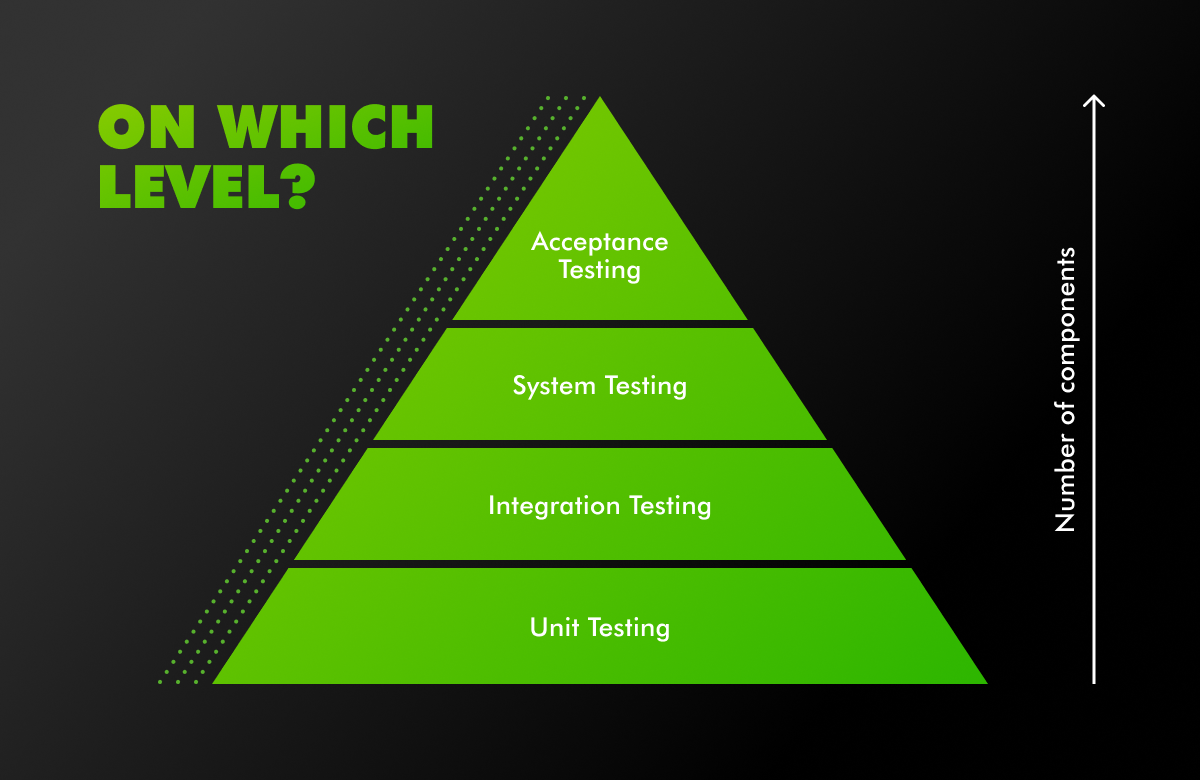
- Testing can be performed at different levels, depending on the number of components involved in the system.
- These levels help in ensuring that each component, as well as the system as a whole, functions correctly.
System-Level Testing Techniques

Black Box Testing
- Validates system behavior based on inputs and expected outputs.
- Focuses on user experience and business functionality.
- Does not require knowledge of internal implementation.

Gray Box Testing
- Combines functional validation with limited knowledge of internal logic.
- Improves understanding of complex system behavior.
- Enables faster and more targeted defect identification.

White Box Testing
- Validates internal logic, code structure, and control flows.
- Supports early defect detection at the code level.
- Strengthens security and reliability of critical components.
Execution-Based Testing Methods

Static Testing
- Focuses on reviewing requirements, design documents, and source code.
- Helps detect defects early in the development lifecycle.
- Contributes to the overall design quality and code maintainability.

Dynamic Testing
- Verifies that the software behaves correctly during execution.
- Detects functional and runtime defects under real usage conditions.
OUR SOFTWARE TESTING PROCESS

Test Planning


Test Preparation

Test Analysis

Test Execution

Defects Management

Quality Management

Acceptance Testing

Test Closure Activities
TYPES OF SOFTWARE WE TEST

Mobile
Our in-house lab has 60 + real mobile devices, including iOS and Android cell phones and tablets, for some specific cases, we also use Cloud-based applications (i.e. BrowserStack) for higher coverage of test devices.

Multiplatform
We have an experience in testing multiplatform mobile applications with focus on Consistency, Functionality, Usability, Performance, Compatibility.

IoT / Embedded
We are experienced in testing computing systems that function within larger mechanical or electrical systems, where we encountered the following challenges: Hardware Dependency, Real-Time Constraints, Limited Debugging.

Desktop
We verify new desktop applications across multiple versions of operating systems, using different hardware configurations similar to customer setups.
We also utilize performance monitoring tools and check logs to measure CPU, memory, and resource consumption across a range of systems.

Web
In addition to functional testing, we also verify a variety of environments, devices, and browsers to ensure compatibility, performance, security, and usability. Automated tools and continuous testing practices help to ensure that the web platform meets user expectations across the board.
Tools We Use For Testing

Quality management
Tools
- TestRail
- Hiptest
- Zephyr
- Google Spreadsheet/Docs
- TM4J

Testing
Tools
For Performance/Load testing:
- JMeter
- Blazemeter
- Loader IO

For Networking/Proxy
- Fiddler
- Charles Proxy

Project Management
Tools
- JIRA/Confluence
- Slack

For Interface/API
testing
- SoapUI
- Swagger UI
- Postman

For Cross browser/platform
testing
- Browserstack
- LambdaTest

For Automated testing/
test automation
- Java/.Net + Selenium
- JavaScript (TypeScript) + Protractor + Jasmine (Language + Framework + Runner)
- Katalon Studio
- Cypress
- Ghost Inspector
Basic Tasks Done by QA Engineers Within a Regular Sprint:
Plan Testing
Define scope:
- Identify Test Items
- Determine Test Approach
- Identify Risks
Plan Scope:
- Create Tasks
- Estimate Tasks
- Assign Tasks
Prepare to Testing
Analyze Scope:
- Review Test Basis
- Clarify missing/ ambiguous requirements
- Evaluate Requirement Testability
Design Tests:
- Create Test Design
- Prepare Test Data
- Create Test Cases / Checklist
Perform Testing
Execute Testing:
- Setup Test Environment
- Execute Test Cases / Checklist
- Log Test Results
Report Defects:
- Create Defect Reports
- Perform Re-testing
- Perform Regression Testing
Deliver Functionality
Evaluate Build Readiness:
- Check Exit Criteria
- Prepare Test Summary Report
- Deploy build to production / UAT
Analyze Statistics:
- Defect Statistics
- Process Statistics
- Analyze Lessons Learned
Estimate Your
Software Project Cost
Leobit’s software cost estimation tool that transforms your project idea into a clear, structured budget breakdown. Powered by an AI assistant, it delivers complexity level, development effort in hours, recommended team composition, and an estimated budget range in just a few minutes.
Why Choose Leobit for Software Testing?

- ISTQB Platinum Partnership;
- 30+ experienced certified QA Engineers;
- 150+ projects successfully delivered;
- ISO 9001:2015 and ISO 27001:2022 certified;
- On-site testing laboratory with 60 + smartphones and tablets;
- Leobit Testing Center of Excellence – Quality Management Office (QMO);
Q&A
Testing can consume up to 30% of a project’s effort, and if developers are responsible for testing, it reduces their availability for other tasks by that same 30%. This separation helps maintain high standards by enforcing systematic testing processes, allowing developers to focus on feature implementation, while QA ensures that each release meets quality expectations before reaching users.
Having a separate QA team is essential to ensure objective and unbiased evaluation of a product’s quality. QA specialists focus solely on testing and validation, bringing a fresh perspective to identify defects that development teams might overlook. In addition, teams with QA engineers differ primarily in how they approach quality control, risk management, and product delivery processes.
Developers’ primary focus is on building features and functionality rather than on systematically finding weaknesses or edge cases. A dedicated QA team brings a specialized, unbiased perspective and a structured approach to testing, which helps ensure that products are thoroughly evaluated from multiple angles, ultimately leading to higher quality and reliability.
Manual testing is ideal for exploratory testing, usability assessments, and scenarios requiring human judgment or visual inspection, such as UI/UX reviews. It is also better for one-time tests, ad-hoc checks, or tests with frequently changing requirements, where automation setup may be too time-consuming.
Automation testing, on the other hand, is optimal for repetitive, high-volume test cases, regression testing, and scenarios that demand fast, consistent results, such as load and performance tests. It’s most effective for stable features that require frequent testing across different builds and environments, maximizing efficiency and reducing manual effort over time.
Quality assurance and quality control are often used interchangeably, but they are distinct processes that occur at different stages. Each serves a unique role essential for an effective and comprehensive quality management system.
QA is a proactive process focused on preventing defects. It involves setting up and improving processes, standards, and methodologies to ensure high-quality outcomes. QA activities include defining testing strategies, creating test plans, and establishing quality standards. The goal of QA is to enhance development and testing processes so that defects are minimized from the outset.
QC is a reactive process focused on identifying and correcting defects in the final product. It involves executing test cases, detecting bugs, and verifying that the product meets the established quality standards. The goal of QC is to evaluate the product by finding and fixing defects to ensure it functions as intended before release.
The cost of QA services is influenced by several key factors, including the complexity of the application (number of features, integrations, and testing requirements), the type of testing needed (manual vs. automated, performance, security), and the scope of coverage (number of platforms, devices, and environments to be tested). Additionally, the experience level of the QA team, project duration, and frequency of testing cycles play significant roles. Together, these factors help define the level of effort, time, and resources required, all of which impact the overall cost.
The number of QA specialists needed depends on the project’s size, complexity, and quality requirements. An ideal tester-to-developer ratio is typically between 1:3 and 1:5 for most projects, meaning one QA specialist for every 3 to 5 developers. This provides a balance between adequate testing coverage and team efficiency. For projects with higher complexity or critical testing needs, consider a lower ratio, like 1:2, to ensure thorough quality assurance.
Quality Assurance checks whether your product works as intended and meets business requirements. QA goes beyond finding bugs. When QA is involved in the development process from the start, it helps identify potential issues early, especially when new features or integrations are introduced. Thanks to it, QA brings predictability to delivery, reduces production incidents, and increases confidence for stakeholders and users.
QA prevents defects, regressions, broken integrations, and usability issues that can damage user trust and business outcomes. It validates workflows end-to-end, ensuring features work together correctly. In complex systems, QA mitigates risks related to unclear requirements, frequent changes, and third-party dependencies. Overall, QA acts as a control mechanism that protects the product from unexpected failures, reputational damage, and costly post-release fixes.
QA accelerates delivery by identifying issues early, when they are easier and less costly to fix. Working side by side with the client, the QA team provides continuous feedback, minimizes production incidents, and ensures software is truly production-ready. This builds confidence in product quality and helps teams better understand realistic release timelines, improving predictability and reducing costly rework.
Yes, it can. QA improves requirements and product design by identifying gaps, ambiguities, and inconsistencies early. QA specialists review workflows from both user and business perspectives, ensuring solutions are practical and intuitive. Early feedback reduces costly rework and prevents defects caused by unclear requirements. As a result, teams build the right product from the start.
Automation is best suited for stable, repetitive, and business-critical scenarios such as regression, smoke, API, and key end-to-end tests. It provides fast feedback, reduces manual effort, and increases release speed. Exploratory and usability testing should remain manual, where human insight adds value. A balanced approach maximizes efficiency, quality, and return on automation investment.
Testing effectiveness is measured through a combination of clear metrics and business-focused indicators such as test coverage, defect trends, defect leakage, and release stability. Continuous monitoring of test results ensures quality improvements are measurable and aligned with business goals. Thanks to it, stakeholders have a clear visibility into product readiness and overall risk level.
